BW SERIES COMPACT BENCH SCALE EN-5
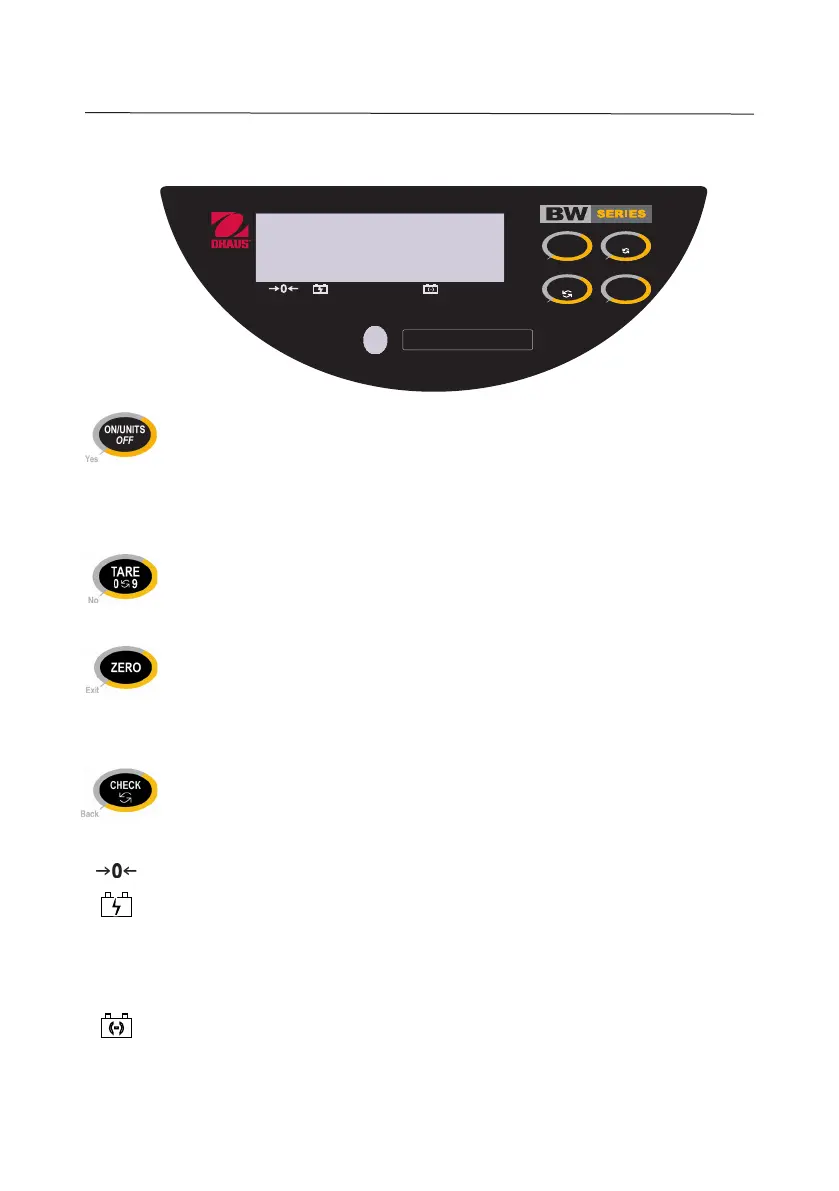
3. OVERVIEW OF CONTROLS AND FUNCTIONS
• Turns the scale on
• Long-press turns the scale off
• Short-presses display successive units of measure
• In SETUP Mode, “Yes” accepts/confirms the displayed setting
• In CHECK Mode, accepts/confirms the displayed value
•
Inputs the weight of the object on the weighing pan as a Tare value
• In SETUP Mode, “No” toggles through the available settings
• In CHECK Mode, increments the value of the selected digit
• Zeros the display
•
With the scale off, long-press together with ON/UNITS
OFF
enters User Setup Mode
• In SETUP Mode, “Exit” ends setup and exits to “Save”
• In CHECK Mode, ends Over/Under setup and exits to weighing mode
• Initiates CHECK Over/Under setup
• In SETUP Mode, “Back” reverts to the previous parameter
• In CHECK Mode, shifts to the next digit
• LED annunciator indicates Center of Zero
• LED annunciator indicates battery is fully charged (blinking if charging)
UNDER •
LED annunciator indicates displayed weight is less than the preset Under value
OVER •
LED annunciator indicates displayed weight is more than the preset Over value
• LED annunciator blinks to indicate the battery voltage is low
NET • LED annunciator indicates Net (Gross minus Tare) value
g, oz, lb • LED annunciator indicates the active weighing unit
UNDER OVER NET
CHECK
ZERO
90
TARE
Yes
Exit
Back
No
oz
g
lb
CAPACITY: 3 lb x 0.001 lb
ON/UNITS
OFF





 To Next Page