d-Color MF2001/MF2501 and d-Copia 253MF/303MF Sales Guide
Internal and confidential publication not to be reproduced without authorisation 24
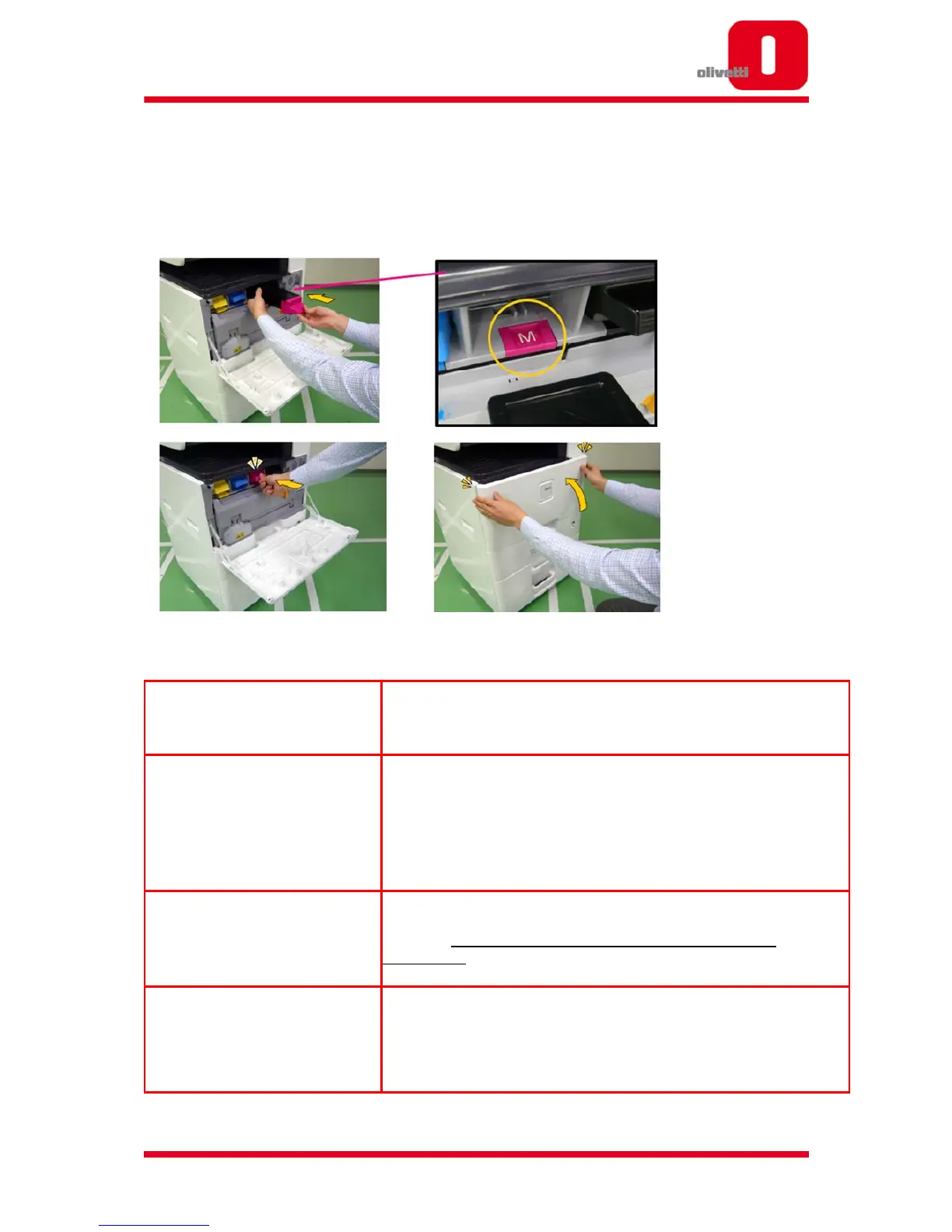
2.3.3 How to change the Toner
With the new colour series, the toner locking method is automatic, so changing the
toner is really easy and just 3 steps are needed.
2.3.4 Mono Print Function when Colour Toner is exhausted
What is Monochrome Print Function?
to create output in monochrome in the case that the colour toner
becomes empty
When can I use Monochrome Print
Function?
This function can be used when either Cyan, Magenta, or Yellow toner
becomes empty. When one of these colours becomes empty, the panel
will display a warning message.
Choose ‘HOLD,’ and wait until the colour toner is replaced, or press ‘OK’
and the Monochrome Print Function can be used
How do I activate Monochrome Print
Function?
Select ‘OK,’ and the Monochrome Print Function is activated. After
activation, all jobs sent to the MFP afterwards will be printed in
monochrome, even if colour was selected from the driver
How many pages can be printed with










 To Next Page