23
ENGLISH
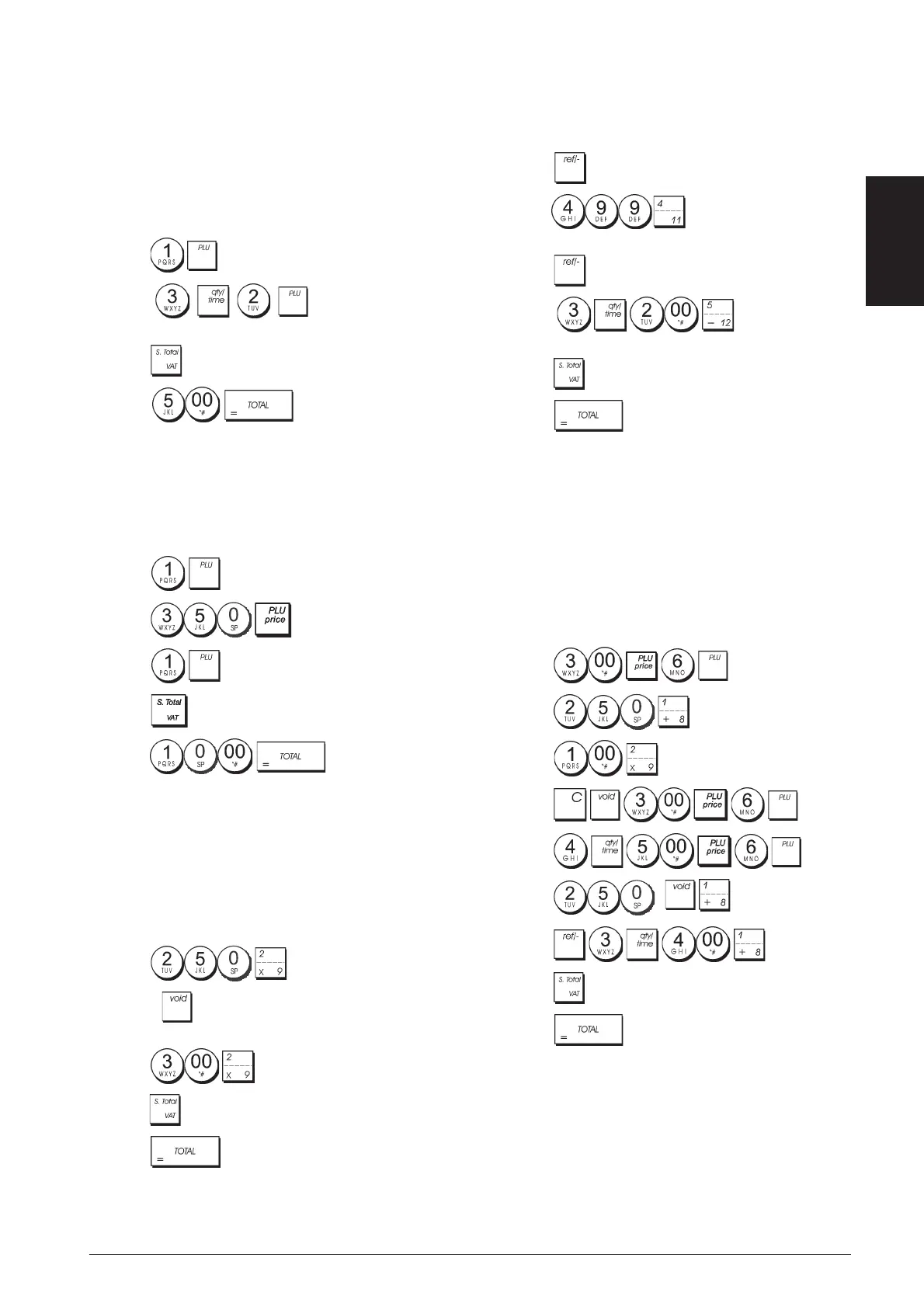
Registering a Sales Transaction Using Preset
PLU Codes
To use this feature, PLU codes must have been previously
set.
Example: Use preset PLU codes to register an entire
transaction: register PLU 1 and multiply 3 PLU 2. Com-
pute change for a cash tender.
1. Press .
2. Press
. The amount of the
multiplication is displayed.
3. Press
.
4. Press . The change due to the
customer is displayed.
Overwriting a Preset PLU Price
Example: Register the sale of programmed PLU 1 and
then overwrite the preset PLU 1 with € 3.50. Computer
change for a € 10.00 tender.
1. Press .
2. Press
.
3. Press .
4. Press
.
5. Press
. The change due to
the customer is displayed.
Voiding the Previous Entry in the Middle
of a Sale
Example: Void a € 2.50 entry erroneously made to
Department 2. Then register a € 3.00 item to this same
Department. End the transaction with an exact change
tender.
1. Press .
2. Press . The amount voided is displayed and
printed.
3. Press .
4. Press .
5. Press
.
Refunding Multiple Items
Example: Refund a € 4.99 item to Department 4 and three
€ 2.00 items to Department 5.
1. Press
.
2. Press
. The amount to be refunded
is displayed.
3. Press
.
4. Press . The amount to be
refunded is displayed.
5. Press .
6. Press
.
Registering Multiple Void and Refund
Transactions
Example: Overwrite the preset PLU 6 with € 3.00, register
the sale of a € 2.50 item to Department 1, and of a € 1.00
item to Department 2. Void the € 3.00 sale to PLU 6 and
then register the sale of four € 5.00 items to PLU 6. Void
the sale of the € 2.50 item previously made to Depart-
ment 1 and then refund 3 items costing € 4.00 each.
Subtotal the sale and end the transaction with an exact
cash tender.
1. Press
.
2. Press
.
3. Press
.
4. Press
.
5. Press
.
6. Press
.
7. Press
.
8. Press
.
9. Press
.


 To Next Page
 Loading...











