71
4
1
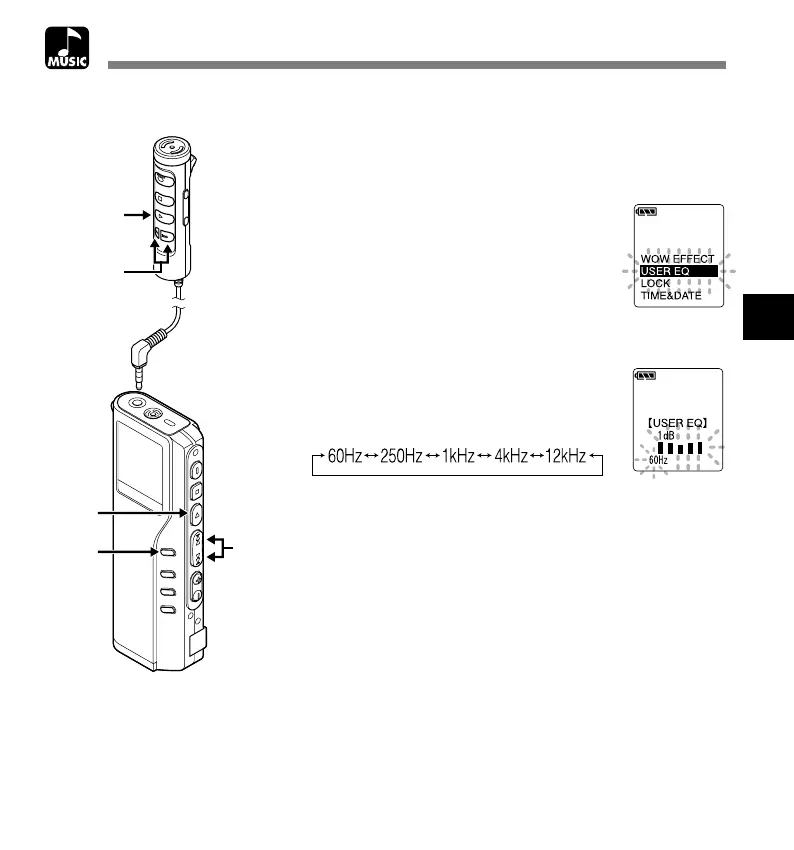
Press and hold the MENU button
for 1 second or longer.
The menu opens (☞ P.76).
2
Press the FF or REW button to open
the user equalizer setup screen.
3
Press the PLAY button.
Select the frequency band.
4
Press the FF or REW button to
select the frequency band.
Low tone ←→ High tone
Will switch in this order.
5
Press the PLAY button to save your
setting.
Changing the User Equalizer (USER EQ)
Changing the User Equalizer (USER EQ)
You can customize your own equalizer by changing the USER EQ settings.
2,4
1
3,5
2,4
3,5


 To Next Page