29
EN
1
Basic camera operations
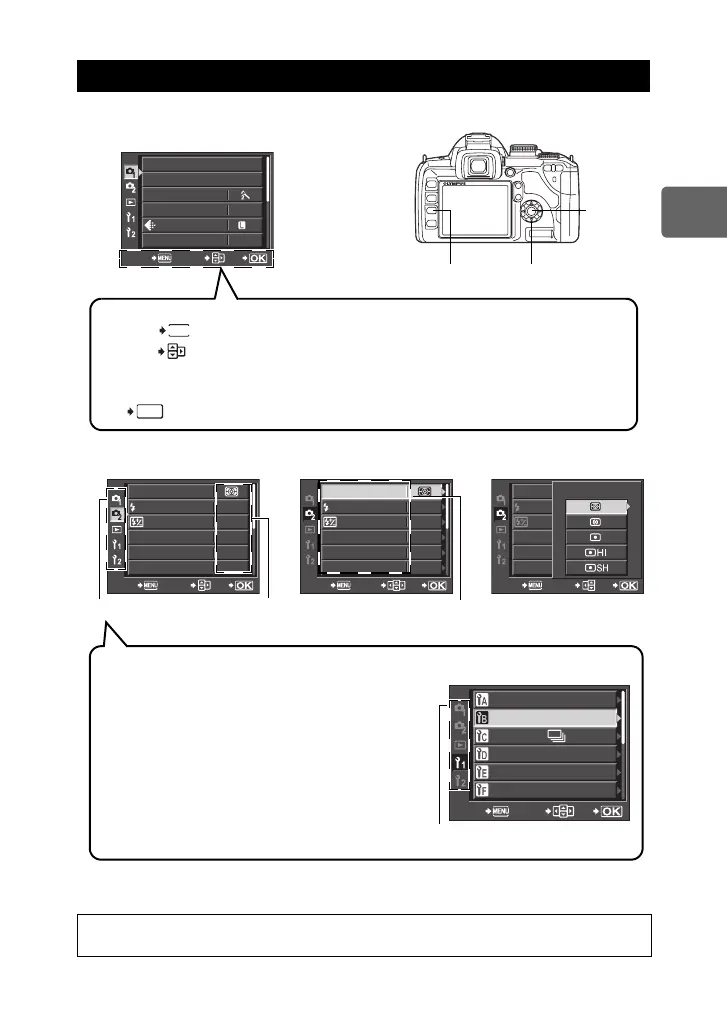
1 Press the MENU button.
• The menu is displayed on the LCD monitor.
4 Press the i button to confirm your settings.
• Press the i button repeatedly to exit the menu.
Using the menu
2 Use ac to select a tab
and d to set an item.
3 Use ac to select a function and d to go to the
setting screen.
For details on the functions that can be set with the menu, refer to “Menu
directory” (gP. 130).
MENU button
p Arrow pad
i button
CARD SETUP
NORM
AUTO
CUSTOM RESET
PICTURE MODE
GRADATION
WB
CANCEL SELECT
GO
N
Operation guide is displayed at the bottom of the screen.
: Press the MENU button to cancel the setting.
: Press dac on the arrow pad to move the cursor and select an item.
The symbols displayed on the LCD monitor correspond to the arrow pad
shown below.
t: a u: c 8: d 7: b
: Press the i button to confirm your settings.
MENU
CANCEL
SELECT
OK
GO
Tab The current setting
is displayed
METERING
S-AF
0.0
OFF
OFF
RC MODE
AF MODE
AF AREA
ANTI-SHOCK
z
AUTO
CANCEL SELECT
GO
S-AF
AUTO
0.0
METERING
OFF
OFF
RC MODE
AF MODE
AF AREA
ANTI-SHOCK
z
CANCEL SELECT
GO
Function
METERING
RC MODE
AF MODE
AF AREA
ANTI-SHOCK
CANCEL SELECT
GO
METERING
Types of tabs
W (Shooting menu 1)
Sets shooting functions.
X (Shooting menu 2)
Sets shooting functions.
q (Playback menu)
Sets playback functions.
Y (Custom menu 1)
Customizes shooting functions. Depending on the
function being customized, the function is further
separated into 9 tabs (A to I).
Z (Custom menu 2)
Sets the basic functions of the camera.
AF/MF
BUTTON/DIAL
RELEASE/
DISP/
8
/PC
EXP/
e
/ISO
#
CUSTOM
CANCEL SELECT
GO
Screenshot of menu with the Y
tab selected
Tab
s0018_e_00_0_unified.book Page 29 Tuesday, March 18, 2008 4:08 PM













 To Next Page