54
EN
5
Focusing and shooting functions
Another way to adjust focus manually in C-AF mode:
j You can set the AEL/AFL button to operate C-AF. g“AEL/AFL” (P. 90)
x Notes
• If the shutter button is pressed again after fine-adjusting the focus with the focus ring, the AF
is activated and your adjustments are canceled.
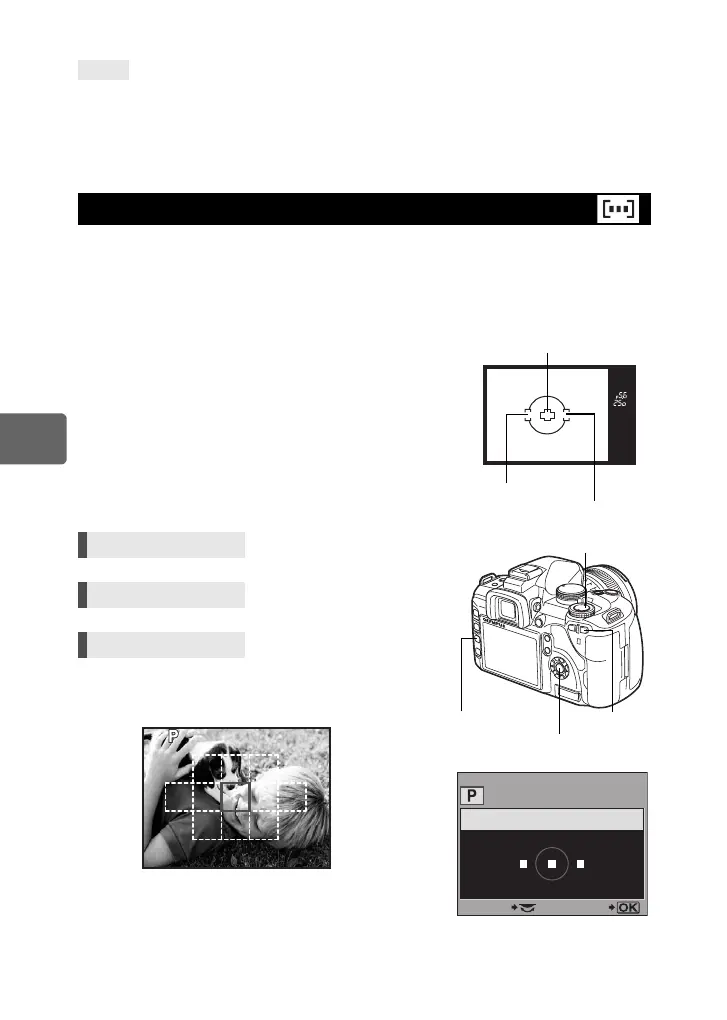
This camera has 3 AF targets for focusing on the subject with auto focus. You can select only
one of the AF targets.
When [LIVE VIEW AF MODE] is set to [IMAGER AF], 11 AF targets will be available during
live view. g“Taking a picture using live view” (P. 37)
[AUTO] or P
Focuses using the 3 AF targets.
Q Focuses using the left AF target.
R Focuses using the center AF target.
S Focuses using the right AF target.
•With the [IMAGER AF] setting, target selection is
possible using the P button or the super control panel.
Turn the control dial to select the AF target.
TIPS
AF target selection
Direct button Pj
Super control panel ip: [AF AREA]
Menu MENU[X][AF AREA]
Viewfinder
Center AF target
Left AF target
Right AF target
AF AREA
SELECT GO
i button
MENU button
j
P button
250
F5.6
When selecting the AF target with
the [IMAGER AF] setting
s0018_e_00_0_unified.book Page 54 Tuesday, March 18, 2008 4:08 PM













 To Next Page