Shooting
2
22
EN
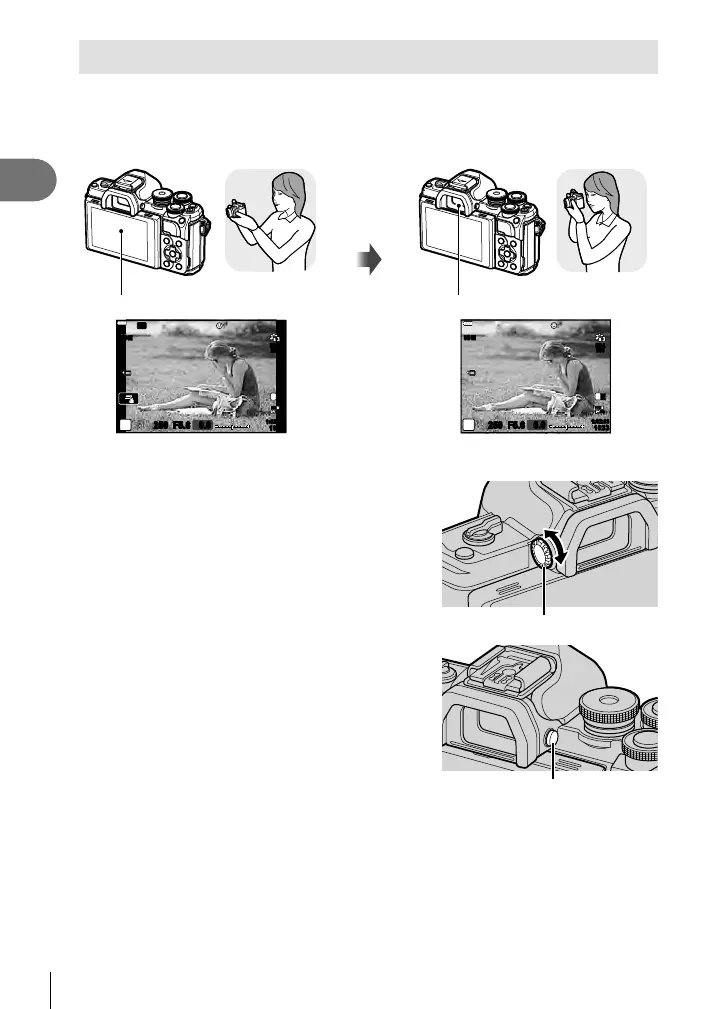
Switching between displays
The camera is equipped with an eye sensor, which turns the viewfi nder on when you
put your eye to the viewfi nder. When you take your eye away, the sensor turns the
viewfi nder off and turns the monitor on.
Monitor
Put your
eye to the
viewfi nder
Viewfi nder
250250 F5.6
P
Wi-Fi
S-IS ONS-IS ON
ISO-A
200
1023
1:02:03
L
N
F
FHD
30p
0.0
250250 F5.6
P
1:02:03
1023
S-IS ONS-IS ON
ISO-A
200
L
N
F
FHD
30p
0.0
View through lens shown in monitor View through lens shown in viewfi nder
• If the viewfi nder is not in focus, put your eye to the
viewfi nder and focus the display by rotating the
diopter adjustment dial.
Diopter adjustment dial
• You can display the EVF Auto Switch setting menu
if you press and hold the u button. g [EVF
Auto Switch] (P. 114)
• When [OFF] is selected for [EVF Auto Switch], you
can switch displays by pressing the u button.
u button
$ Notes
• Tilting the monitor disables the eye sensor.





 To Next Page