23
Product description
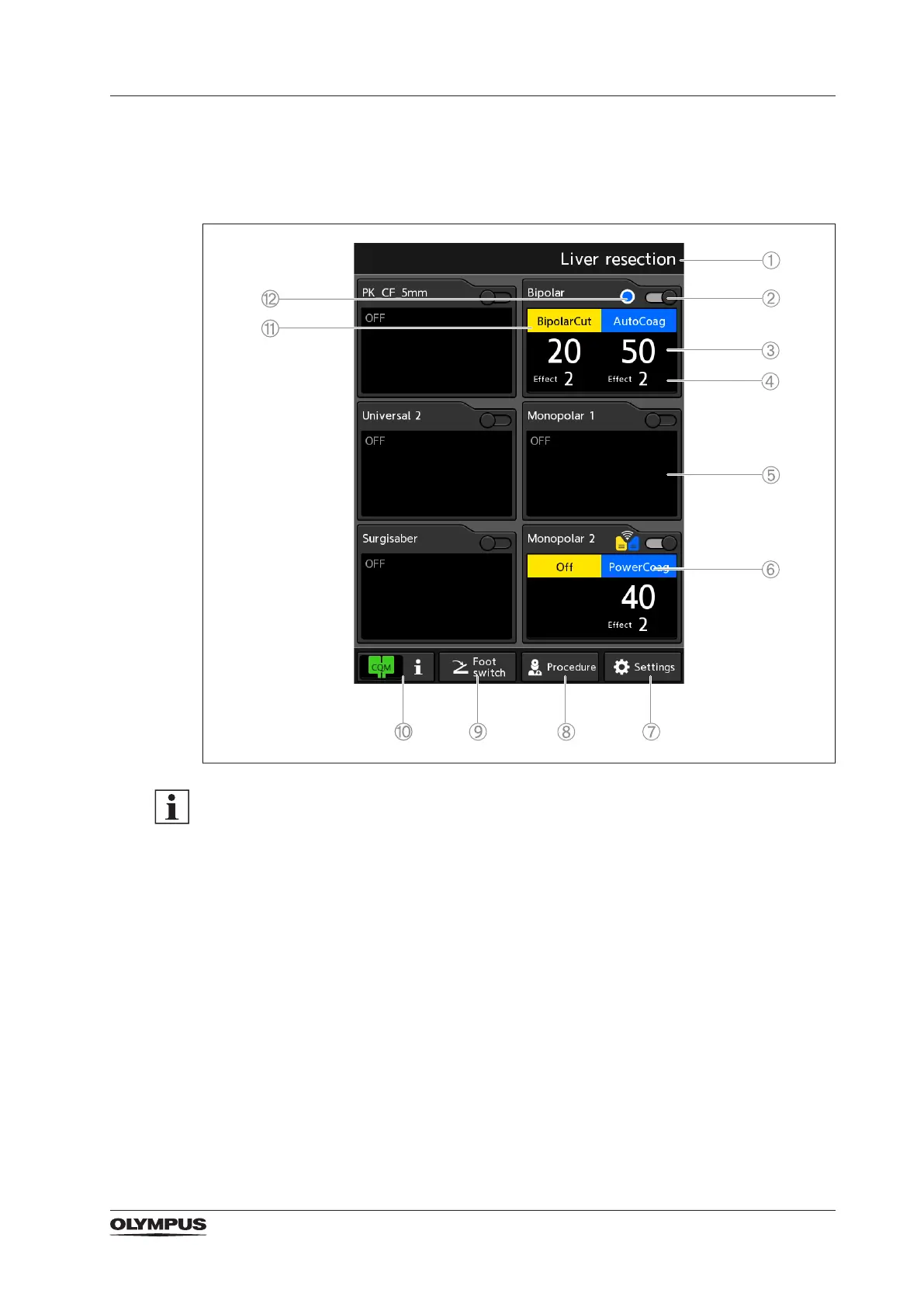
3.4.1 Home screen
Each of the 6 panes on the home screen corresponds to one of the 6 output sockets of the
ESG-410.
UNIVERSAL panes accessible after connecting instrument
The 2 Universal panes on the left side represent the 2 Olympus specic output sockets
UNIVERSAL 1, UNIVERSAL 2. These 2 panes are accessible only when a correspondent
Olympus instrument is connected to the output socket.
(The Surgisaber pane and SURGISABER socket are without function.)
1) Selected user-dened procedure
2) Toggle key
To switch the output socket on and off.
3) Selected power setting
4) Selected effect setting
5) Socket pane (switched off)
6) Selected coagulation mode
7) [Settings] button
To enter the setup and maintenance screen.
8) [Procedure] button
To select or save a user-dened procedure.
9) [Foot switch] button
To assign a foot switch to an output socket.


 To Next Page