68
Use
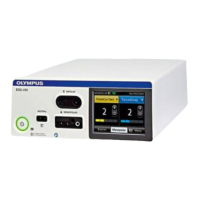
2) Socket pane that is switched OFF
3) Socket pane that is switched ON
8.4.1 Mode selection
The mode is selected according to the type of procedure that will be performed and
according to the instruments that will be used. Refer to the section “7.4 Description of
modes” on page 55.
Selecting a mode
1. Tap the pane of the required output socket.
► The set screen for the selected output socket is displayed.
2. Tap the mode name button.
► A drop down list with modes names is displayed.
3. Tap the required mode name.
► The mode is selected.
8.4.2 Power level
Selecting the power level
1. Tap the pane of the required output socket.
► The set screen for the selected output socket is displayed.
2. Tap the plus or minus button to set the appropriate power level.
► For values up to 50, the power level increases/decreases in steps of 1.
For values above 50, the power level increases/decreases in steps of 5.
For values above 100, the power level increases/decreases in steps of 10.
To increase/decrease the power level fast, tap and hold the plus/minus button.
Actually applied power
The power levels that are displayed on the touchscreen represent the maximum possible
output power in watts. The actually applied power depends on the tissue characteristics, e.g.
resistance.
8.4.3 Effect level
The effect setting allows for customizing the mode settings and power settings. The user
can inuence the tissue effect by changing the effect level without increasing or decreasing
the power setting.
Selecting the effect level
1. Tap the pane of the required output socket.
► The set screen for the selected output socket is displayed.
2. Tap the arrow button to set the effect level.
► The current setting is highlighted.
3. Tap the required effect level.
► The select level is set.


 To Next Page