3
• Be sure to turn OFF the power before removing or attaching the scope unit.
Otherwise, the instrument may be damaged.
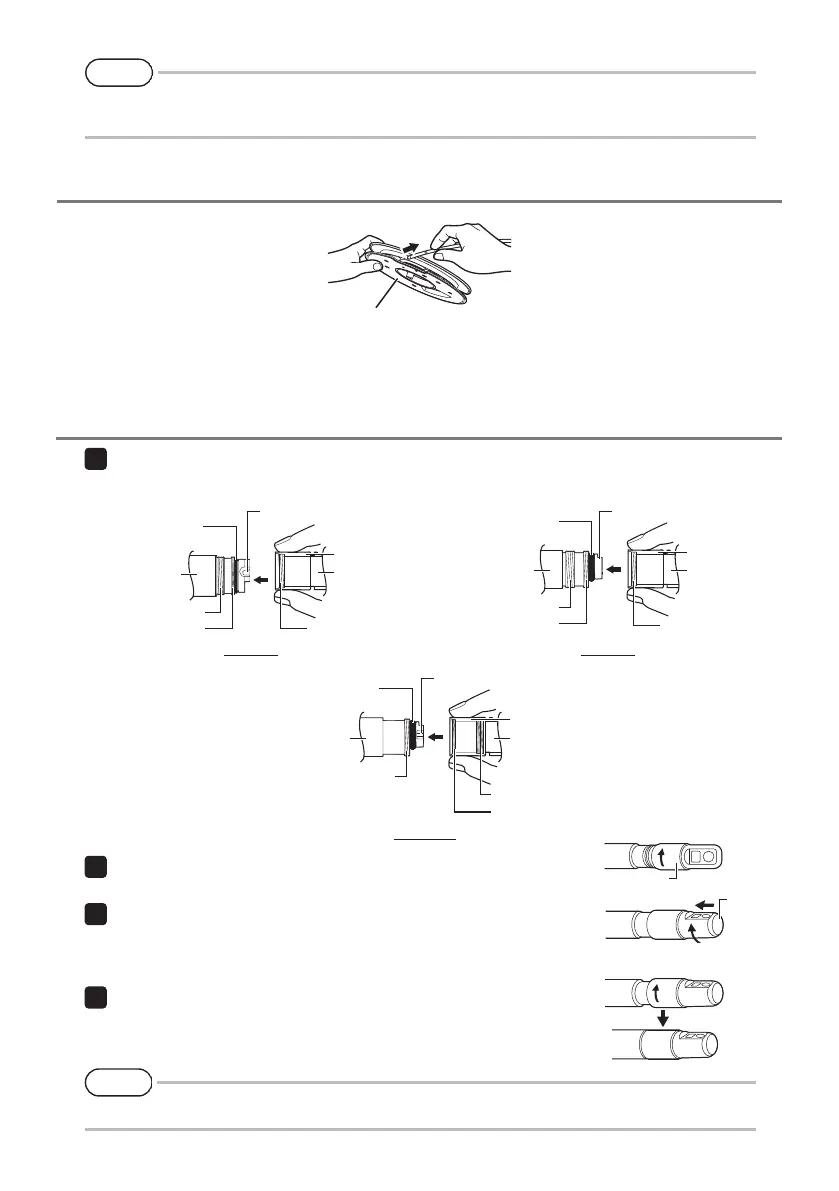
Remove the drum from the drum case of the main unit, and take out the insertion tube from the drum.
4. Taking out the insertion tube
Drum
• When using the stereo optical adapter, refer to the IPLEX NX instruction manual.
Optical adapter
Rotate the nut of the optical adapter clockwise until the connecting
screw thread passes over the first screw thread.
After passing the first screw thread, rotate the entire main body of
the optical adapter clockwise while pushing gently until the optical
adapter main body fits into the positioning groove of the insertion
tube and stops rotating anymore.
Rotate the nut of the optical adapter clockwise to attach the con-
necting screw thread to the second screw thread. Tighten the nut
until it stops completely.
3
Optical adapter
main body
6-mm type 4-mm type
6.2-mm type
5. Attaching the optical adapter
Holding the optical adapter and the distal end so that they make one straight line each other, care-
fully insert the optical adapter into the distal end.
Second screw thread
Connecting screw
thread
First screw thread
O-ring
Distal end
Nut
Optical adapter
Optical adapter positioning
groove
First screw thread
Connecting screw
thread
Second screw thread
O-ring
Distal end
Nut
Optical adapter
Optical adapter positioning
groove
First screw thread
Connecting screw thread
Second screw thread
O-ring
Distal end
Nut
Optical adapter
Optical adapter positioning
groove
Nut




 To Next Page