2
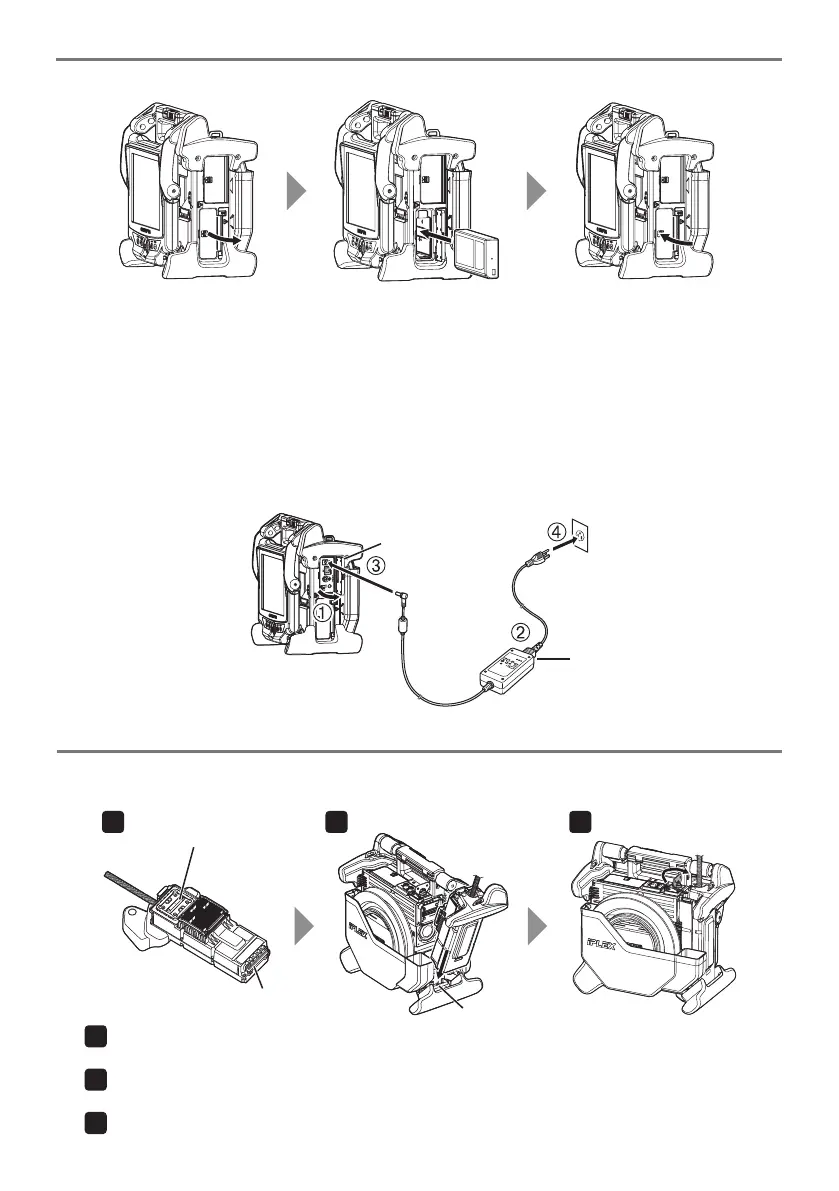
• Using AC adapter:
1 Open the connector cover on the side of the main unit.
2 Connect the AC power cord to the AC inlet of the AC adapter
3 Connect the output connector of the AC adapter to the DC-IN terminal of the main frame.
4 Connect the plug of the AC power cord securely into a 3P power outlet.
AC inlet
Connecteor cover
1 Open the battery cover.
2 Noting the orientation of the battery, insert it.
3 Make sure that the battery is locked and close the cover. Confirm that the battery cover is locked
completely.
2. Preparing the power supply
• Using battery:
Check to ensure that the battery is charged, followed by setting it to the main unit.
1
2 3
Check that the end surface of the connector is not dirty. If it is dirty, wipe it completely with the cot-
ton swab provided with the lens cleaning kit.
Match the scope unit attaching tab with the main unit attaching bar, and attach the scope unit to
the main unit.
Rotate the latch clockwise to lock it.
1
3. Attaching the scope unit
2 31
Connector
Attaching tab
Attaching bar
When the scope unit is not attached to the main unit, attach the scope unit according to the following
procedures.




 To Next Page