5
Record images
If you are using the image recording media (SDHC card or USB flash drive) for the fiirst time, format it with
the base unit before you start recording. For more details on the procedure, please refer to the instruction
manual of the IPLEX NX.
Record still images
1. Press the [FREEZE] button to freeze the image.
2. While the freeze screen is displayed, press the [RECORD] button to record the still image.
Record movies
1. While the live image is displayed, long-press the [RECORD] button (about 1 second).
2. After a still image is recorded, a movie recording confirmation dialog appears.
3. Touch <YES> on the LCD monitor to start recording.
4. Press the [RECORD] button to end recording.
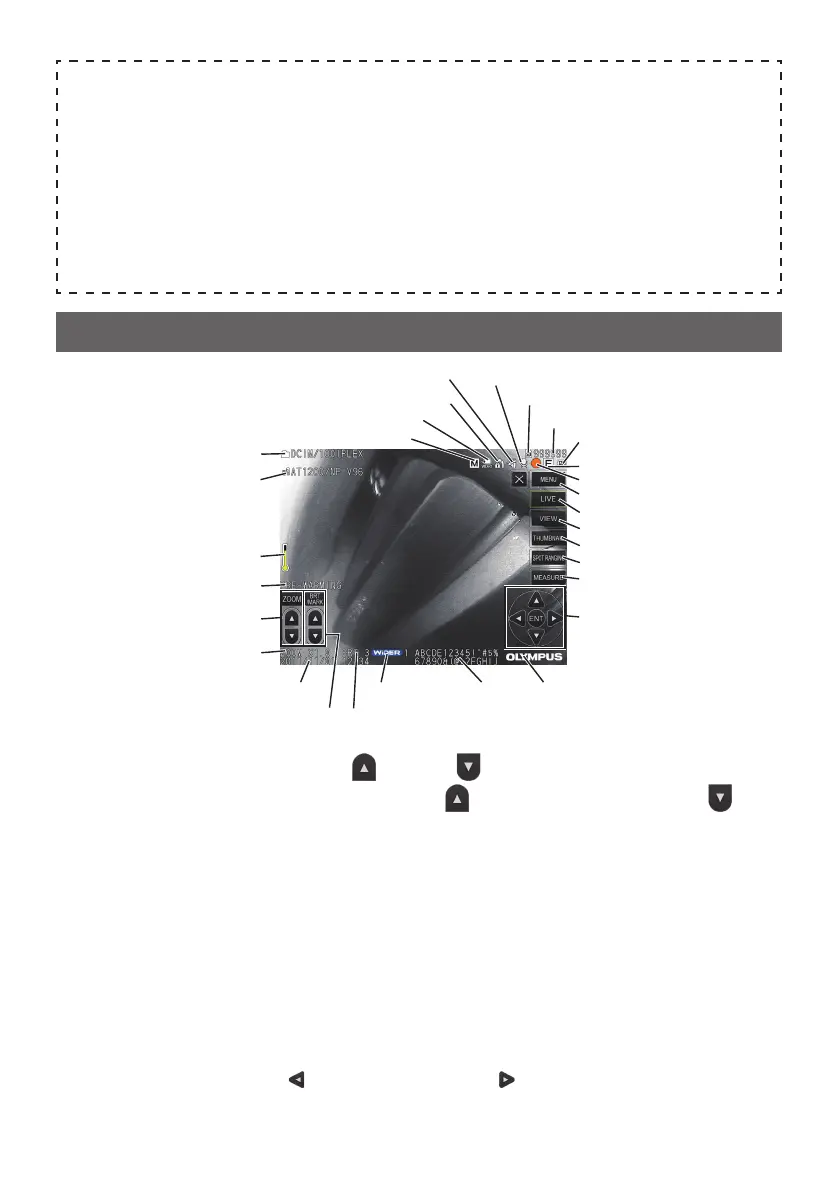
Optical adapter name
Distal end temperature indicator
Manual icon
External input icon
Angle lock icon
Angle centering icon
Warming-up icon
Folder name
Brightness level[BRT] button
Zoom level
[ZOOM] button
Date/Time TitleWiDER icon
Freeze icon
Recording sound icon
Recording movie icon
[MENU] button
[LIVE] button
[VIEW] button
[THUMBNAIL] button
[SPOT RANGING] button
[MEASURE] button
[Move] button,
[ENTER] button
Battery indicator
Logo
Number of recordable images
Media icon (SD or USB)
LCD monitor nomenclature
[ZOOM] button
: Enlarges
or reduces the displayed image.
[BRT] button
: Adjusts the brightness.
increases the brightness level and de-
creases the brightness level.
[MENU] button
: Displays the menu screen.
[LIVE] button
: (Tap) Displays the live screen.
(Log-tap) Changes the brightness adjustment between Auto mode and
Manual mode.
[VIEW] button
: Displays the image in full screen (view screen).
[THUMBNAIL] button
: Displays the thumbnail screen.
[SPOT RANGING] button
: Starts/exits the spot ranging function.
[MEASURE] button
: Starts the stereo measurement function.
[Move] button
: Selects the menu or moves the cursor.
Switches the save destination folder of the image on the live screen.
Switches the selected image on the thumbnail screen.
displays the last image and displays the next image on the view
screen.
[ENTER] button
: Decide the menu, etc.




 To Next Page