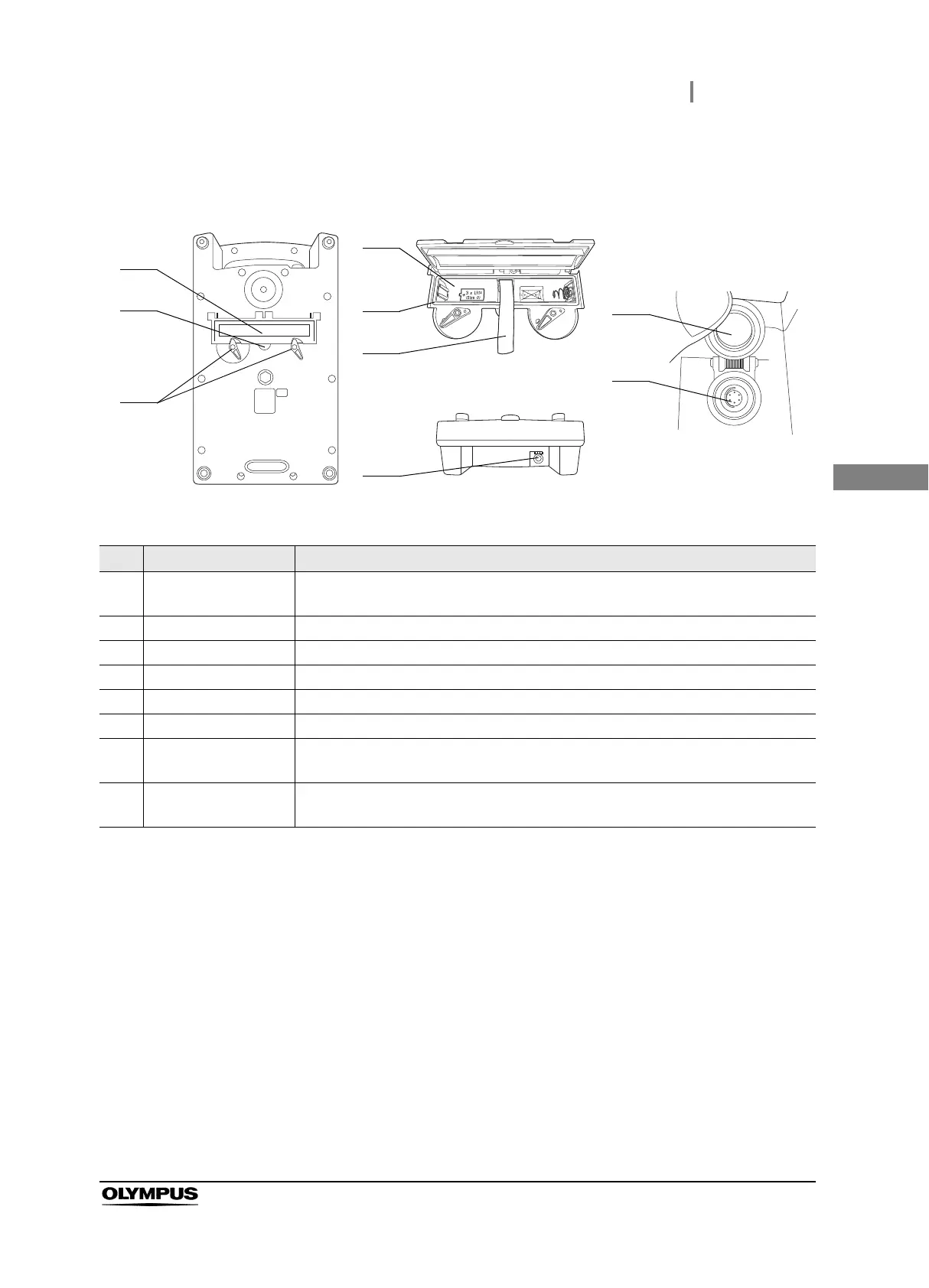
2.2 Foot switch
13
MAJ-2301 INSTRUCTION MANUAL
Ch.2
Rear and front surface
No. Name Description
1 Battery compartment
cover
Opened or closed for inserting or removing batteries.
2 Finger hook Insert your fingertip for opening the battery compartment cover.
3 Lock Used to lock or unlock the battery compartment cover.
4 Battery compartment Insert three “C”-size 1.5 V alkaline batteries.
5 Packing Prevents water penetration inside the battery compartment.
6 Ribbon To be pulled for removing batteries from the foot switch.
7 Connection terminal Connect the FOOTSWITCH connector (on the side marked “FOOTSWITCH”) of the
foot switch cable.
8 Terminal cover Lid for protecting the connection terminal.
To be opened when connecting the foot switch cable to the terminal.
1
3
4
5
6
7
View when battery
compartment cover is opened
Terminal surface
Rear surface
Close-up view
of connection
terminal
8
7
2



 To Next Page