22
3.4 Connection of foot switch hanger
MAJ-2301 INSTRUCTION MANUAL
Ch.3
3.4 Connection of foot switch hanger
1 If the LED light source is connected to the surgical microscope, remove the LED light
source according to the instruction manual of the LED light source.
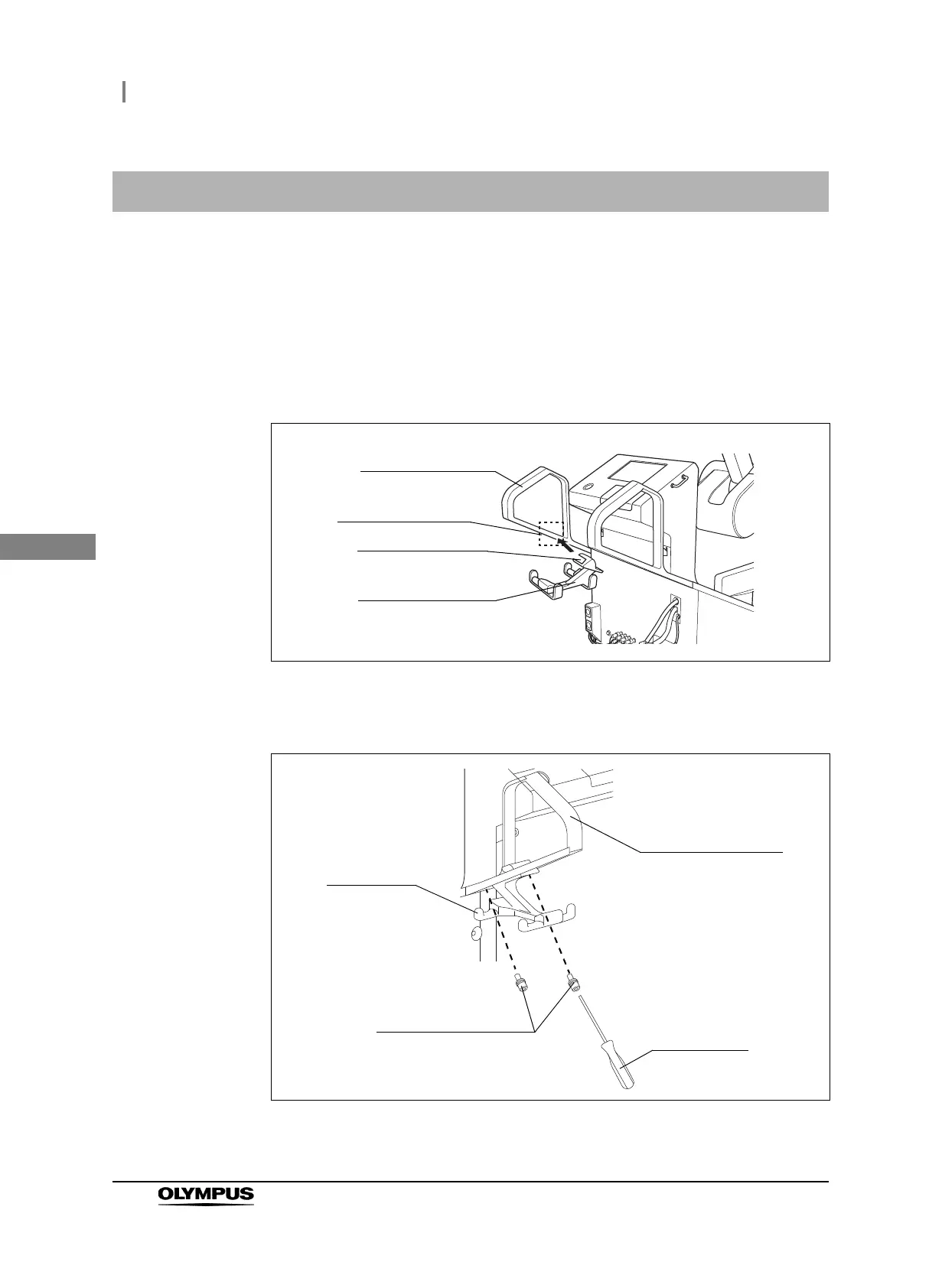
2 Fit the attaching section on the foot switch hanger into the foot switch hanger
attaching section of the movement handle (left-side handle) of the surgical
microscope. Position the foot switch hanger so that its folding holes (× 2) are aligned
with the attaching holes on the movement handle.
Figure 3.6
3 Using the Allen screwdriver (3 mm width across flats) and the provided lock screws
(M4 × 12 mm) (× 2), fix the foot switch on the movement handle.
Figure 3.7
Movement handle
(left-side handle)
Foot switch hanger
attaching section
Foot switch hanger
Attaching section
Foot switch
hanger
Movement handle
Allen
screwdriver
Retaining screws
(M4 × 12 mm) (× 2)



 To Next Page