44
5.2 Wireless control of foot switch
MAJ-2301 INSTRUCTION MANUAL
Ch.5
• If a piece of ancillary equipment installed in proximity of this instrument uses the
same 2.4 GHz band radio as this instrument or it is vulnerable to radio wave,
confirm that both this instrument and the ancillary equipment are free of irregularity.
Without this confirmation, malfunction may cause.
• If there is an obstacle between the foot switch and the surgical microscope
(wireless unit), remove the obstacle before use. Otherwise, the instrument cannot
manifest the performance fully, which may result in slow response or impossibility
of operation. If the problem is still not solved, use the wired control.
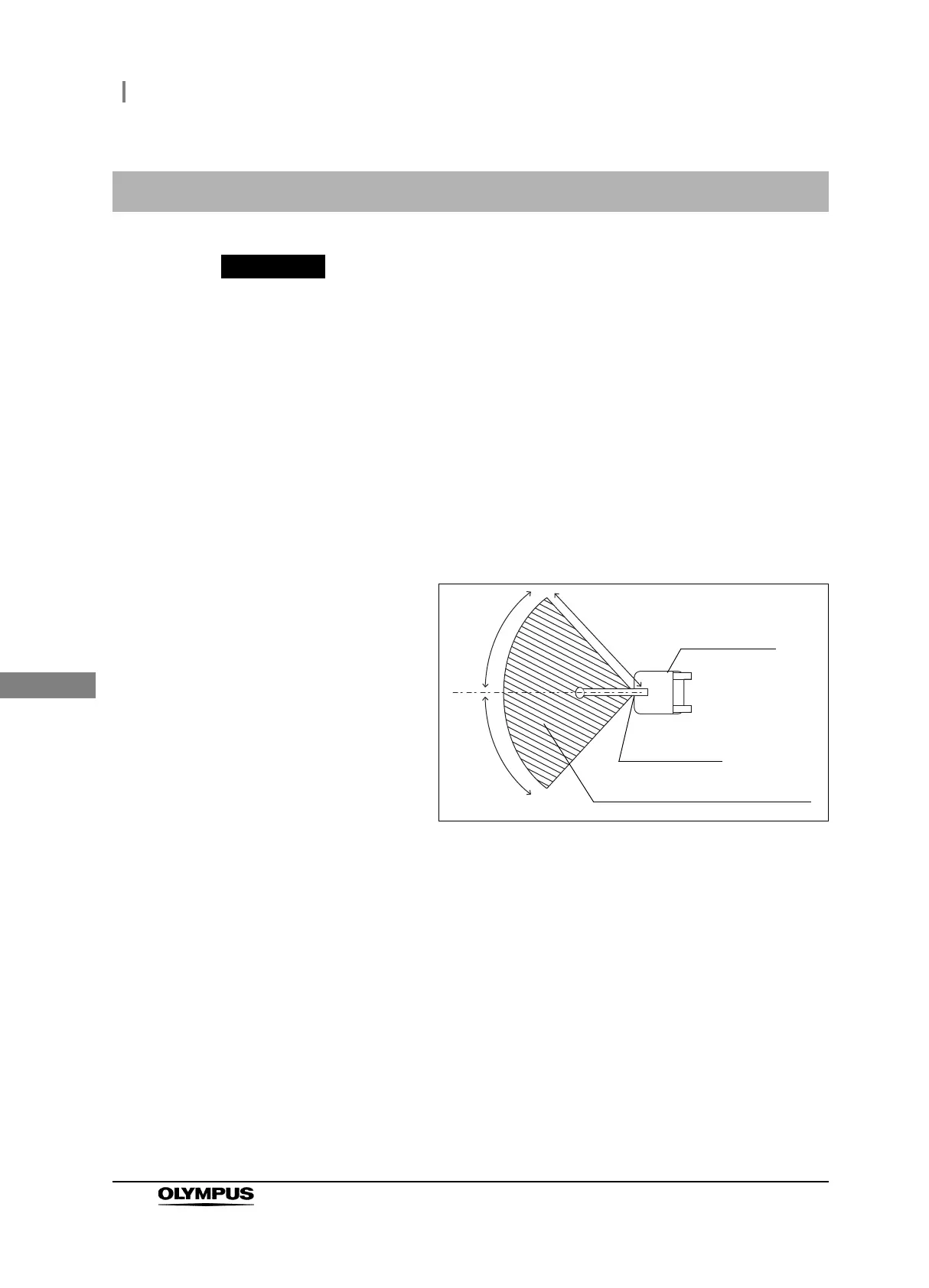
• The radio wave of this instrument has a directivity. The foot switch should be used
within the recommended operation range below (see Figure 5.1). Otherwise, it may
result in slow response or impossibility of operation. In such a case, use the wired
control.
Figure 5.1
5.2 Wireless control of foot switch
2m
45
45
Surgical
microscope
Wireless unit
Recommended operation range



 To Next Page