OEV262H
3. Installation and Connection
3.2 Connecting the AC Power Cord
22
To use the optional AC adapter
1
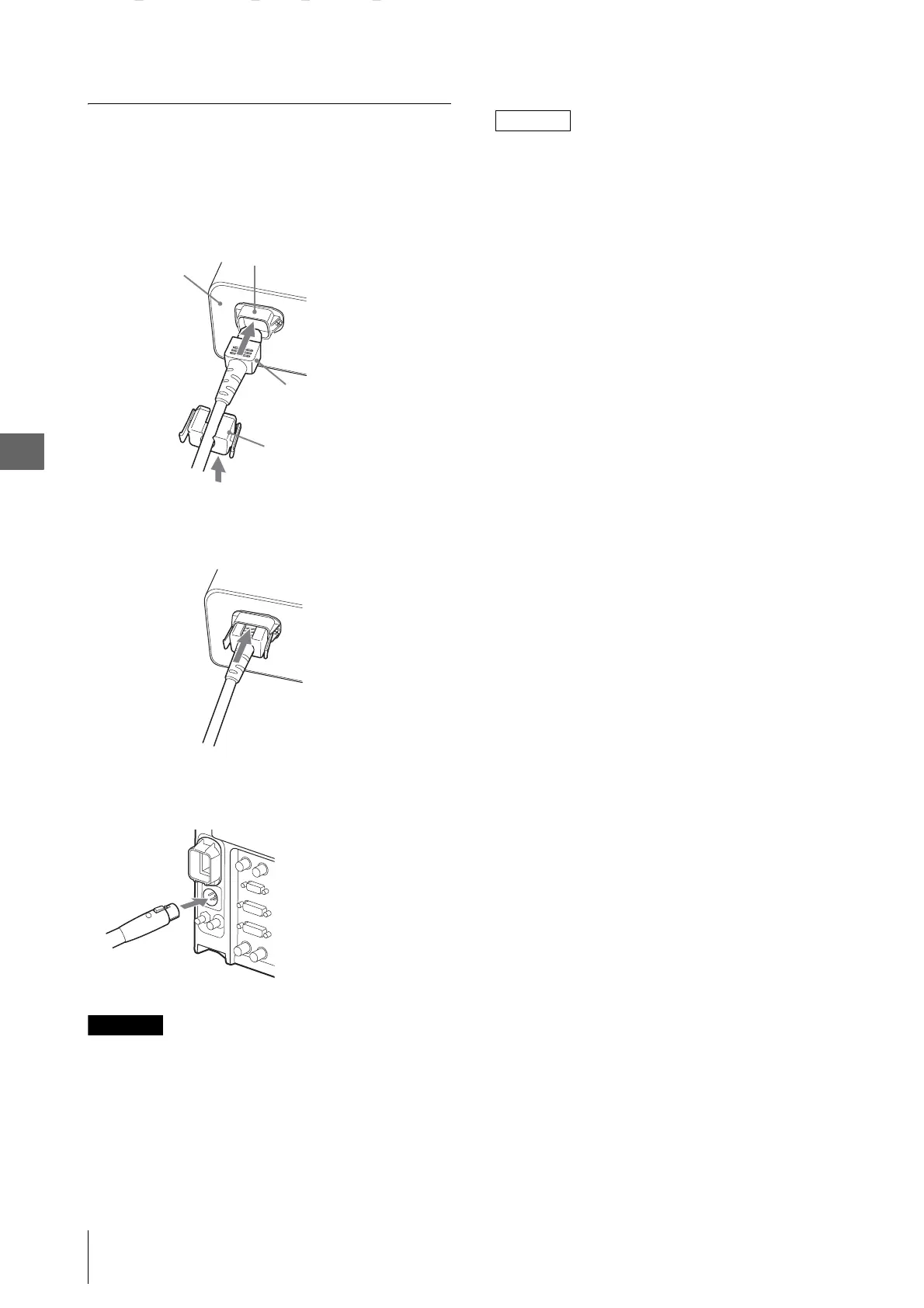
Plug the AC power cord into the AC IN socket on
the AC adapter (optional). Then, attach the plug
holder for the supplied AC power cord to the AC
power cord.
2
Slide the plug holder for the supplied AC power
cord over the cord until it locks.
3
Insert the DC IN connector into the DC 5V/24V IN
connector on the bottom of this unit until it locks.
CAUTION
To use the AC IN socket: Attach the plug holder for the
supplied AC power cord to the AC power cord. To use
the AC adapter: Insert the DC IN connector into the DC
5V/24V IN connector until it locks.
Otherwise the cable may fall out and an image may
disappear.
NOTE
To remove the AC power cord
First, pull out the plug holder for the supplied AC power
cord while pressing the lock levers.
Next, pull out the DC IN connector from the DC 5V/
24V IN connector while pressing the lock lever.
AC power cord
AC IN socket
Plug holder for the supplied AC
power cord (supplied)
AC adapter
(Optional)


 To Next Page