Highlighting a face with blurry effect Creating an index of 9 frames from a
around it [FACE FOCUS] movie [INDEX]
Aface that is largest and facing front in _ This movie frame index can be saved for
the picture is detected as a target, tn some easily recalling the content of a movie. The
images, such target may not be detected, scenes that are automatically extracted can
and editing cannot be performed, be fine adjusted and reselected.
Use _,_(_) to select an image, and press 1 Use _,_(/i_to select a movie, and press
the @ button, the @ button.
• The edited image is saved as a separate image.
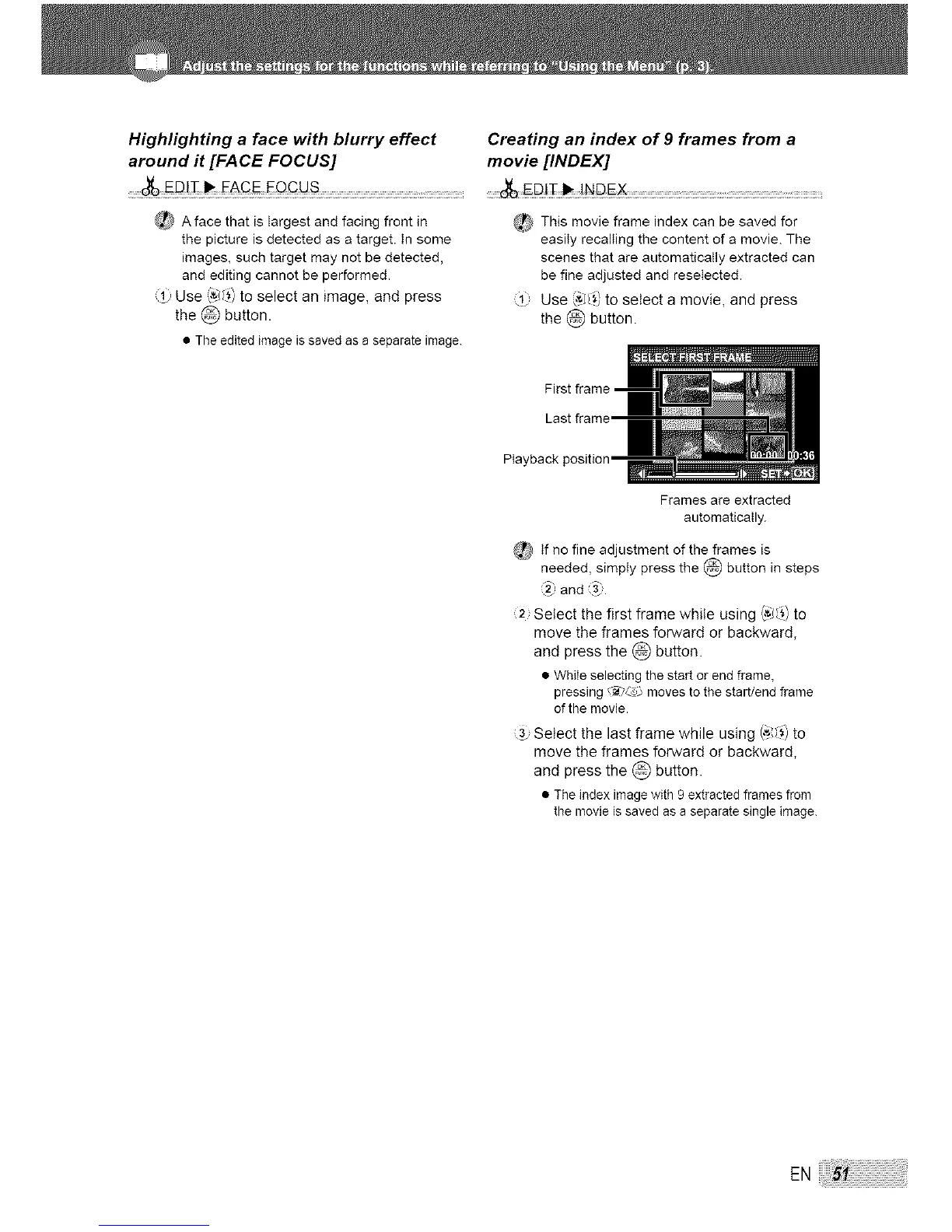
Last frame'
Frames are extracted
automatically.
_ tf no fine adjustment of the frames is
needed, simply press the @ button in steps
and 9.
2 Select the first frame while using (,'_(_) to
move the frames forward or backward,
and press the @ button.
• While selecting the start or end frame,
pressing t'_Ls_ moves to the start/end frame
of the movie.
Select the last frame while using (,_,',',_) to
move the frames forward or backward,
and press the @ button.
• The index image with 9 extracted frames from
the movie is saved as a separate single image.
EN




 To Next Page