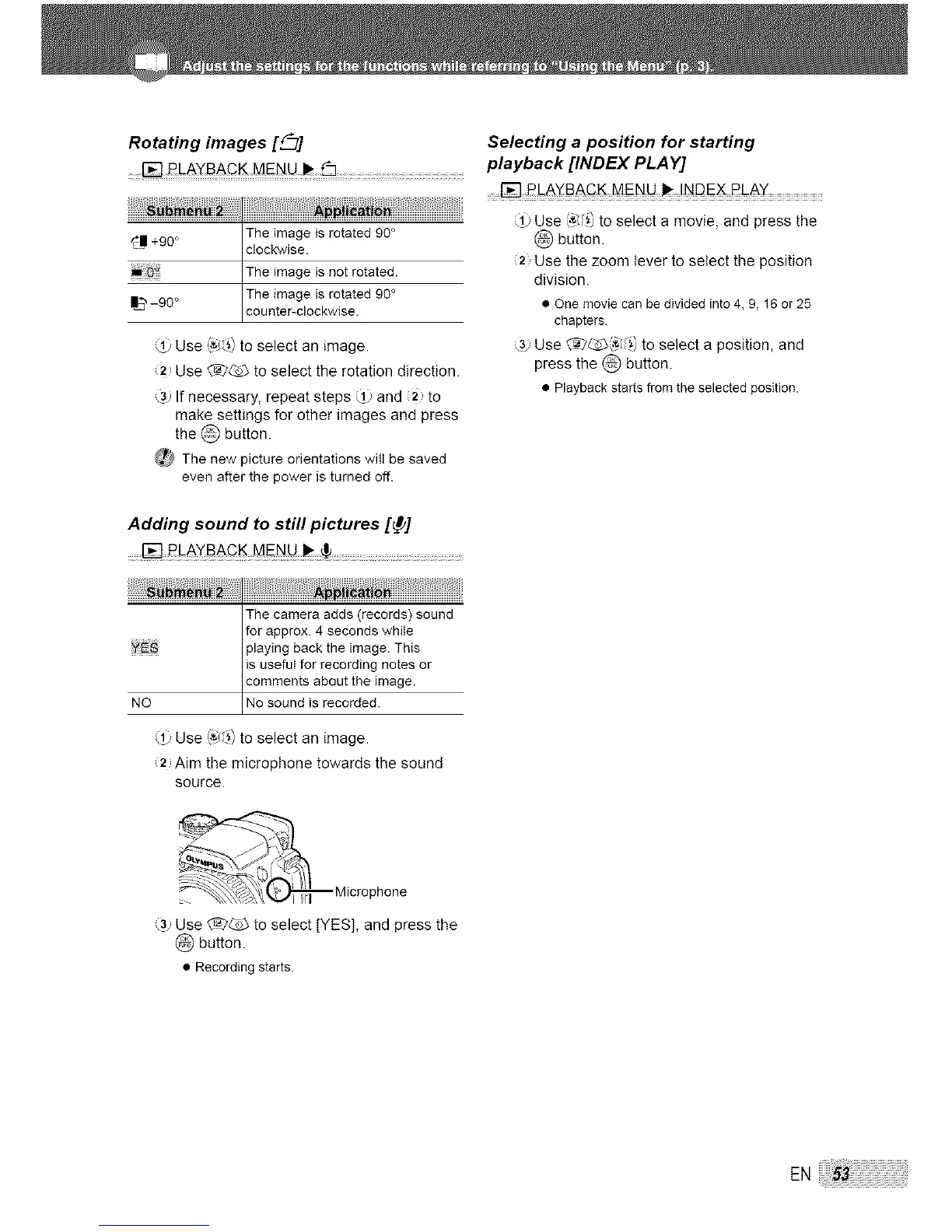
Rotating images [_7]
_11+90 ° The image is rotated 90 °
clockwise•
The image is not rotated•
The image is rotated 90 °
-90° counter-c ockw se.
(_ Use _,'_J_)to select an image.
12 Use @_ to select the rotation direction.
3. If necessary, repeat steps ,_ and (2 to
make settings for other images and press
the @ button.
_ The new picture orientations will be saved
evenafter the power is turned off.
Adding sound to still pictures [_]
The camera adds (records) sound
for approx• 4 seconds while
playing back the image. This
is useful for recording notes or
comments about the image•
NO No sound s recorded•
'_' Use (,'_/_])to select an image•
:2, Aim the microphone towards the sound
source•
j/
_ '_,_:_ Micro phone
,_3.,Use £_2_ to select [YES], and press the
button•
• Recording starts.
Selecting a position for starting
playback [INDEX PLAY]
Use _,'_J_)to select a movie, and press the
button.
2 Use the zoom lever to select the position
division•
• One movie can be divided into 4, 9, 16 or 25
chapters•
3. Use @ _5__(,'_J_)to select a position, and
press the @ button.
• Playback starts from the selected position•
ENi_:_!_!_!_!_!i53_!!i!_i!_i!_i!_i!_i!_i!_i!_i!_i!_i!_i!_i!_i!_i!_i!_i!_i!_i!_i!_i!_i!_i!_i!_i!_i!_i!_i!_i!_i!_i!_i!i




 To Next Page