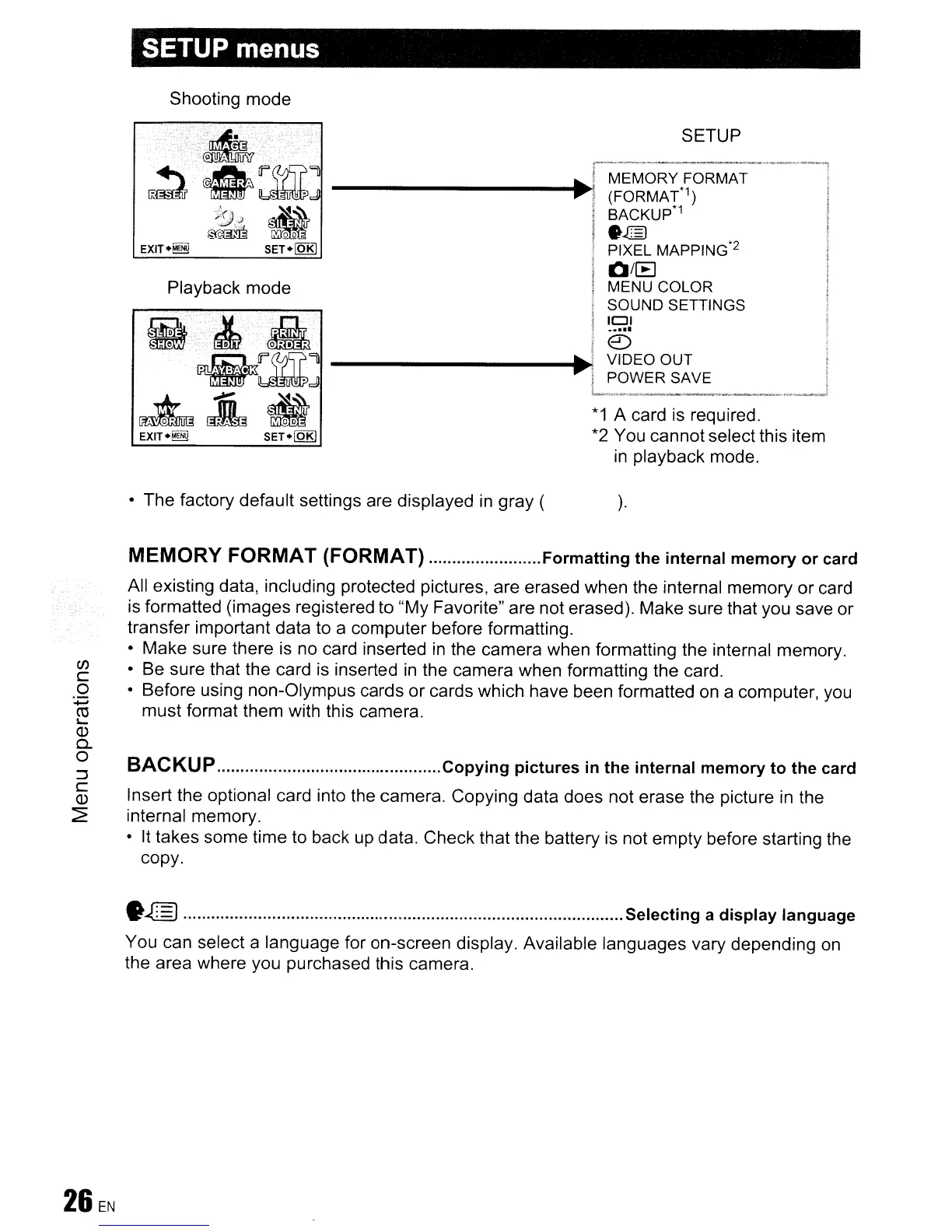
SETUP menus
Shooting mode
Playback mode
EXIT·~
SET.[QE)
*1
A card is required.
*2 You cannot select this item
in
playback mode.
• The factory default settings are displayed
in
gray (
).
C/)
c
o
......
ro
I-
Q)
Q..
o
:::)
c
Q)
~
MEMORY
FORMAT
(FORMAT)
Formatting
the internal memory or card
All existing data, including protected pictures, are erased when the internal memory or card
is formatted (images registered to "My Favorite" are not erased). Make sure that you save or
transfer important data to a computer before formatting.
• Make sure there is no card inserted
in
the camera when formatting the internal memory.
• Be sure that the card is inserted
in
the camera when formatting the card.
• Before using non-Olympus cards
or
cards which have been formatted on a computer, you
must format them with this camera.
BACKUP
Copying
pictures
in
the internal memory to the card
Insert the optional card into the camera. Copying data does not erase the picture
in
the
internal memory.
• It takes some time to back up data. Check that the battery is not empty before starting the
copy.
•
~
Selecting a display language
You can select a language for on-screen display. Available languages vary depending
on
the area where you purchased this camera.









 To Next Page