9
DMAN-xxxx-xx (Rev x.x)
www.omnexcontrols.com
call toll free: 1-800-663-8806
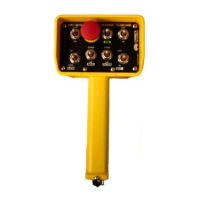
The transmitter’s trigger controls the receiver’s proportional output. The trigger is used in conjunction with any of the
transmitter’s switches. The proportional output can be activated when a switch is held UP or DOWN; it will become active
at an increasingly high level as the trigger is pulled. The minimum and maximum levels of the proportional output can be
calibrated by following these steps.
Refer to the Light Legend below for diagram details.
NOTE: Calibration settings can be reset to factory default in steps 4 & 5 by holding the [SW-5] switch UP or DOWN for 5 seconds
.
NOTE: All switches, except the
[SW-5] switch, remain active in
Calibration Mode.
A switch can be activated during
calibration to help determine the
desired levels.
To reset the MIN and MAX set-
tings to factory default, hold the
[SW5] switch either UP or DOWN
for 5 seconds
A. Press [E-Stop]
B. Twist Clockwise &
Release [E-Stop]
C. Supply power to the
receiver
A. B. C.
ESTOP
FAULT LINK
STATUS
1. Prepare T150, Power R160
A. Hold [SW-5] switch
DOWN
B. Press [E-Stop]
C. Twist Clockwise &
release [E-Stop]
D. Release [SW-5] Switch
2. Power T150 into Configuration Mode
4. Set Minimum Level
A. Keep Trigger released to set mini-
mum level
B. Press [SW-5] switch UP to increase
minimum level or DOWN to
decrease it
A.
5. Set Maximum Level
A. Keep Trigger fully engaged to set
maximum level
B. Press [SW-5] switch UP to increase
maximum level or DOWN to
decrease it
A.
6. Power Off
A. Press [E-Stop]
A.
B.
Calibrating Proportional Controls
Light Legend
Solid
Slow
Flash
Fast
Flash
Red
Light
Green
Light
Alternating Red
& Green Light
Yellow
Light
B.
C.
B.
D.
A.
3. Set T150 in Calibration Mode
A. Press [SW-5] switch DOWN
A.


 To Next Page