Omnia 6 Use and Installation Guide – Version 1.00a
100
100
Port Setup for MS Windows Hyperterminal
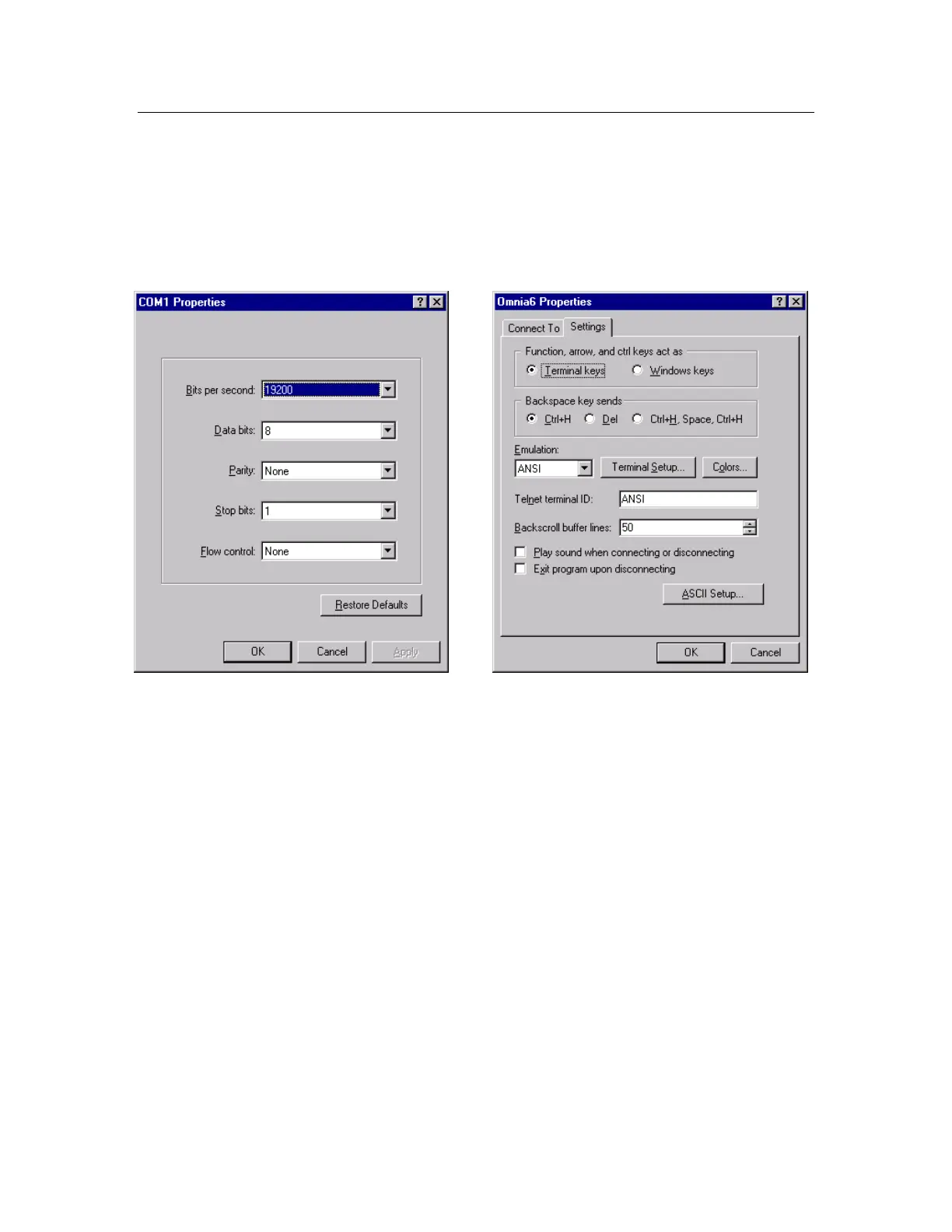
The following examples illustrate how to configure Windows
©
Hyperterminal
©
for use on the Omnia 6 RS-
232 port.
COM Port Setup Parameters Terminal Emulation Parameters
Once these parameters have been entered and saved as a connection profile, they can be used to capture and
display (and/or print) the output of the Omnia 6's RS-232 serial port during boot up. Note that the Omnia's
serial port is designed to operate without handshaking. This makes it compatible with a variety of external
devices. It also makes it "stupid", meaning that you don't need fancy interface equipment or strange
combinations of jumpers on the RS-232 connector in order to make it 'talk'.
At Omnia, we commonly use Hyperterminal
©
with only the serial port's receive data line and ground
connected. This creates a simple, two-wire interface 'listen mode' that we can use for troubleshooting.
See the next page for an example of a normal Omnia 6 boot up message that can be obtained from the rear-
panel's RS-232 serial port...


 To Next Page