1110
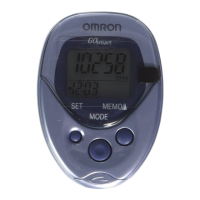
1. Press the MEMO (up) or MODE (down)
Button to adjust by
increments/decrements of 1 inch.
Press and hold the button to adjust the height
in 4-inch increments/decrements.
2. Press the SET Button to set the height.
The number of steps and time will display.
All the settings are completed.
SETTING THE HEIGHT
Setting range: 3'4'' to 6'6''.
The height flashes on the display.
1. Press the MEMO (up) or MODE (down)
Button to adjust by
increments/decrements of 1 lb.
Press and hold the button to adjust weight in
10 lb increments/decrements.
2. Press the SET Button on the back of the
unit to set the weight.
The height flashes on the display.
10
SETTING THE WEIGHT
Setting range: 70 to 300 lb.
The weight flashes on the display.
HJ-151-IM_Q4.qxd 07.1.25 11:09 AM Page 10



 To Next Page