EN12
Preparing for Use
Before using the device, inspect these items and ensure that:
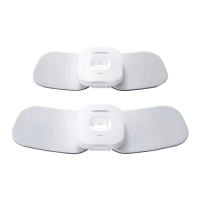
1. The pads are not damaged.
2. The devices are intact and working.
3. The AC adapter is not broken or damaged.
For the First Time Use:
1. Recharge the battery to full.
2. Install the OMRONTENS app and open it.
3. Turn on the device and pair it to your smart device by using the app.
4. Attach the device onto the pad.
5. Select your body treatment area and place the pad on your skin.
6. Select a mode and your therapy time, then start a session.
After the First Time Use:
1. Open the OMRONTENS app.
2. Turn on the device.
3. Select your body treatment area and place the pad on your skin.
4. Select a mode and your therapy time, then start a session.
Note:
• Once fully charged, one battery charge is sufficient for approximately 6 uses at 1
time per day for 30minutes. Once the battery has been depleted, it takes about
8hours to fully charge.
• If the device is not being used for more than 3 months, recharge it.
• Environmental temperature while battery is charging should be +5 to +35°C.
Step 1 – Recharging the Battery
1. Connect the AC adapter plug to the AC adapter jack on the charger.
Operating Instructions



 To Next Page