1 Preparation
1-3 Name of each part
BN50T/BN75T/BN100T/BN150T/BN220T/BN300T
1-4
Side view
"AC Input" plug
Air vent
AC input cable
"AC Input" plug Air vent
AC input cable
AC input cable
"AC Input" plug
Air vent
<BN220T/BN300T>
<BN100T/BN150T>
<BN50T/BN75T>
*The other side (right side as seen from the front) has a similar air vent.
*The other side (right side as seen from the front) has a similar air vent.
1 Preparation
1-3 Name of each part
BN50T/BN75T/BN100T/BN150T/BN220T/BN300T
1
1-5
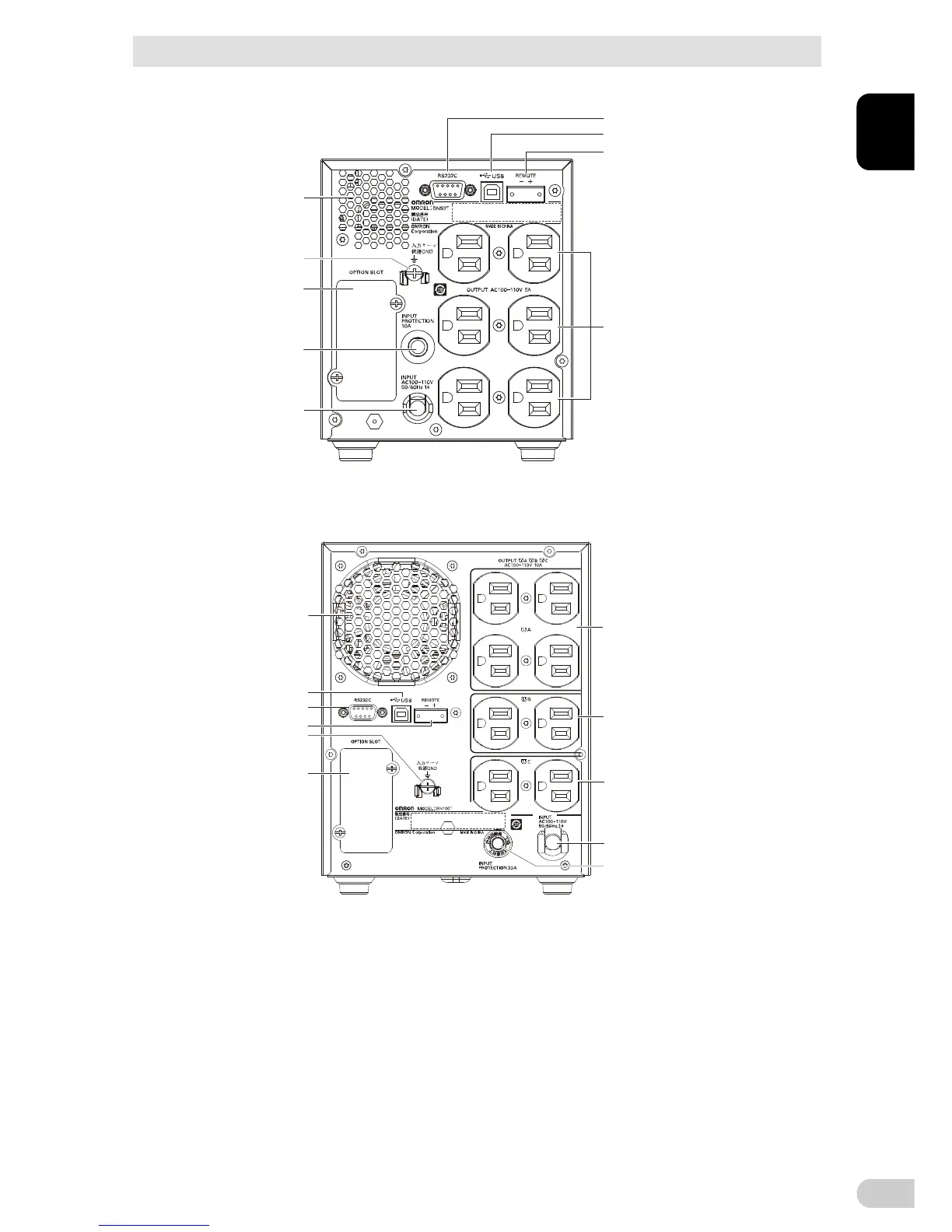
Rear view
<BN50T/BN75T>
<BN100T/BN150T>
D
E
F
I
G
C
B
A
K
C
H
I
J
A
B
G
D
E
F
H
I. Power supply output receptacle B
J. Power supply output receptacle C
K. Cooling fan
A. AC Input cable
B. AC Input overcurrent protection switch
C. Grounding terminal (M4 screw)
D. RS-232C port
E. USB port
F. Remote ON/OFF port
G. Option slot
H. Power supply output receptacle A
G. Option slot
H. Power supply output receptacle
I. Air vent
A. AC Input cable
B. AC Input overcurrent protection switch
C. Grounding terminal (M4 screw)
D. RS-232C port
E. USB port
F. Remote ON/OFF port



 To Next Page