33
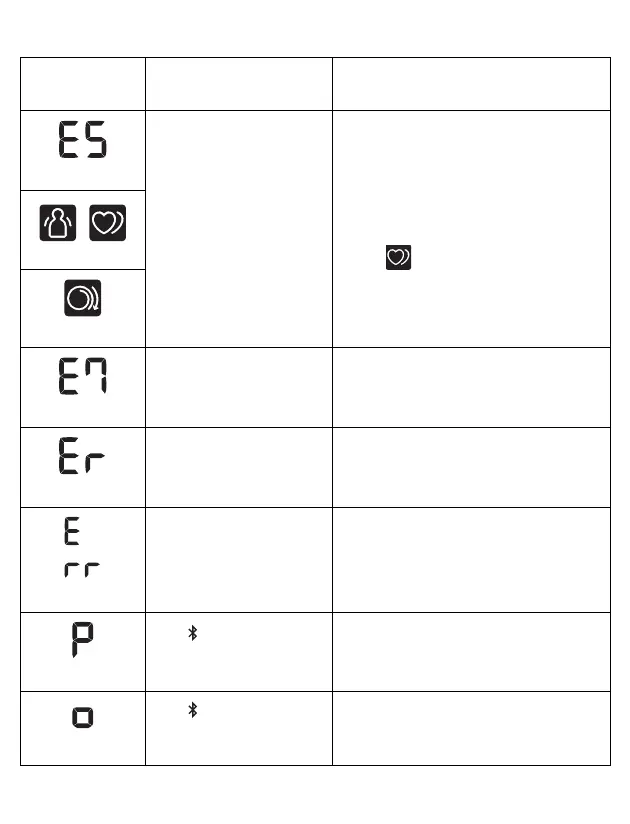
appears
The pulse rate is not
detected correctly.
Apply the wrist cuff correctly, then take
another measurement. Refer to
section 2.4.
Remain still and sit correctly during a
measurement.
If the “ ” symbol continues to
appear, we recommend you to consult
with your physician.
/
appears
appears
appears
Your wrist is moved up
and down during a
measurement.
Do not move your wrist, then take
another measurement.
Refer to chapter 3.
appears
The monitor is
malfunctioned.
Press the [START/STOP] button
again. If “Er” still appears, contact
customer service. Refer to chapter 11.
appears
The monitor cannot
connect to a smart
device or transmit data
correctly.
Follow the instructions shown in the
app. If the “Err” symbol still appears
after checking the app, contact
customer service. Refer to chapter 11.
flashes
The [ ] button is
pressed and held to pair
with a smart device.
Flashes when pairing to the smart
device. Visit the “Help” section in the
app for pairing.
flashes
The [ ] button is
pressed to transfer your
readings.
Flashes when transferring your
readings to the app.
Display/
Problem
Possible Cause Solution


 To Next Page