EasyManua.ls Logo

Omron Complete - User Manual

Omron Complete
19 pages
Print Icon
To Next Page IconTo Next Page
Loading...
App User Manual
For
Complete
TM
Blood Pressure Monitor + EKG
Model BP7900
The instruction manual for BP7900 Blood Pressure Monitor + EKG is provided with the monitor.
Or visit:
OmronHealthcare.com
4602958-0C
Question and Answer IconNeed help?

Do you have a question about the Omron Complete and is the answer not in the manual?

Summary

Product Description

What is Atrial Fibrillation

EKG Detectors Overview

Atrial Fibrillation Detector

Detects possible atrial fibrillation in an EKG tracing, notifying users if AFib is found.

Bradycardia Detector

Detects bradycardia (slow heart rate) in an EKG tracing, notifying users of rates between 40-50 bpm.

Tachycardia Detector

Detects tachycardia (fast heart rate) in an EKG tracing, notifying users of rates between 100-140 bpm.

Normal Detector

Identifies normal sinus rhythm with heart rate between 50-100 bpm and no major abnormalities.

EKG Result Classifications

Unreadable Detector

Determines if a recording can be accurately interpreted due to interference, suggesting actions.

Unclassified Detector

Indicates results that are not Normal, AFib, Bradycardia, Tachycardia, or Unreadable.

Setup Monitor and App

Compatibility Requirements

Details smartphone compatibility requirements for the BP7900 monitor and app.

BP7900 Setup Instructions

Guidance on setting up the BP7900 Blood Pressure Monitor + EKG from the box.

Download and Install Phone App

Instructions for downloading and installing the compatible OMRON app.

Create User Account

Steps for creating an OMRON Healthcare account for app access.

Smartphone Security Measures

Recommendations for securing the smartphone storing personal health information.

Supplemental App Features

Manage EKG Recordings

Instructions for emailing, printing, and deleting recorded EKGs from the Phone app.

View EKG History

How to access, view, and filter previously recorded EKG readings in the app's history.

Track Medications (Premium)

Details on tracking medications, setting reminders, and viewing adherence via the premium app feature.

Integrate with Health Apps

Connects the app with Apple Health and Google Fit to share health data.

App Report Options

Information on available report types: Daily, Standard, and Premium (EKG, BP, Medication).

Manage Blood Pressure Readings

How to pair the monitor, upload, and manually enter blood pressure readings into the app.

Track Weight Data

Enter weight manually or sync with Apple Health/Google Fit to track weight over time.

Access Health Education Resources

Provides access to educational content on heart health, EKG, and arrhythmias within the app.

Access In-App Help

Instructions on how to access the help section within the Phone app for support.

Settings and Adjustments

Recording Review Adjustments

Options to adjust EKG review, including enhanced filtering and inversion.

Adjustable App Settings

Customizable settings for recording duration, mains filter, paper size, and reminders.

Editing User Profile

Guidance on how to access and edit personal information in the user profile.

Troubleshooting Common Issues

Monitor Not Working

Solutions for when the OMRON monitor is not functioning correctly.

EKG Artifact and Noise

Tips for acquiring high-quality EKG recordings and resolving artifact/noise issues.

Inverted EKG Rhythms

How to correct upside-down EKG rhythm display.

Password Reset Issues

Procedure for resetting a forgotten password for the Phone app.

PDF Report Discrepancies

Explanation for minor differences between PDF reports on web and app.

Spikes at Recording Start

Explanation for initial spikes or artifact at the beginning of an EKG recording.

Manual Availability

Information on obtaining printed versions and language availability of the manual.

Summary

Product Description

What is Atrial Fibrillation

EKG Detectors Overview

Atrial Fibrillation Detector

Detects possible atrial fibrillation in an EKG tracing, notifying users if AFib is found.

Bradycardia Detector

Detects bradycardia (slow heart rate) in an EKG tracing, notifying users of rates between 40-50 bpm.

Tachycardia Detector

Detects tachycardia (fast heart rate) in an EKG tracing, notifying users of rates between 100-140 bpm.

Normal Detector

Identifies normal sinus rhythm with heart rate between 50-100 bpm and no major abnormalities.

EKG Result Classifications

Unreadable Detector

Determines if a recording can be accurately interpreted due to interference, suggesting actions.

Unclassified Detector

Indicates results that are not Normal, AFib, Bradycardia, Tachycardia, or Unreadable.

Setup Monitor and App

Compatibility Requirements

Details smartphone compatibility requirements for the BP7900 monitor and app.

BP7900 Setup Instructions

Guidance on setting up the BP7900 Blood Pressure Monitor + EKG from the box.

Download and Install Phone App

Instructions for downloading and installing the compatible OMRON app.

Create User Account

Steps for creating an OMRON Healthcare account for app access.

Smartphone Security Measures

Recommendations for securing the smartphone storing personal health information.

Supplemental App Features

Manage EKG Recordings

Instructions for emailing, printing, and deleting recorded EKGs from the Phone app.

View EKG History

How to access, view, and filter previously recorded EKG readings in the app's history.

Track Medications (Premium)

Details on tracking medications, setting reminders, and viewing adherence via the premium app feature.

Integrate with Health Apps

Connects the app with Apple Health and Google Fit to share health data.

App Report Options

Information on available report types: Daily, Standard, and Premium (EKG, BP, Medication).

Manage Blood Pressure Readings

How to pair the monitor, upload, and manually enter blood pressure readings into the app.

Track Weight Data

Enter weight manually or sync with Apple Health/Google Fit to track weight over time.

Access Health Education Resources

Provides access to educational content on heart health, EKG, and arrhythmias within the app.

Access In-App Help

Instructions on how to access the help section within the Phone app for support.

Settings and Adjustments

Recording Review Adjustments

Options to adjust EKG review, including enhanced filtering and inversion.

Adjustable App Settings

Customizable settings for recording duration, mains filter, paper size, and reminders.

Editing User Profile

Guidance on how to access and edit personal information in the user profile.

Troubleshooting Common Issues

Monitor Not Working

Solutions for when the OMRON monitor is not functioning correctly.

EKG Artifact and Noise

Tips for acquiring high-quality EKG recordings and resolving artifact/noise issues.

Inverted EKG Rhythms

How to correct upside-down EKG rhythm display.

Password Reset Issues

Procedure for resetting a forgotten password for the Phone app.

PDF Report Discrepancies

Explanation for minor differences between PDF reports on web and app.

Spikes at Recording Start

Explanation for initial spikes or artifact at the beginning of an EKG recording.

Manual Availability

Information on obtaining printed versions and language availability of the manual.

Overview

This document is an App User Manual for the OMRON Complete™ Blood Pressure Monitor + EKG, Model BP7900. It provides instructions and information for users of the BP7900 device in conjunction with its compatible smartphone application, referred to as the "Phone app." While primarily for BP7900 users, some tips may also apply to users of other OMRON blood pressure monitors.

Function Description:

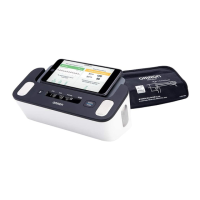
The BP7900 Blood Pressure Monitor + EKG is a medical device designed to measure blood pressure and record clinical-quality electrocardiograms (EKGs). It consists of a monitor with an arm cuff for blood pressure measurement and electrodes to sense and transmit EKG rhythms to a smartphone. The device works in conjunction with a user-supplied compatible smartphone running the OMRON Phone app.

The Phone app, powered by OMRON Healthcare, is a smartphone application that supports the BP7900. It allows users to record and display EKGs, providing instant analysis of the recorded EKG to evaluate heart rhythm. The app can detect whether the heart rhythm is normal or if possible atrial fibrillation (AFib), bradycardia, or tachycardia are present.

The primary functions of the BP7900 and its Phone app include:

  • Blood Pressure Measurement: The device measures blood pressure using an arm cuff. Readings can be uploaded directly to the Phone app or entered manually.
  • EKG Recording: Users can record single-channel EKG readings. The default recording duration is 30 seconds, but users can extend it up to 5 minutes via the Phone app.
  • Real-time EKG Viewing: EKG recordings can be viewed in real-time during and after the recording process.
  • Instant EKG Analysis: The Phone app provides immediate analysis of recorded EKGs, displaying results such as "Possible Atrial Fibrillation (or AFib)," "Bradycardia," "Tachycardia," "Normal," "Unreadable," or "Unclassified."
    • Atrial Fibrillation Detector: Identifies possible atrial fibrillation in EKG tracings. This is a potential finding, not a diagnosis, and requires physician review.
    • Bradycardia Detector: Detects bradycardia (slower heart rate, 40-50 beats per minute) in EKG tracings, indicating a type of arrhythmia.
    • Tachycardia Detector: Detects tachycardia (faster heart rate, 100-140 beats per minute) in EKG tracings, indicating a type of arrhythmia.
    • Normal Detector: Notifies users when a recording is normal, meaning the heart rate is between 50 and 100 beats per minute, with few abnormal beats and normal sinus rhythm. It's designed to be conservative in its detection of "normal."
    • Unreadable Detector: Determines if a recording can be accurately interpreted. If interference is detected, it suggests ways to acquire a good quality EKG.
    • Unclassified: This message appears for EKG recordings not detected as Normal, AFib, Bradycardia, Tachycardia, or Unreadable. It may include normal rhythms outside the 50-100 bpm range (e.g., after physical activity) or abnormal rhythms.
  • Data Storage: The Phone app collects and stores single-channel EKG recordings on the smartphone. With a premium feature, it can also store and allow access to the entire EKG history in the OMRON Healthcare cloud.
  • Data Transmission: EKG recordings can be wirelessly transmitted to the OMRON Healthcare server.
  • Reporting: Users can print or save EKG recordings in PDF format. The app also provides Daily Reports (Blood Pressure, Activity), Standard Reports (Blood Pressure, Activity, Weight), and Premium Reports (EKG, Blood Pressure, Medication).
  • Health Tracking: Users can track events that may impact heart health, such as symptoms, activities, and diet, by adding tags to recordings.
  • Medication Tracking (Premium Feature): For iOS and Android users, the app allows tracking of medications, including setting frequencies, reminders, viewing daily lists, and generating medication reports.
  • Weight Tracking: Users can manually enter their weight or enable the Phone app to pull weight data from Apple Health or Google Fit apps.
  • Education Resources: The app provides access to educational content on cardiac anatomy, what an EKG is, arrhythmia library, and external resources, verified by medical professionals.

Usage Features:

To use the BP7900, users must first set up the monitor and download the OMRON Phone app on a compatible smartphone (iOS or Android). An account needs to be created within the app to access, print, and save EKG recordings.

  • Monitor Setup: Follow the instruction manual for the BP7900 to set up the device.
  • App Download and Account Creation: Scan a QR code or visit OmronHealthcare.com/app to download the OMRON compatible app. Open the app and tap "Sign up here" to create an account. Existing users can add the new monitor to their account.
  • Security: It is recommended to add a passcode, Touch ID, or Face ID recognition to the smartphone to secure personal health information stored in the app.
  • Pairing the Monitor: To upload blood pressure readings, the OMRON blood pressure monitor must be paired with the Phone app. This involves selecting the "Complete device" option in the app and pressing and holding the [Connection] button on the monitor until a flashing "P" appears.
  • Recording an EKG: Refer to the BP7900 instruction manual for detailed steps on recording an EKG. The Phone app is designed for personal use, but the monitor can be used with multiple Phone app accounts/smartphones.
  • Adding Tags and Notes: After an EKG recording, users are prompted to add tags (symptoms, activities, diet) and personalized notes on the Data Entry screen.
  • Reviewing History: All EKG recordings are stored in the "History" screen. Users can tap on an EKG for a larger view on the EKG Review screen.
  • Filtering Recordings: The "Filter by" drop-down menu allows users to filter recordings by categories such as Starred, Atrial Fibrillation, Analysis Reports, My EKGs, and Guest EKGs.
  • Emailing Recordings: From the History screen, tap the envelope icon next to the desired EKG, then tap "Email." A PDF version of the EKG recording will be attached to a new email.
  • Printing Recordings: From the History screen, tap the envelope icon, open the report in PDF view, then use the share/menu icon to select "Print" and choose a printer.
  • Deleting Recordings: On the History screen, swipe right to left on the EKG reading and tap the "Delete" icon.
  • Health App/Google Fit Integration: The Phone app can integrate with Apple Health and Google Fit™ apps, sending information such as Active Energy, Body Fat Percentage, Body Mass Index, Diastolic Blood Pressure, Heart Rate, Steps, Systolic Blood Pressure, Walking + Running Distance, and Weight. This integration can be turned off.
  • Accessing Education and Help: The app provides sections for "Heart Education" and general "Help" via the "+" icon and "Help" menu.

Maintenance Features:

The manual provides guidance on maintaining the quality of EKG recordings and troubleshooting common issues.

  • Battery Replacement: If the monitor is not working, changing the battery is a recommended step. Instructions for battery replacement are found in the BP7900 instruction manual or on OmronHealthcare.com.
  • Ensuring App Access: For the monitor to function correctly, the Phone app must have access to the smartphone's microphone. Users are instructed to check and enable microphone access in their smartphone's settings (e.g., iPhone Settings > Privacy > Microphone, or Android App Settings).
  • Improving EKG Recording Quality:
    • Enhanced Filter: Ensure the "Enhanced Filter" is turned on in the EKG Settings. This filter suppresses noise in the EKG. It can be toggled ON or OFF from the EKG Review screen under "MORE."
    • Cleaning Electrodes: Clean the electrodes on the BP7900 with an alcohol-based sanitizer.
    • Skin Moisture: If hands are very dry, use a water-based lotion before recording.
    • Relaxation: Relax arms and hands to reduce muscle noise. Rest forearms and hands on a flat surface, allowing the BP7900 to rest on the hands.
    • Device Usage: Ensure the smartphone is not charging/syncing and headphones are not in use during recording.
    • Stillness: Both the smartphone and the user must remain still during EKG recordings, as movement causes noise.
    • Mains Filter: Set the "Mains Filter" appropriately for the geographical location (e.g., 60 Hz for the United States and Canada, 50 Hz for most other countries) in the Phone app Settings to remove mains interference.
  • Inverting EKG Recording: If EKG rhythms appear upside down, the orientation can be toggled on a particular EKG from the EKG Review screen by tapping "MORE" and then the "INVERT" switch.
  • Password Reset: If a user forgets their password, they can tap the "Password Reset" link on the Phone app login screen to receive a reset link via email.
  • Adjustable Settings:
    • Recording Duration: Users can adjust the maximum length of a single EKG recording in the "EKG Settings" under "Duration."
    • Paper Size: The paper size for PDF reports can be changed to accommodate Letter and A4 paper sizes in the "EKG Settings" under "Paper Size."
    • Reminders: EKG reminders can be turned on or off and their time set in the "EKG Settings" under "Reminders."
  • Editing User Profile: Personal information can be edited by launching the Phone app, tapping the "+" icon, then "Profile," and "Personal Information."

The app is designed to provide a comprehensive tool for managing blood pressure and EKG data, supporting users in monitoring their heart health and sharing information with their physicians.

Omron Complete Specifications

General IconGeneral
BrandOmron
ModelComplete
CategoryPersonal Care Products
LanguageEnglish

Related product manuals