EasyManua.ls Logo

Omron Focus PM710-M - User Manual

Omron Focus PM710-M
40 pages
Print Icon
To Next Page IconTo Next Page
Loading...
Focus
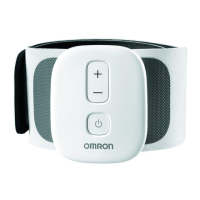
TENS Therapy for Knee
PM710-M
PM710-L
Instruction Manual

Questions and Answers

  • C
    Curtis MckenzieAug 13, 2025
    How to increase intensity on Omron Focus PM710-M Medical Equipment?
    • A
      alittleAug 13, 2025
      If you're not feeling the intensity or it feels too weak, there might be a few reasons. First, ensure the adhesive surfaces of the pad aren't overlapping. If they are, check the pad placement. Also, the intensity might be set too low; try pressing the [+] button to increase it. Lastly, if the adhesive surface is damaged, you'll need to replace the pad.
  • V
    vandersonAug 17, 2025
    Why my Omron Focus PM710-M won't turn on?
    • S
      Shelly MarshallAug 17, 2025
      If your Omron Medical Equipment isn't turning on, the battery may be depleted. If the battery indicator light is orange, fully charge the battery.
  • M
    Miss Samantha Figueroa DDSAug 21, 2025
    What to do if Omron Focus PM710-M Medical Equipment power cut off during use?
    • T
      Thomas EvansAug 21, 2025
      If the power cuts off during use, it could be due to a depleted battery, indicated by an orange battery light; in this case, fully charge the battery. Also, the device automatically turns off after 30 minutes of therapy, if therapy hasn't started within 3 minutes, or if the pad is removed. Check if the therapy has finished, press the [+] button after turning the power on, and ensure the pad is correctly placed.
  • L
    Louis RodriguezAug 25, 2025
    Why is my Omron Medical Equipment not charging?
    • C
      Crystal BarrAug 25, 2025
      If your device isn't charging, first ensure the AC adapter is properly connected to both the charger and an electrical outlet. Also, make sure the device is correctly placed on the charger and that there are no foreign objects in the charging area. Lastly, high heat or cold temperatures can prevent charging or extend charging time.
  • C
    Chad MorrisAug 29, 2025
    Why does my skin turn red using Omron Focus PM710-M Medical Equipment?
    • J
      jonesrachelAug 29, 2025
      Skin redness or irritation can occur if the therapy duration is too long; shorten sessions to less than 60 minutes. Ensure the pad is correctly placed below your knee. If the adhesive surface of the pad is damaged, replace it.
  • T
    Tina VegaSep 1, 2025
    What to do if therapy does not start on Omron Focus PM710-M Medical Equipment?
    • J
      Jacqueline JohnsonSep 1, 2025
      If therapy doesn't start, ensure the pad is placed properly below your knee. Also, check that the device is correctly attached to the pad; detach and reattach it properly. Remove any plastic films from the pad's adhesive surface. If the pad is damaged, replace it.
  • K
    Kimberly AndersonSep 5, 2025
    How to make Omron Focus PM710-M Medical Equipment pad stick to skin?
    • T
      Tyler PetersonSep 5, 2025
      If the pad isn't sticking, remove any plastic films from the adhesive surface. Make sure the pad and your skin are dry. Replace the pad if the adhesive surface is damaged. If there's too much hair, shave the area. Pads stored improperly (high temperature, humidity, or direct sun) may also need replacement.
  • B
    Bobby AllenSep 8, 2025
    What if Omron Focus PM710-M Medical Equipment charger gets hot?
    • W
      wardseanSep 8, 2025
      If the device, charger, or AC adapter gets abnormally hot during charging, unplug the AC adapter from the charger and remove the device from the charger immediately, as this could indicate damage.

Summary

Contraindications and Important Safety Information

Device Contraindication Details

Lists specific medical conditions or situations where the device should not be used.

General Safety Warnings and Physician Consultation

Highlights potentially hazardous situations and advises consulting a physician.

Specific Safety Precautions for Usage

Usage Restrictions and Limitations

Details limitations on where, when, and how the device can be used safely.

Device, Battery, and Charging Safety

Battery Handling and Usage Precautions

Provides instructions for safe handling and usage of the device's battery.

Usage Precautions and Pad Maintenance

Understanding Adverse Reactions

Potential Skin and Sensorial Reactions

Describes possible side effects like skin irritation, burns, or sensations.

Device Preparation and Charging

Charging the OMRON Focus Device

Step-by-Step Charging Procedure

Step-by-step instructions for plugging in and charging the device.

Attaching the Device to the Pad

Using the OMRON Focus TENS Device

Attaching the Band Below Your Knee

Instructions for positioning the band correctly on the knee.

Proper Band and Device Placement

Aligning Device on Knee for Comfort

Details on aligning the device and band for optimal comfort and placement.

Securing the TENS Therapy Band

Fastening the Band for Stability

How to wrap and secure the band using the hook and loop fastener.

Critical Safety Guidelines During Use

Critical Warnings for Device Application

Emphasizes crucial safety warnings about where and how NOT to use the device.

Starting and Managing Your Therapy Session

Adjusting Therapy Intensity Levels

Session Completion and Control

Maintenance Procedures

Cleaning Device Components

Pad and Band Replacement Schedule

Troubleshooting Common Issues

Resolving Intensity and Irritation Problems

Addresses common problems like intensity not felt or pad irritation.

Troubleshooting Power and Charging

Addressing Charging and Power Cut Issues

Solutions for device not charging or experiencing power interruptions.

Troubleshooting Operation and Adhesion

Resolving Therapy Start and Pad Issues

Resolves problems with therapy not starting or the pad not sticking.

OMRON Focus Product Specifications

Limited Warranty Information

Omron Focus PM710-M Specifications

General IconGeneral
BrandOmron
ModelFocus PM710-M
CategoryMedical Equipment
LanguageEnglish

Related product manuals