9
1
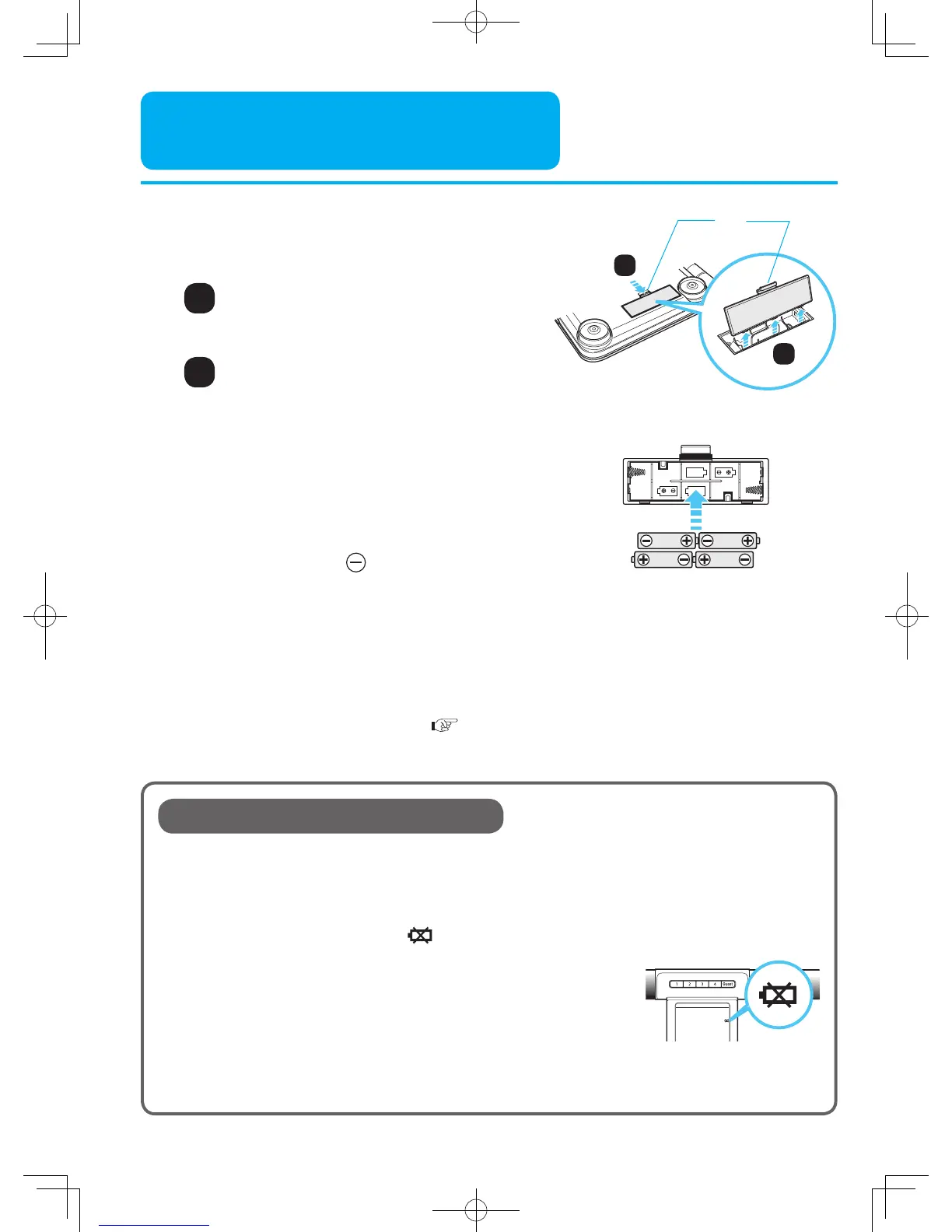
Press the tab of the battery cover
along arrow direction
Installing the Battery
Install four supplied AA batteries.
1
2
Turn over the main unit
Open battery cover
Install the batteries in correct
polarity as marked inside the
battery compartment
The side with spring is .
Close the battery cover
1.5V R6
(LR6.AA)
1.5V R6
(LR6.AA)
Battery Life and Replacement
■ Four AA batteries will last approximately 1 year. (At room temperature 23°C, when
measured 4 times per day.)
Because the supplied batteries are for trial use only, they may have a shorter life.
■ When the low battery indicator ( ) flashes, it indicates running out of the battery.
Replace all four batteries with new ones (same type) at the same time.
■ Replace the batteries after turning off the main unit power.
• Personal data stored in memory are retained even if the batteries are
removed.
• Disposal of used batteries should be carried out in accordance with the city environment
protection regulations for the disposal of batteries.
Low battery
indicator
3
Pull up the tab of the battery
cover and open battery cover
2
Main Unit Back
Tab
1
2
4
Setting date and time (
Page 10)
Reset date and time after replacing the battery.












 To Next Page