EasyManua.ls Logo

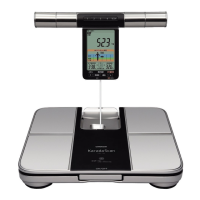
Omron HBF-701 - User Manual

Omron HBF-701
44 pages
Print Icon
To Next Page IconTo Next Page
Loading...
Instruction Manual
Illustrations in this manual are for reference only.
Thank you for purchasing OMRON Body Composition
Monitor.
Before using this unit for the first time, please be sure to
read this Instruction Manual carefully and use the unit
safely and properly.
Please keep this Instruction Manual at hand all the time
for future reference.
Model HBF-701
Body Composition Monitor
Contents
How to use HBF-701
........ 1
Foreword
Notes on Safety .......................................... 3
Know Your Unit ........................................... 7
Automatic Switch-off of the Power /
Arranging the Display Unit .......................... 8
Before Measuring
(various settings)
Installing the Battery ................................... 9
Setting Date and Time .............................. 10
Setting Personal Data (Date of Birth,
Gender, Height) ........................................ 12
Changing / Deleting Personal Data .......................14
Measuring Methods and
Measuring Results
Measuring Weight and Body Composition
(with Personal Profile Number button /
Guest button)
.........................................................
16
Progress Chart
..................................................
21
Measuring Weight Only
..................................
22
Using the Memory Function
..........................
23
Care and Maintenance
Error Displays
....................................................
25
Error Displays .......................................................25
Troubleshooting
....................................................26
Specifications
....................................................
28
Appendix
Application guide
Useful Information
..............................
29
AppendixCare and Maintenance
Measuring Methods and Measuring Results
Before Measuring (various settings)
Foreword

Questions and Answers

  • N
    Nicole MeltonAug 13, 2025
    Why are my Omron Scales measurements inconsistent?
    • C
      Connor HerreraAug 13, 2025
      Inconsistent measurements from your Omron Scales can stem from several factors. Ensure you're using the correct posture during measurement. The unit should be placed on a hard, level floor, not carpet or uneven surfaces. Cold feet or a cold body can affect blood circulation, so warm up beforehand. If the electrodes are too cold, let the unit warm up in a room. Excessively dry palms or soles can also cause issues; slightly moisten them with a damp towel before trying again. For additional information, refer to "Things to Take Note" of Appendix.
  • S
    Scott SalazarAug 17, 2025
    What to do if my Omron HBF-701 display a blank result?
    • D
      Darren RuizAug 17, 2025
      A blank display on your Omron Scales indicates that some results cannot be shown. This can occur if the set values or body composition values are outside the measurement range. Verify that the date of birth, gender, and height settings are correct. If settings are correct, this unit may not be able to measure body composition because it is outside of its measurement range. Also, check if the batteries are properly inserted and have sufficient charge. Insert the batteries, ensuring correct polarity. If the batteries are worn out, replace all four with new ones.
  • L
    Lindsay EvansAug 20, 2025
    Why won't my Omron HBF-701 Scales measure body composition after weighing?
    • C
      christopherjenkinsAug 20, 2025
      If your Omron Scales only measure weight and not body composition, it could be because personal or guest data hasn't been set. Ensure a "Personal Profile Number" or "G" appears on the display unit. Make sure you press the "Personal Profile Number" button or "Guest" button before taking a measurement.
  • J
    Jennifer JacksonAug 25, 2025
    How to fix Omron HBF-701 when it shows '0.0 kg' and doesn't weigh?
    • K
      kingstephanieAug 25, 2025
      If your Omron Scales display "0.0 kg" even when you step on them, it's likely because you stepped onto the unit before "0.0 kg" was initially displayed. Wait until "0.0 kg" appears on the display before stepping onto the unit.
  • E
    Eric BeasleyAug 28, 2025
    What to do if Omron HBF-701 don't show '0.0 kg' after setting data?
    • C
      Carrie WilliamsonAug 28, 2025
      If your Omron Scales fail to display "0.0 kg" after setting personal or guest data, it might be because more than 2 kg of weight was added during the setup process. Reconnect the power supply. If you are a measurer with a personal number, press the "No." button to measure. If you are measuring as a guest, remove the display unit to set and measure.
  • K
    Katherine ClarkSep 1, 2025
    Why does my Omron Scales display a high weight?
    • A
      Amber JenningsSep 1, 2025
      If your Omron Scales are displaying a high weight, it could be because the display unit was taken out before "0.0 kg" was displayed. Ensure you wait until "0.0 kg" is displayed before removing the display unit.
  • S
    Stephanie TaylorSep 4, 2025
    Why can't I set the start date on my Omron Scales progress chart?
    • M
      Margaret RodriguezSep 4, 2025
      You may be unable to set the start date of the progress chart on your Omron Scales if you are under 9 years old, as users under 9 years old cannot set the start date. Also, ensure you set the start date immediately after completing the measurement.
  • A
    Amanda MannSep 9, 2025
    How to fix Omron HBF-701 cord that won't rewind?
    • A
      alexanderrobertSep 9, 2025
      If the cord on your Omron Scales won't rewind automatically, it's likely tangled. Pull out the cord and rewind it.

Summary

How to use HBF-701

Before Measuring (various settings)

Guides users through initial setup and necessary preparations before taking measurements.

Installing the Battery

Instructions for installing the batteries correctly.

Setting Date and Time

Procedure for setting the current date and time on the unit.

Setting Personal Data (Date of Birth, Gender, Height)

Steps to input personal information for accurate body composition analysis.

Changing; Deleting Personal Data

How to modify or remove previously entered personal data.

Foreword

Notes on Safety

Important safety instructions and definitions for proper use of the unit.

Measuring Methods and Measuring Results

Measuring Weight and Body Composition

Detailed steps for performing body composition measurements.

Taking a Measurement

Instructions on stepping onto the unit and proper posture for measurement.

Holding method of grip electrodes

Correct grip method for accurate measurement results.

Check measurement results

How to view and interpret the various measurement results displayed.

Measuring Weight only

Procedure for measuring only weight without full body composition analysis.

Using the Memory Function

How to access and view saved measurement results from previous days.

Care and Maintenance

Error Displays

Explanation of error codes and their corresponding causes and corrections.

Troubleshooting

Common problems, their causes, and recommended solutions.

Specifications

Product Specifications

Detailed technical specifications of the body composition monitor.

Application guide

Progress Chart

How to achieve and interpret progress charts for tracking health changes.

Body Weight and BMI

Understanding BMI and ideal weight calculations.

Which somatotype do you belong?

Classifying body types based on body fat percentage and BMI.

Body Fat, V-FAT and S-FAT

Analysis and understanding of different types of body fat.

Fat and visceral fat index

Explanation of visceral fat and subcutaneous fat levels and their health implications.

RM and Skeletal Muscle

Understanding Resting Metabolism (RM) and Skeletal Muscle.

BM and muscle

Details on skeletal muscle and its relation to resting metabolism and health.

Body age

Interpreting body age as an indicator of physical condition.

Same age comparison

Comparing personal metrics with averages for the same age and BMI group.

Feature and Measuring Principle of Body Composition Monitor

Feature of body composition monitor

Overview of the monitor's features and measurement methodology.

Measuring principle of body composition monitor

Explanation of how the device calculates body fat using resistance values.

Things to Take Note

Proper measuring place... flat and hard ground

Importance of a flat, hard surface for accurate measurements.

Correct posture... arm and body are kept at 90°

Guidelines for maintaining correct posture during measurement.

Suitable period for measuring...

Recommended times for measurement to ensure steady water content.

Do not perform measuring in the following cases.

Situations and conditions to avoid for accurate measurement results.

Q&A of Body Composition Monitor

What is correct weight reduction?

Understanding healthy weight loss methods and their impact on metabolism.

Omron HBF-701 Specifications

General IconGeneral
TypeBody Composition Monitor
Body Fat Percentage Increment0.1%
Body Mass Index (BMI)7.0 to 90.0
DisplayLCD
Measurement MethodBioelectrical Impedance Analysis (BIA)
Weight Capacity150 kg
Weight Increment0.1 kg (0.2 lb)
Body Fat Percentage Range5% to 60%
Visceral Fat Level/Rating1 - 30
Height Range100 - 199 cm
Memory4 users
Power Source4 AAA batteries

Related product manuals