EN37
5. Using Memory Function
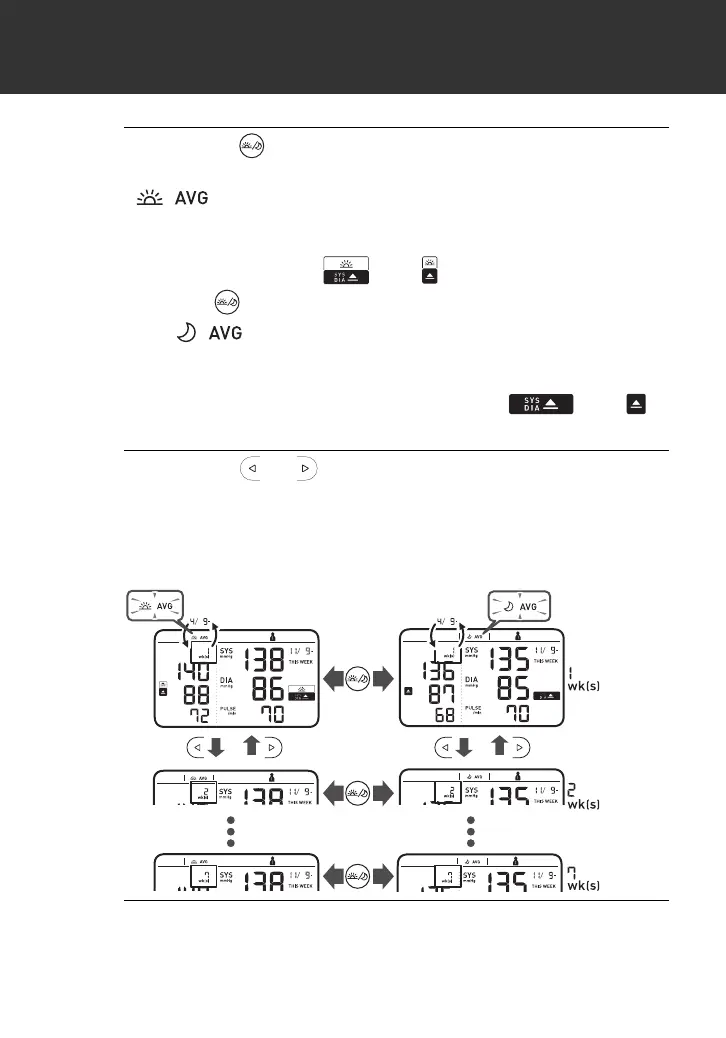
2. Press the button once.
For the morning weekly average for the current week, the
“ ” symbol and “THIS WEEK” appear on the display.
A past reading will appear in the comparison display on the
left. If the morning weekly average is high (refer to
sub-section 1.3), the “ ” or “ ”symbol appears.
Press the button again for the evening weekly average.
The “ ” symbol and “THIS WEEK” appear on the
display. A past reading will appear in the comparison display
on the left.
If the evening weekly average is high, the “ ” or “ ”
symbol appears.
3. Press the or button repeatedly to scroll
through the previous readings stored in the
memory.
Your monitor displays “1 wk[s]” for the previous week's
average, to “7 wk[s]” for the oldest set of averages.
4. Press the [START/STOP] button to turn off your
monitor.
Alternating
week/date
display
2895901-4A_HEM-7361T-ALRU_IM.fm Page 37 Wednesday, October 26, 2022 10:46 AM









 To Next Page