Switch Mode Power Supply S8VM 27
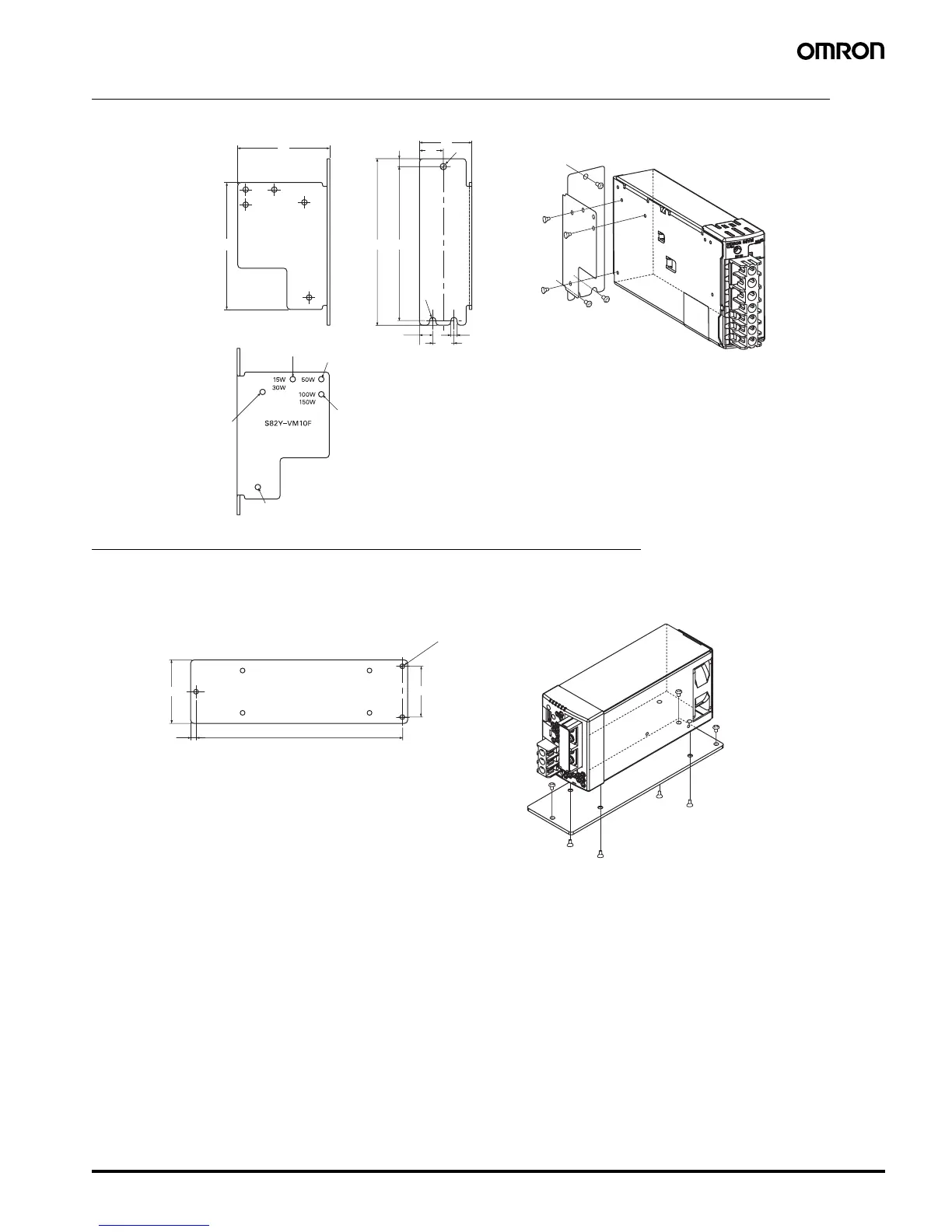
Mounting Bracket C (Front Mounting for 15-, 30- 50-, 100-, and 150-W Models)
Mounting Bracket D (Bottom Mounting for 300-W Models)
33
15
4
R2
5
8.3
a, b
d, e
d, e
a, b, c, d, e
c
13.4
4 dia.
58
80
97±0.5105
t = 1.6
a = Mounting holes for 15-W models
b = Mounting holes for 30-W models
c = Mounting holes for 50-W models
d = Mounting holes for 100-W model
e = Mounting holes for 150-W model
A
B
B
B
A
A
S82Y-VM10F
Using the Mounting Bracket
Screws Used
A: Accessories
(Use the enclosed screws in two places for 15-W, 30-W and 50-
W models and in three places for 100-W and 150-W models.)
B: M3 or M3.5
(three places)
Mounting screw tightening torque (recommended): 0.49 N·m
5 195
60
48
Three, 4.5 dia.
B
A
A
A
A
B
B
S82Y-VM30B
Using the Mounting Bracket
Screws Used
A: Accessories
(Use the enclosed screws in four places.)
B: M4
(three places)
Mounting screw tightening torque (recom-
mended): 1.27 N·m



 To Next Page