System Map: Front, Left, Right & Rear Views (Models A & B) - 11
Concise User’s Guide
English
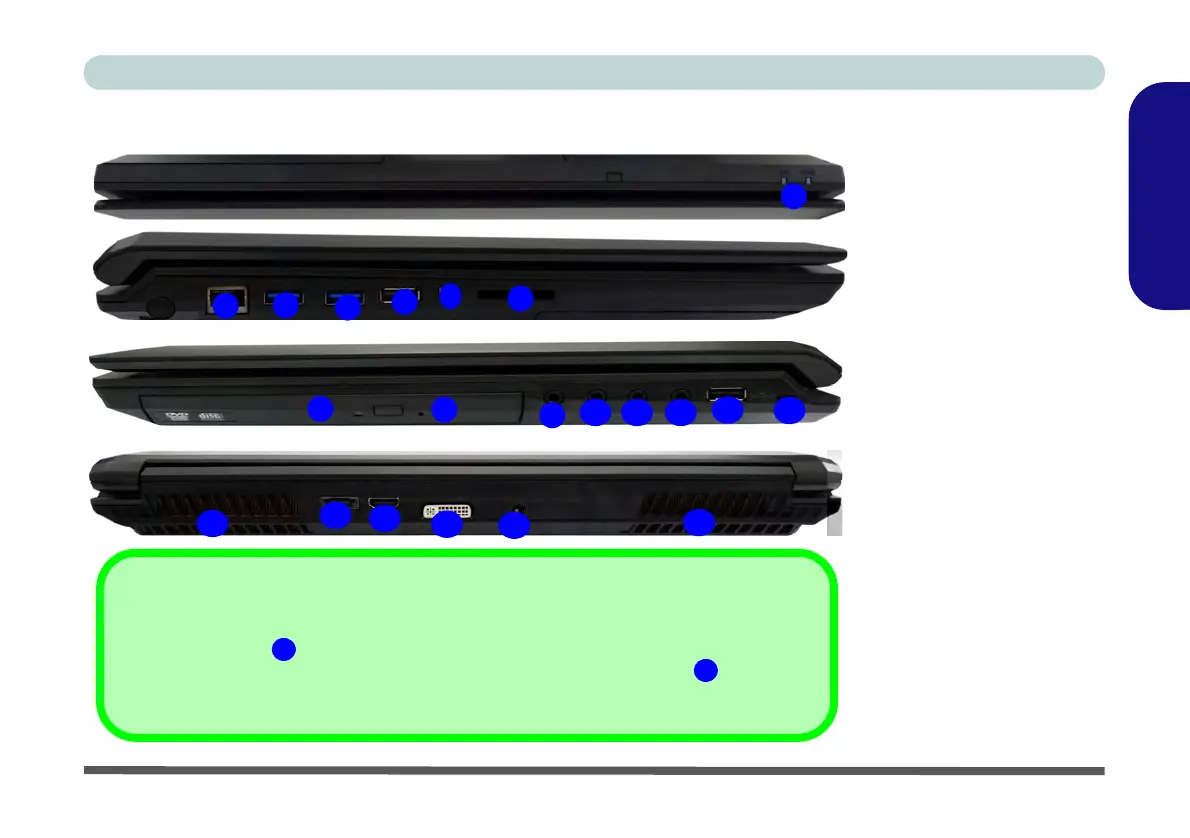
System Map: Front, Left, Right & Rear Views (Models A & B)
4
7
5
6
1
2
3
Front
Left
Right
10 11
13
12
USB
The USB 3.0 ports
are colored blue. USB 3.0 will transfer data much faster than USB
2.0, and is backwards-compatible with USB 2.0. The powered USB 2.0 port
can supply
power when the system is off but still powered by the AC/DC adapter. Toggle power to this
port by using Fn + power button.
8
3
15
17
14
16
15
Rear
18
19
Figure 6 - Front, Left, Right &
Rear Views (Models A & B)
1. LED Power Indicators
2. RJ-45 LAN Jack
3. USB 3.0 Ports
4. Powered USB 2.0 Port
(see note below)
5. Mini-IEEE 1394a Port
6. Multi-in-1 Card Reader
7. Optical Device Drive Bay
8. Emergency Eject Hole
9. Headphone Jack
10. Microphone Jack
11. S/PDIF-Out & Surround-Out
Combo Jack
12. Line-In Jack
13. USB 2.0 Port
14. Security Lock Slot
15. Vent
16. eSATA/USB 2.0 Combo
Port
17. HDMI-Out Port
18. DVI-Out Port
19. DC-In Jack
9


 To Next Page