English
~.;,;
....
.,
.
.,
....
~
~.·
.·
..
T.;
~
.'
',;
?~
f¥~;,
" :
~.,
"'
~
~
>
Using Internet Radio
NET
i
II
,_
11lC±JJ
[E:J
~
JJo-,
II,
••
' :
!lGJltl
~
1111-
11:
' '
/\IV
1<1>
~--41
ENTER
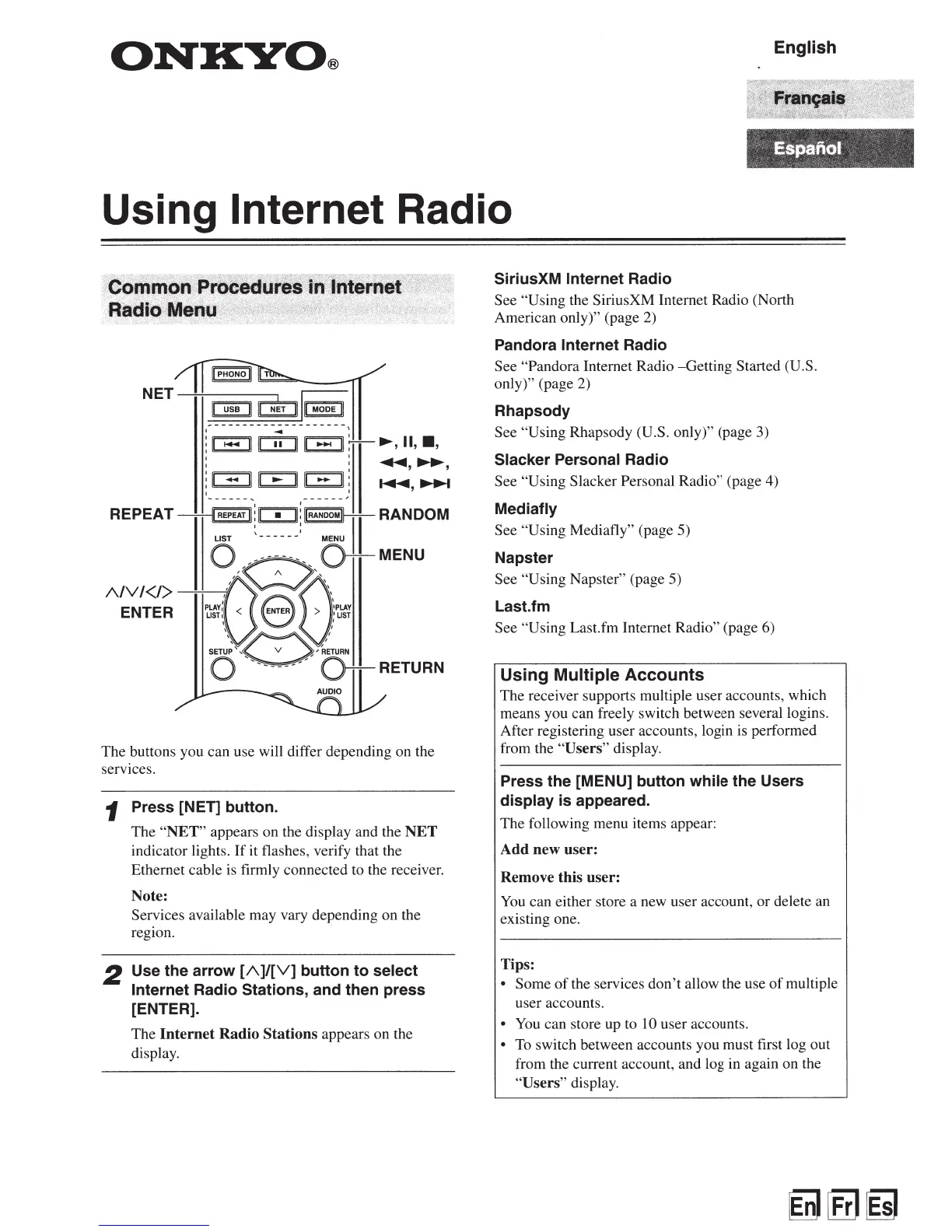
The buttons you can use will differ depending on the
services.
1 Press [NET] button.
2
The
"NET"
appears on the display and the
NET
indicator lights.
If
it flashes, verify that the
Ethernet cable
is
firmly connected to the receiver.
Note:
Services available may vary depending on the
region.
Use
the
arrow
[A)/[V)
button
to
select
Internet Radio Stations, and then press
[ENTER).
The
Internet
Radio
Stations appears on the
display.
SiriusXM Internet Radio
See "Using the SiriusXM Internet Radio (North
American only)" (page 2)
Pandora Internet Radio
See "Pandora Internet Radio -Getting Started (U.S.
only)" (page 2)
Rhapsody
See "Using Rhapsody (U.S. only)" (page 3)
Slacker Personal Radio
See "Using Slacker Personal Radio" (page 4)
Mediafly
See "Using Mediafly" (page 5)
Napster
See "Using Napster" (page 5)
Last.fm
See "Using Last.fm Internet Radio" (page 6)
Using Multiple
Accounts
The receiver supports multiple user accounts, which
means you can freely switch between severallogins.
After registering user accounts, login
is
performed
from the "Users" display.
Press
the
[MENU] button while the Users
display
is
appeared.
The following menu items appear:
Add
new
user:
Remove this
user:
You
can either store a new user account, or delete an
existing one.
Tips:
• Some
of
the services don't allow the use
of
multiple
user accounts.
•
You
can store up to
10
user accounts.
•
To
switch between accounts you must first log out
from the current account, and log in again on the
"Users" display.


 To Next Page