10
• ARC only works with devices that are
HDMI ARC capable as well as with
an HDMI 1.4 cable (and higher).
• Your TV digital sound output S/
PDIF mode setting must be PCM.
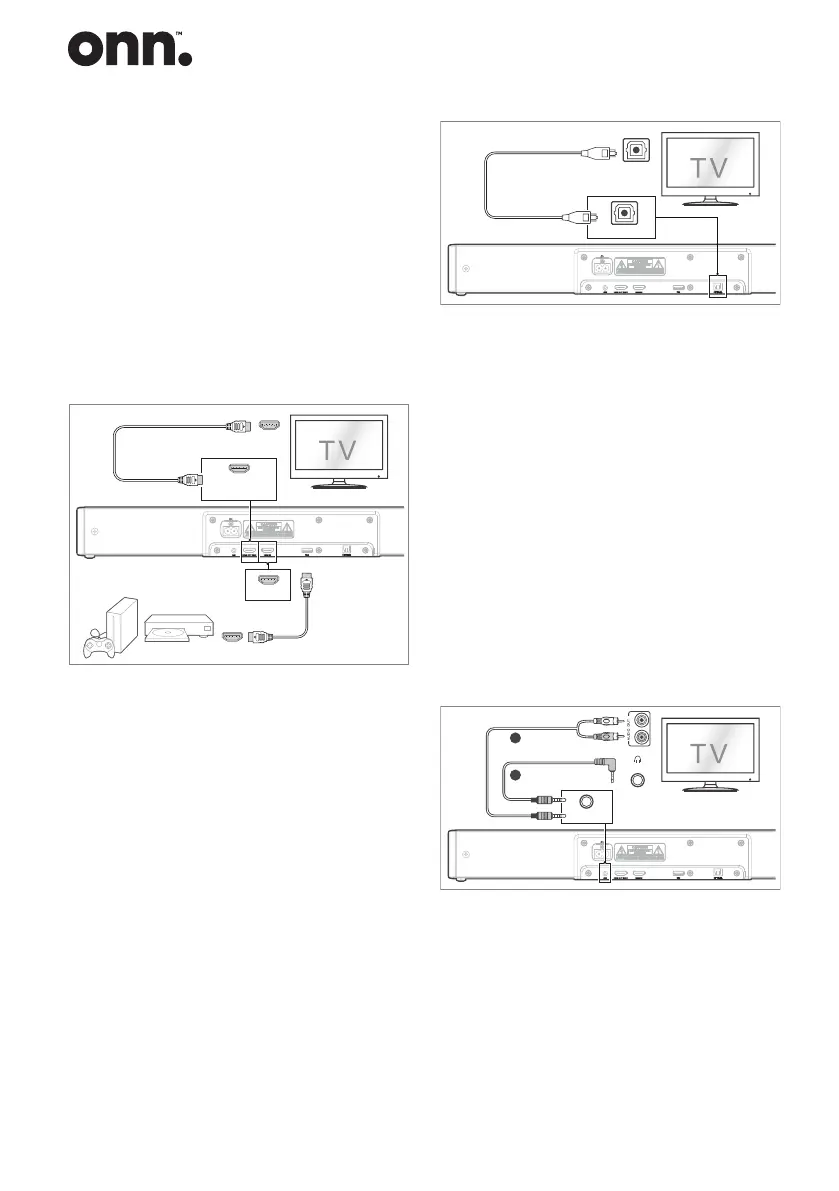
Method 2: Standard HDMI
- If your TV is not HDMI ARC-
compliant, connect your Sound
Bar to the TV through a standard
HDMI connection.
HDMI OUT
.
.
.
HDMI IN
HDMI OUT (ARC)
HDMI ARC
HDMI OUT (ARC)
OPTICAL
OPTICAL
HDMI IN
1. Use an HDMI cable to connect the
Sound Bar's HDMI OUT (ARC)
socket to the TV’s HDMI IN socket.
2. Use an HDMI cable to connect the
Sound Bar's HDMI IN socket to
your external devices (e.g. games
consoles, DVD players and blu
ray).
Use the OPTICAL Socket
- Use an OPTICAL cable to connect
the Sound Bar's OPTICAL socket
and the TV’s OPTICAL OUT
socket.
HDMI OUT
.
.
.
HDMI IN
HDMI OUT (ARC)
HDMI ARC
HDMI OUT (ARC)
OPTICAL
OPTICAL
Tip: The unit may not be able to
decode all digital audio formats from
the input source. In this case, the unit
will mute. This is NOT a defect. Ensure
that the audio setting of the input
source (e.g. TV, game console, DVD
player, etc.) is set to PCM or Dolby
Digital (Refer to the user manual of the
input source device for its audio setting
details) with HDMI / OPTICAL input.
Use the AUX Socket
A. Use a RCA to 3.5mm audio cable to
connect the TV’s audio output sockets
to the AUX socket on the unit.
HDMI OUT
.
.
.
HDMI IN
HDMI OUT (ARC)
HDMI ARC
HDMI OUT (ARC)
OPTICAL
OPTICAL
HDMI IN
Headphone
A
B
AUX
B. Use a 3.5mm to 3.5mm audio cable
to connect the TV’s or external
audio device headphone socket to
the AUX socket on the unit.


 To Next Page