4
12
1
2
3 54
6 8 109 117
Your Sound Bar
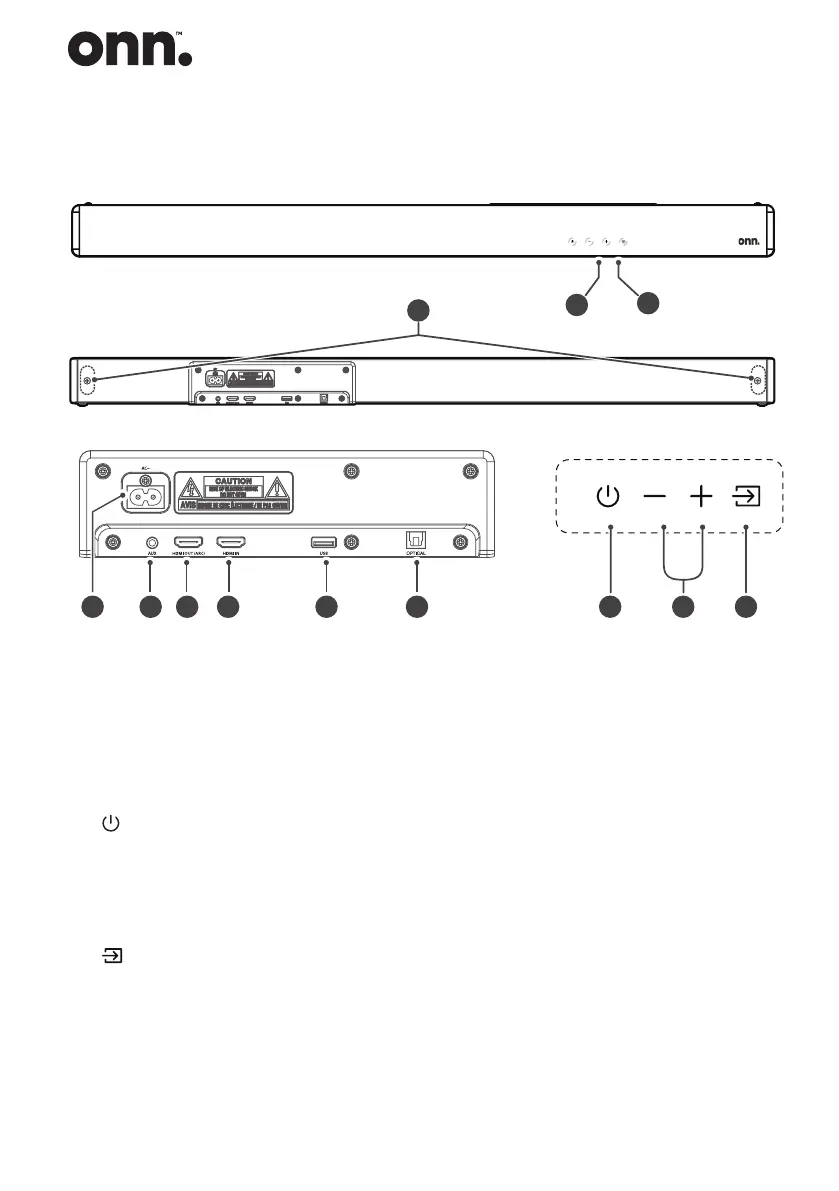
8 HDMI OUT (ARC) Socket
The port for connecting a TV.
The port supports the ARC HDMI
feature, which allows the Sound
Bar to play audio that originates
on the connected TV.
9 HDMI IN Socket
The port for connecting HDMI
source devices, such as a DVD player,
Blu-ray Disc™ player, or gaming
console.
10 USB Socket
Insert the USB device to play
music.
11 OPTICAL Socket
Use to connect to the OPTICAL
OUT socket on an external device.
12 Wall bracket screws
1 Remote Control Sensor
Receive signal from the remote
control.
2 Display Window
Show the current status.
Wall bracket screws
3
(ON/OFF) button
Switch on/off.
4 VOL+/VOL- buttons
Increase/decrease the volume
level.
5
(SOURCE) button
Select the play function.
6 AC~ Socket
Use to connect to power cable.
7 AUX Socket
Connect to an external audio
device.


 To Next Page