15
To disconnect the Bluetooth
®
function, you can:
• Switch to another function on the
unit;
• Disable the function from your
Bluetooth
®
device.
• Press and the
/OK button on the
remote control. The Bluetooth
®
device will be disconnected from
the Sound Bar after the “Pairing”
voice prompt.
Listen to Music from Bluetooth
®
device
If your Bluetooth
®
device supports
A2DP, play music via your device.
If your Bluetooth
®
device supports
AVRCP, use the supplied remote
control to control play.
• To increase/decrease the volume,
press
/ button.
• To pause/resume playback, press
/OK button.
• To skip to a track, press
/
button.
Tips:
• The operational range between
the unit and the device is
approximately 8 metres.
• Before connecting a Bluetooth
®
device to the unit, ensure you
know the device’s capabilities.
• Compatibility with all Bluetooth
®
devices is not guaranteed.
• Any obstacle between the
device and the unit can reduce
operational range.
• Keep this player away from other
electronic devices that may cause
interference.
• The player will also be disconnected
when your device is moved beyond
the operational range.
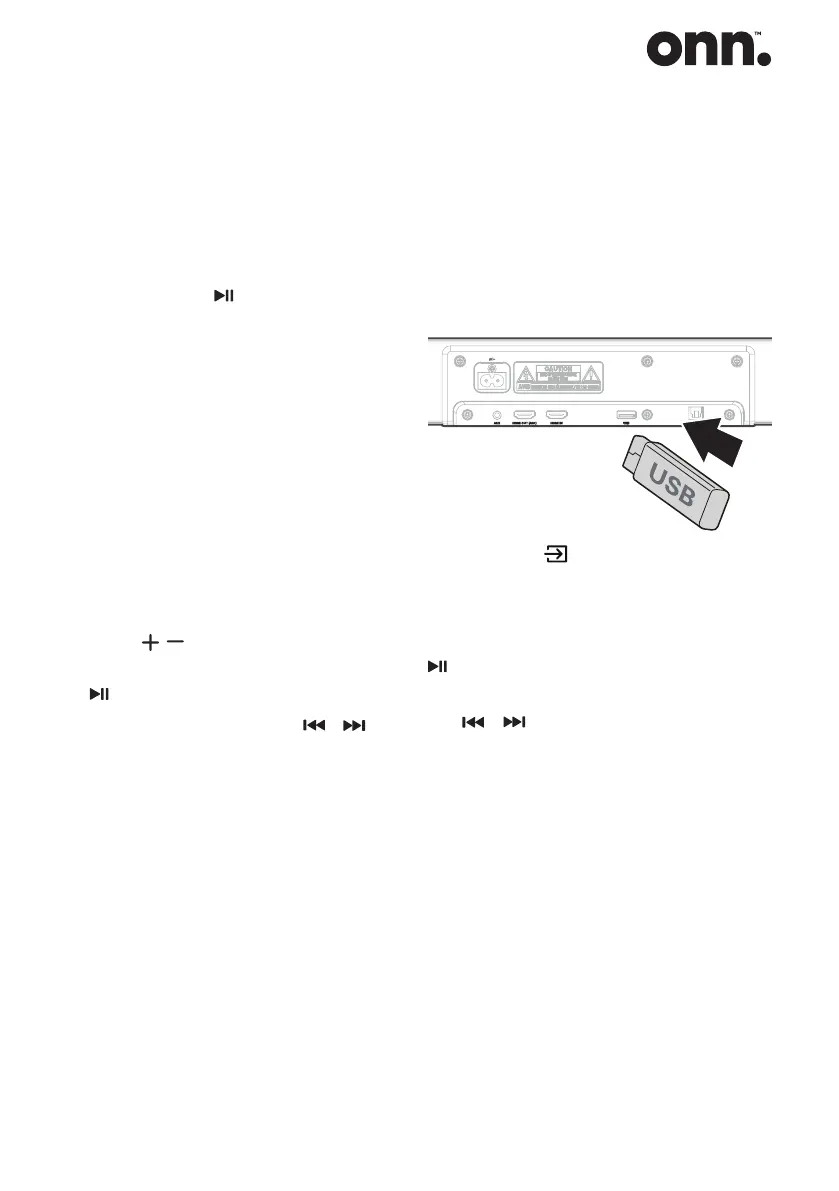
USB Operation
1. Slot the USB device into the USB
slot in the back of the Sound Bar.
2. Press the (SOURCE) button
repeatedly to select the USB mode.
During playback:
To pause or resume play: press the
/OK button on the remote control.
To skip to the previous/next le: press
the
/ buttons on the remote
control.
Note:
• This product may not be
compatible with certain types of
USB storage devices.
• If you use a USB extension cable,
USB hub, or USB Multifunctional
card reader, the USB storage
device may not be recognized.
• USB can only support MP3 le,
maximum memory size 32G.


 To Next Page