6000 Series Digital Gas Monitor/Controller
4.0 OPERATION
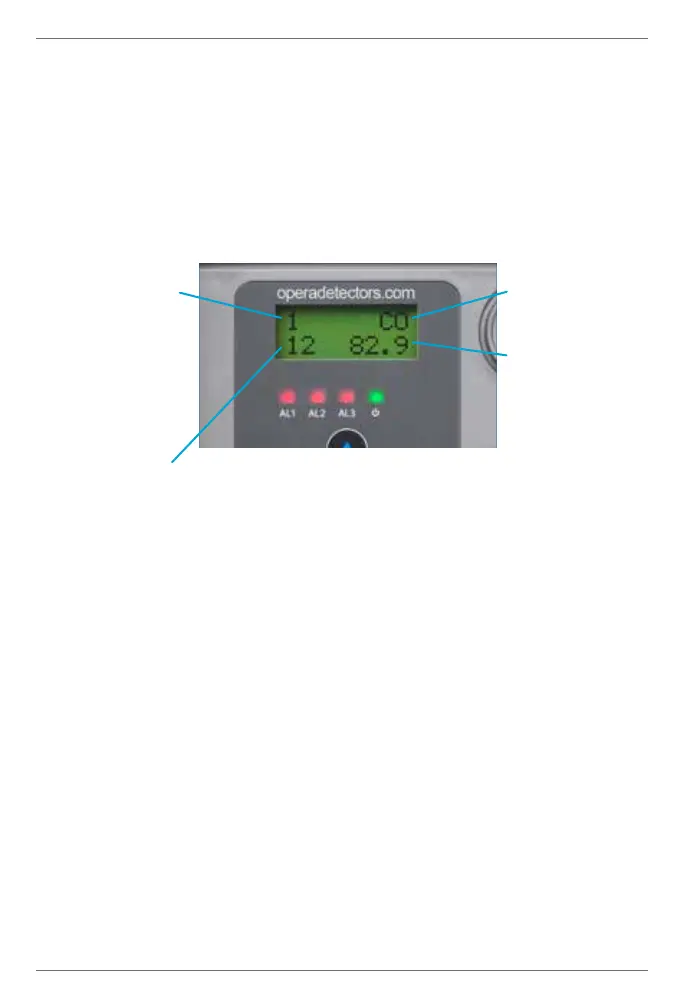
4.1 Screen Display
The LCD shows the type of gas and the current gas
concentration. If two sensor modules are installed, the display
will alternate between them.
1 indicates alarm 1 on, per settings 0, 1, 2 or if activated by
another sensor on the CAN network via setting 36. This is
usually the low gas level alarm.
2 indicates alarm 2 on. Per settings 3, 4, 5 or if activated by
another monitor on CAN network per setting 37.
3 indicates alarm 3 on. Per settings 6, 7, 8 or if activated
by another monitor on CAN network per setting 38. Alarm 3
activates the sounder and strobe.
M indicates manual override mode on. Useful to start ventilation
system without the risk of leaving it on too long in cold weather.
From the home screen, press and hold ↑ for 5 seconds to start.
Then click again to increase time from 5 to 60 minutes. This
activates alarm 1 (or 2, and 3 per setting 69) and sends alarm
transmit messages (settings 9-17) to other monitor on the CAN
Address
(See setting 56)
Alarm status
Type of gas
Concentration


 To Next Page