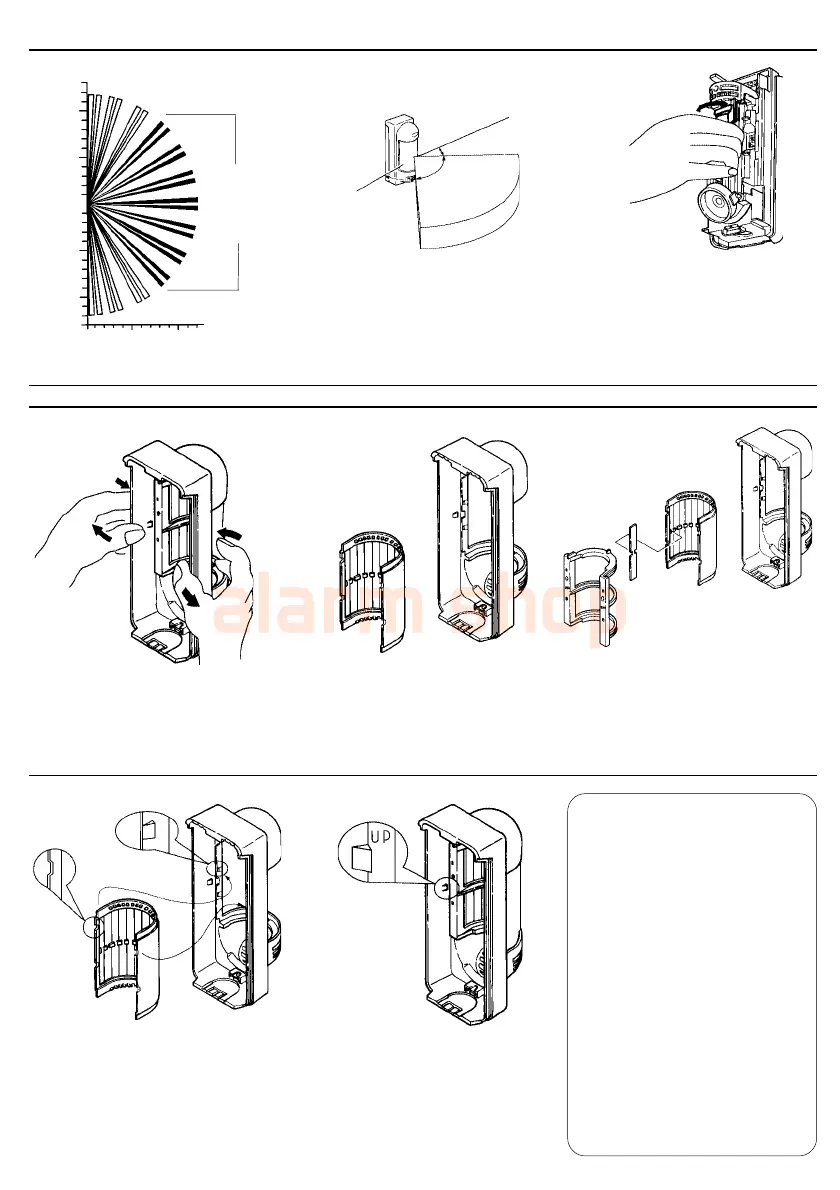
6-2.Area Angle Adjustment
6-3.Area Masking
Hold the pyro electric unit
and turn it to the desired
direction (15° steps).
Area angle is 90° with 7 fingers
by 15° Turn optical cylinder.
Angle moves by 15° per notch.
Active
detection
fingers.
Top view
45° Adjustable
45° Adjustable
12 10 5 0 5 10 12 m
40 30 20 10 0 10 20 30 40 (ft)
0 5 10 12 m
0 10 20 30 40 (ft)
45゜
90゜
45゜
2. Separate the lens from
the cover.
1. Remove the lens holder from the
cover as shown above.
3. Apply the provided area masking
plate to the inside of the lens
on the zone to be eliminated.
IMPORTANT
As shown at left, the active
detection fingers are always 7,
if the area masking plate is not
applied.
The active fingers are varied by
area adjustment as explained at
above.
Before putting the area masking
plate to the inside of the lens,
make sure which part of the
lens will be the detection areas
you want to eliminate. There is
no effect if you put the plate on
the part of the lens which do not
cover the detection area.
4. Put the lens back in by aligning
the 4 projections on the cover to
the 4 cut outs on the lens. Please
do not put the lens up side down.
5. Place the lens holder. Confirm
the lens holder is held by left
and right prongs on the cover.
-8-



 To Next Page