:Set Directional Detection to OFF.
:Do not set a voice mode switch as Pre-Warning
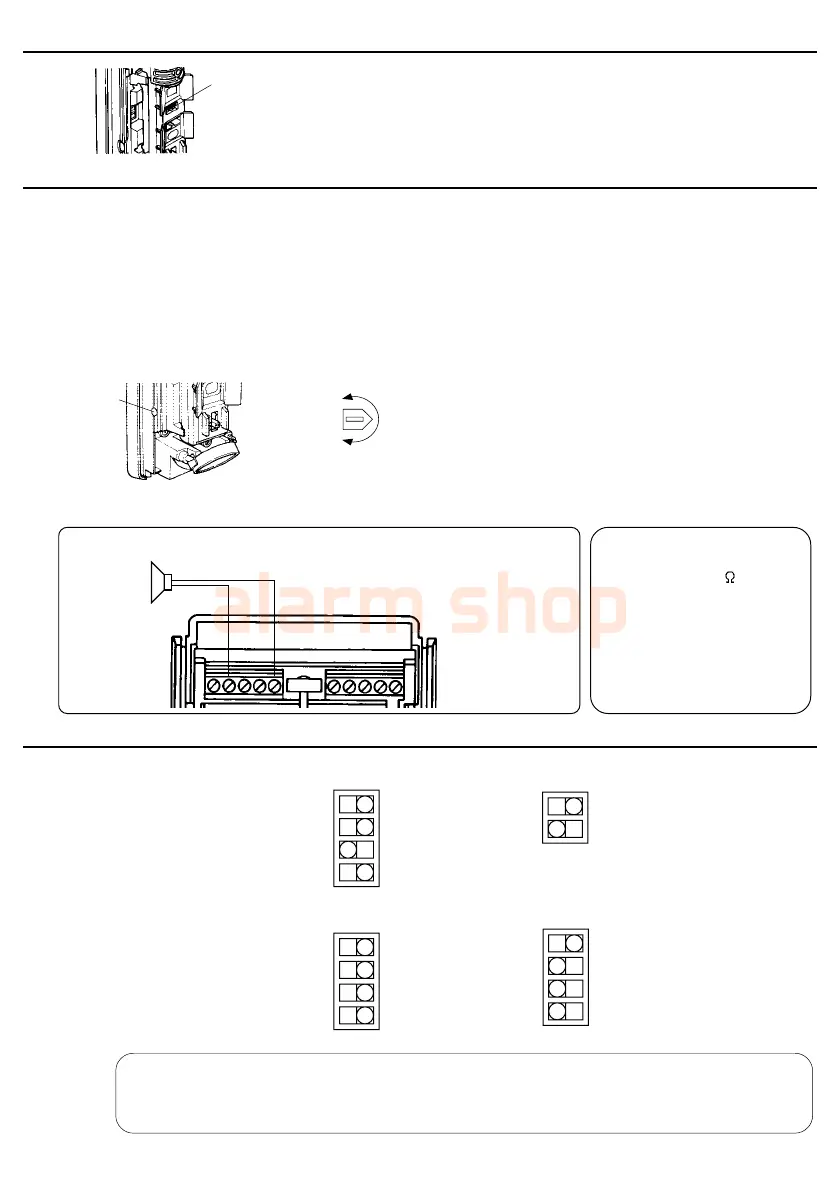
When greater sensitivity is desired,
select "H". When the installation site is
poor (bad conditions) select "L".
6-4.Sensitivity Adjustment
Sensitivity Select
Switch (L,M,H)
6-5.Voice Warning Function Setup (VX-402REC only)
3. Volume adjustment
Voice
Volume
MIN.
MAX.
Adjust the voice volume by
turning the adjustment .
6-6.DIP Switch Setup
-9-
1. Choosing a playback mode
The VX-402REC detector provides several playback modes.(See section7 on page 10-12.)
Choose the desired mode using the voice mode switch.
2. Message selection and recording
Choose and record a message suitable for the function to be used.
For message selection, operate the DIP switch B. (See section 6-6.)
4. External speaker
An external speaker may be connected to the VX-402REC detector to thunder the intruder away.
DIP SWITCH A
NIGHT
ONLY
DAY
NIGHT
DETECTABLE DIRECTION:
ALARM OUTPUT:
DIRECTIONAL DETECTION:
DAY/NIGHT MODE:
:LED INDICATOR
:PULSE COUNT
:MESSAGE A
:MESSAGE B
:LED INDICATOR
:PULSE COUNT
SLAVE
->
VX-402
VX-402
->
SLAVE
N O N C
ON OFF
2 4
OFF ON
2 4
ACTIVE PAUSE
PAUSE
VX-402
IMPORTANT
VX-402REC
NIGHT
ONLY
DAY
NIGHT
DETECTABLE DIRECTION:
ALARM OUTPUT:
STATUS SELECT:
DAY/NIGHT MODE:
SLAVE
->
VX-402
VX-402
->
SLAVE
N O N C
-ARM
+ARM
DIP SWITCH B
OFF
VX-402
VX-402REC
When AUX INPUT is not connected, set as follows.
SPEAKER
Wiring between Power (–) and Voice Output
•Recommended speaker
Impedance : 8
Max powe •r : over 30W
Output S.P.L: over 90dB/m
Weatherproof
•Speaker with amplifier can
not be used.
•Wiring length
AWG18(0.83mm
2
): 10 m
IMPORTANT
ON
ACTIVE
Wiring Diagram
1234
1234
12
1234
Power (–)Voice Output



 To Next Page