EasyManua.ls Logo

Optex VX-402 - Page 10

Optex VX-402
16 pages
Print Icon
To Next Page IconTo Next Page
To Previous Page IconTo Previous Page
Loading...
|
7-FUNCTIONS
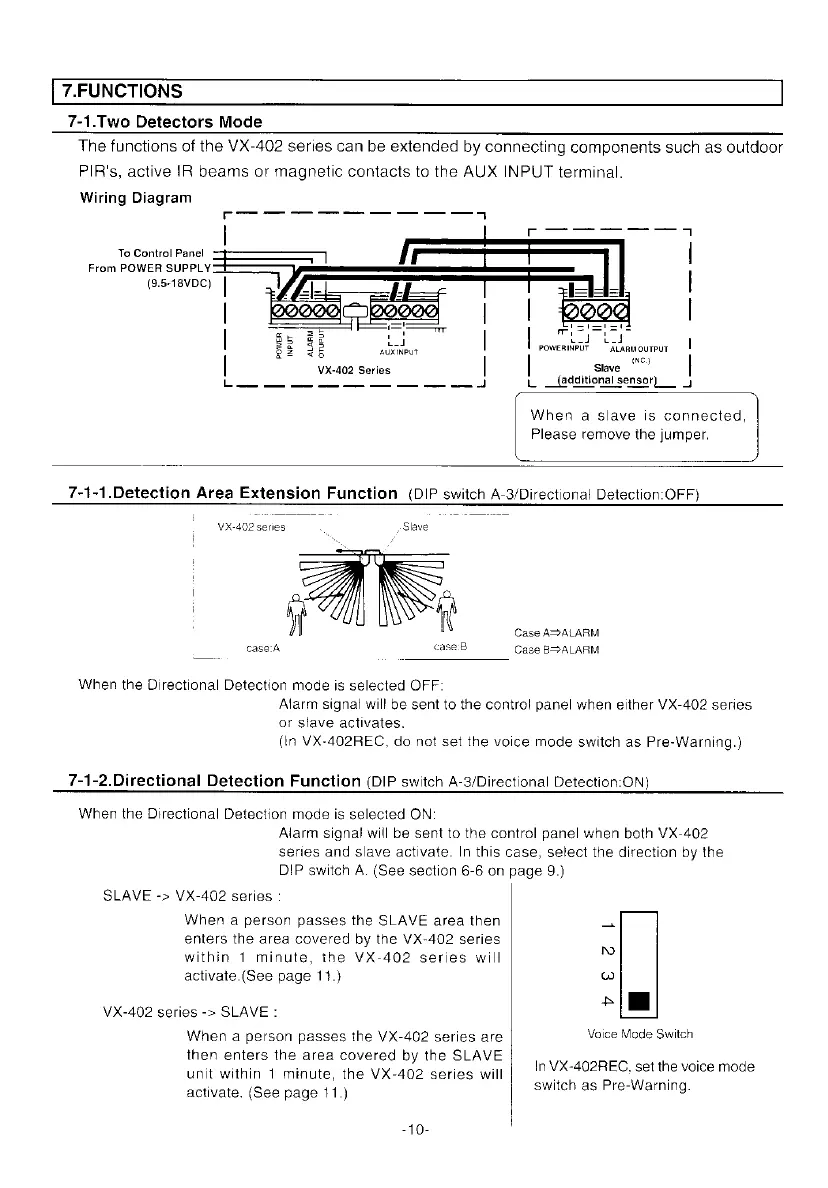
7-1.Two
Detectors
Mode
The
functions
of
the
VX-402
series
can
be
extended
by
connecting
components
such
as
outdoor
PIR's,
active
{R
beams
or
magnetic
contacts
to
the
AUX
INPUT
terminal.
Wiring
Diagram
oC
TTT
4
|
_-o
oo
To
Control
Panel
|
From
POWER
SUPPLY
(9.5-18VDC)
|
|
|
gs
2
Ld
|
Joti
ta
Be
a
aubeinPut
poweRWriT
“ALanmourPur
aS
INC}
|
VX-402
Series
|
__
Slave
ee
ee
ee
L
additional
sensor)
J
When
a
slave
is
connected,
Please
remove
the
jumper.
7-1-1.Detection
Area
Extension
Function
(DIP
switch
A-3/Directional
Detection:
OFF)
VX-402
series
.
-
Slave
i
Case
AS
ALARM
case:A
case:B
Case
B>ALARM
When
the
Directional
Detection
mode
is
selected
OFF:
Alarm
signal
will
be
sent
to
the
control
panel
when
either
VX-402
series
or
slave
activates.
(In
VX-402REC,
do
not set
the
voice
mode
switch
as
Pre-Warning.)
7-1-2.Directional
Detection
Function
(DIP
switch
A-3/Directional
Detection:ON)
When
the
Directional
Detection
mode
is
selected
ON:
Alarm
signal
will
be
sent
to
the
control
panel
when
both
VX-402
series
and
slave
activate.
In
this
case,
select
the
direction
by
the
DIP
switch
A.
(See
section
6-6
on
page
9.)
SLAVE
->
VX-402
series
:
When
a
person
passes
the
SLAVE
area
then
a
enters
the
area
covered
by
the
VX-402
series
within
1
minute,
the
VX-402
series
will
©
activate.(See
page
11.)
w
ph
VX-402
series
->
SLAVE
:
=
When
a
person
passes
the
VX-402
series
are
Voice
Mode
Switch
then
enters
the
area
covered
by
the
SLAVE
.
unit
within
1
minute,
the
VX-402
series
will
|"
vse
eetthe
voice
mode
activate.
(See
page
11.)
switch
as
Pre-Warning.

Other manuals for Optex VX-402

Related product manuals