EasyManua.ls Logo

Optex VX-402 - Installation Guide; Pre-Installation Steps; Wall Mounting Procedures

Optex VX-402
16 pages
Print Icon
To Next Page IconTo Next Page
To Previous Page IconTo Previous Page
Loading...
|
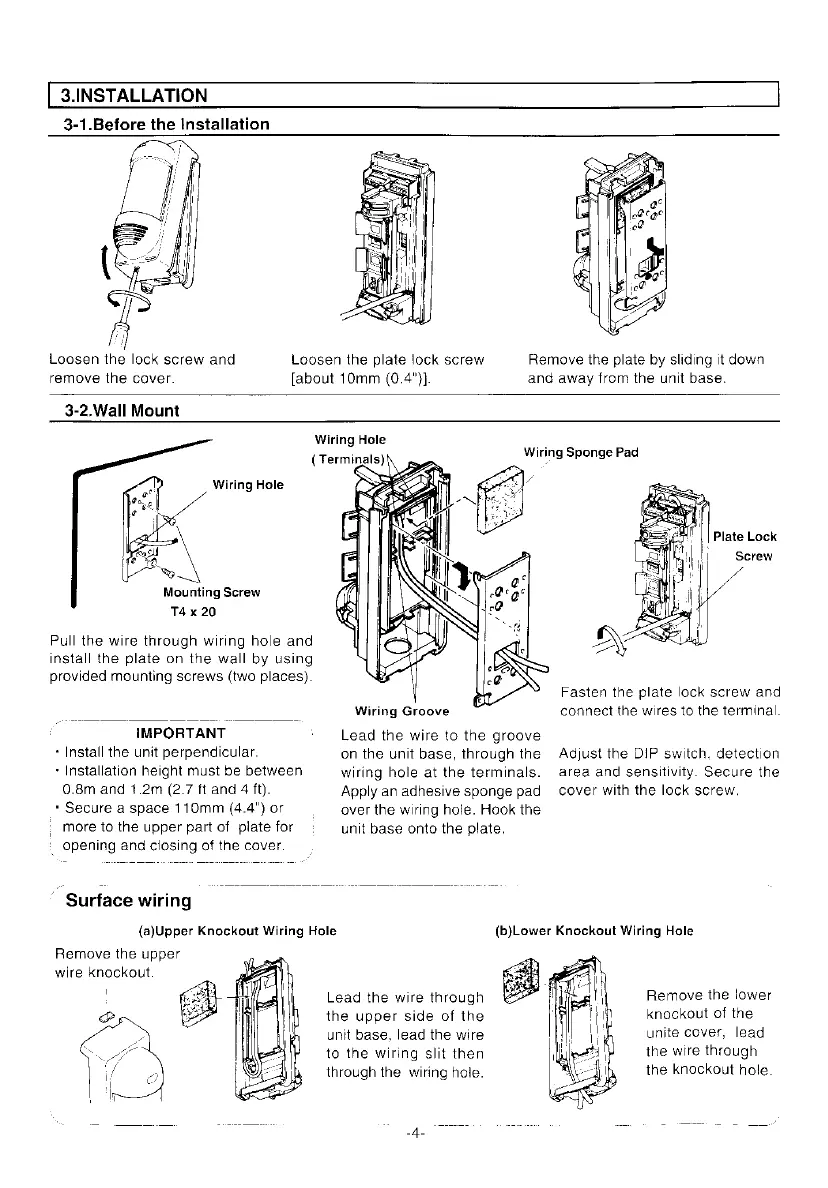
3.INSTALLATION
3-1.Before
the
Installation
Loosen
the
plate
lock
screw
Loosen
the
lock
screw
and
[about
10mm
(0.4")}.
remove
the
cover.
3-2,Wall
Mount
Wiring
Hole
(
Terminals)
Wiring
Hole
Mounting
Screw
T4
x
20
Pull
the
wire
through
wiring
hole
and
install
the
plate
on
the
wall
by
using
provided
mounting
screws
(two
places).
Wiring
Groove
Lead
the
wire
to
the
groove
on
the
unit
base,
through
the
wiring
hole
at
the
terminals.
Apply
an
adhesive
sponge
pad
over
the
wiring
hole.
Hook
the
unit
base
onto
the
plate.
IMPORTANT
+
Install
the
unit
perpendicular.
+
Installation
height
must
be
between
0.8m
and
1.2m
(2.7
ft
and
4
ft).
*
Secure
a
space
110mm
(4.4")
or
+
more
to
the
upper
part
of
plate
for
‘opening
and
closing
of
the
cover.
'
Surface
wiring
(a)Upper
Knockout
Wiring
Hole
Remove
the
upper
wire
knockout.
Lead
the
wire
through
the
upper
side
of
the
unit
base,
lead
the
wire
to
the
wiring
slit
then
through
the
wiring
hole.
Wiring
Sponge
Pad
Remove
the
plate
by
sliding
it
down
and
away
from
the
unit
base.
Fasten
the
plate
lock
screw
and
connect
the
wires
to
the
terminal.
Adjust
the
DIP switch.
detection
area
and
sensitivity.
Secure
the
cover
with the
lock
screw.
Remove
the
lower
knockout
of
the
unite
cover,
lead
the
wire
through
the
knockout
hole.

Other manuals for Optex VX-402

Related product manuals