EasyManua.ls Logo

Optex VX-402 - Settings and Adjustments; Detection Length Adjustment

Optex VX-402
16 pages
Print Icon
To Next Page IconTo Next Page
To Previous Page IconTo Previous Page
Loading...
|
6.SETTING
&
ADJUSTMENTS
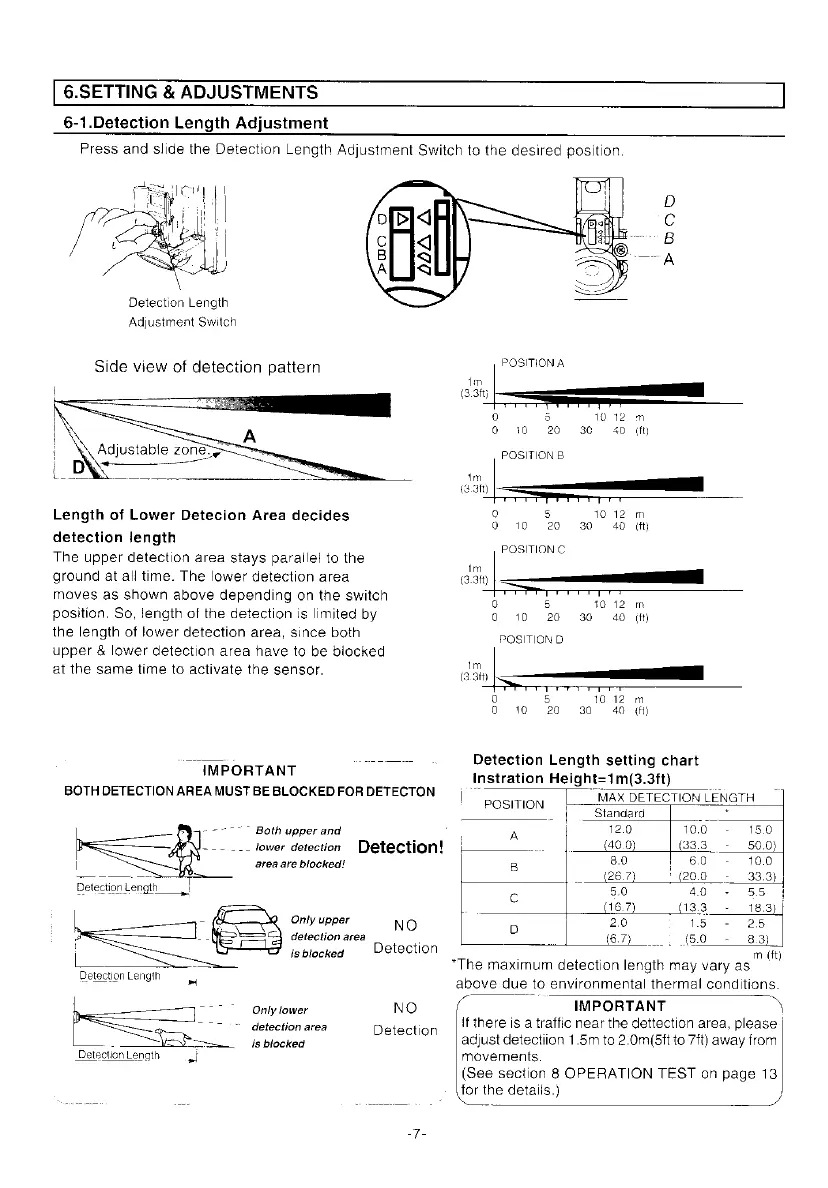
6-1.Detection
Length
Adjustment
Press
and
slide
the
Detection
Length
Adjustment
Switch
to
the
desired
position.
Detection
Length
Adjustment
Switch
Side
view
of
detection
pattern
Length
of
Lower
Detecion
Area
decides
detection
Jength
The
upper
detection
area
stays
parallel
to
the
ground
at
all
time.
The
lower
detection
area
moves
as
shown
above
depending
on
the
switch
position,
So,
jength
of
the
detection
is
limited
by
the
length
of
lower
detection
area,
since
both
upper
&
lower
detection
area
have
to
be
blocked
at
the
same
time
to
activate
the
sensor.
~
IMPORTANT
BOTH
DETECTION
AREA
MUST
BE
BLOCKED
FOR
DETECTON
-~7~”
Both
upper
and
~---..
lower
detection
Detection!
area
are
blocked!
Detection
Length
-
{fr
Only
upper
NO
detection
area
|
i
isblocked
Detection
Detection
Length
4
7
Only
lower
NO
~
"
detection
area
Detection
-
a
~—sis
blocked
Detection
Length
al
0
10
20 30
40
if)
POSITION
B
33)
|}
——_
3
1012
m
10
20 30
40°
(ft)
POSITION
G
im
oan)
|
———_—___—
0
5
1012
m
o
10
20
40
30
(ft)
POSITION
D
im
3.3)
|.
<————_—._
0 5
10
12
m
0
10
20
30
40
df)
Detection
Length
setting chart
instration
Height=1m(3.3ft)
|
Position
|
MAX
DETECTION
LENGTH
Standard
*
A
12.0
10.0
15.0
(40.0)
(33.3
50.0)
B
8.0 6.0
10.0
(26.7)
(20.0 33.3)
c
5.0
40
5.5
(16.7)
(13.3
18.3)
D
2.0
1.5
25
(6.7)
(5.0 8.3)
m
(ft)
“The
maximum
detection
length
may
vary
as
'
above
due
to
environmental
thermal
conditions.
IMPORTANT
if
there
is
a
traffic
near
the
dettection
area,
please
adjust
detectiion
1.5m
to
2.0m(5tt
to
7ft)
away
from
movements.
(See
section
8
OPERATION
TEST
on
page
13
for
the
details.)

Other manuals for Optex VX-402

Related product manuals