EasyManua.ls Logo

Optex VX-402 - Operation Testing

Optex VX-402
16 pages
Print Icon
To Next Page IconTo Next Page
To Previous Page IconTo Previous Page
Loading...
|
8.OPERATION
TEST
1.Turn
LED
indicator
on.
{See
page
9.)
2.
Check
and
adjust
the
detection
area.
(See
pages
7,8.)
|__*
_—___..
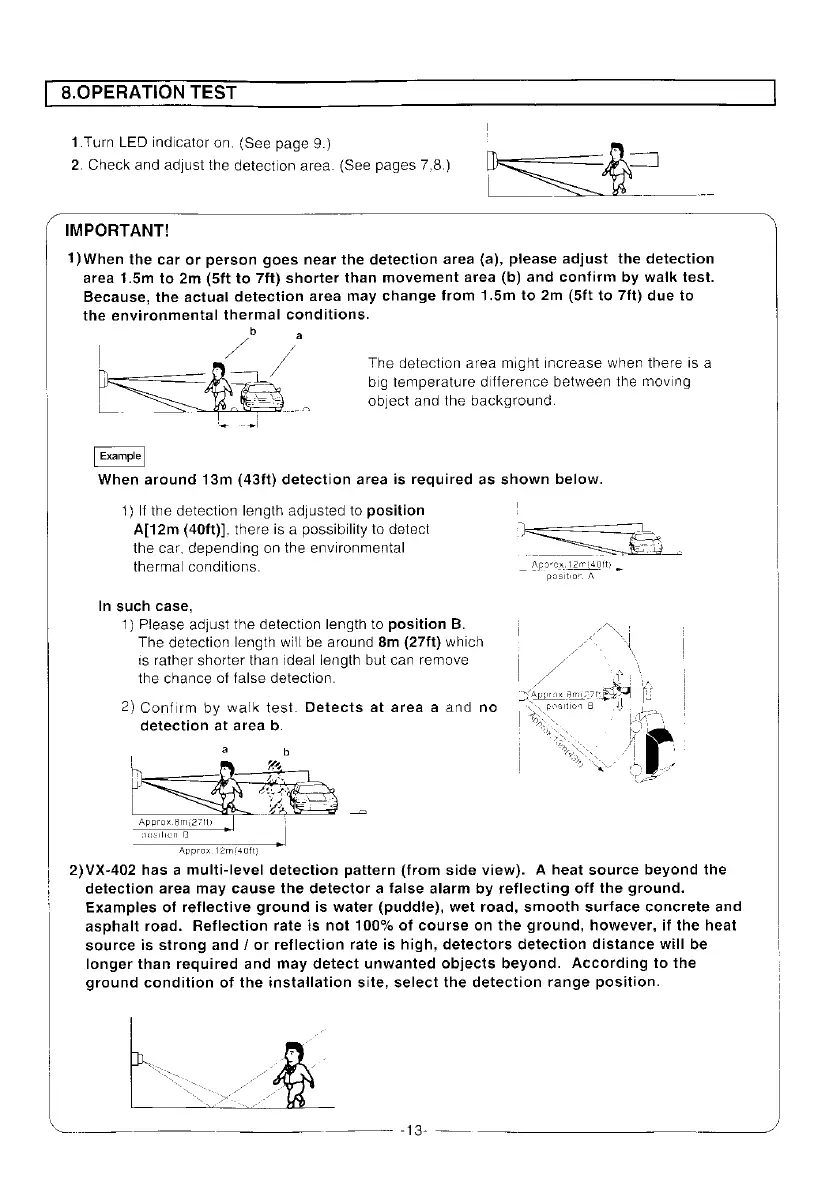
IMPORTANT!
1)When
the
car
or
person
goes
near
the
detection
area
(a),
please
adjust
the
detection
area
1.5m
to
2m
(5ft
to
7ft)
shorter
than
movement
area
(b)
and
confirm
by
walk
test.
Because,
the
actual
detection
area
may
change
from
1.5m
to
2m
(5ft
to
7ft)
due
to
the
environmental
thermal
conditions.
The
detection
area
might
increase
when
there
is
a
big
temperature
difference
between
the
moving
object
and
the
background.
When
around
13m
(43ft)
detection
area
is
required
as
shown
below.
1)
If
the
detection
length
adjusted
to
position
A[12m
(40ft)],
there
is
a
possibility
to
detect
the
car,
depending
on
the
environmental
thermal
conditions.
In
such
case,
1)
Please
adjust
the
detection
length
to
position
B.
The
detection
length
will
be
around
8m
(27ft}
which
is
rather
shorter
than
ideal
length
but
can
remove
the
chance
of
false
detection.
2)
Confirm
by
walk
test.
Detects
at
area
a
and
no
detection
at
area
b.
Approx.6m(27H)
pagiien
B
Approx.
12mi40ft}
2)VX-402
has
a
multi-level
detection
pattern
(from
side
view).
A
heat
source
beyond
the
\
detection
area
may
cause
the
detector
a
false
alarm
by
reflecting
off
the
ground.
:
Examples
of
reflective
ground
is
water
(puddie),
wet
road,
smooth
surface
concrete
and
asphalt
road.
Reflection
rate
is
not
100%
of
course
on
the
ground,
however,
if
the
heat
source
is
strong
and
/
or
reflection
rate
is
high,
detectors
detection
distance
will
be
longer
than
required
and
may
detect
unwanted
objects
beyond.
According
to
the
ground
condition
of
the
installation
site,
select
the
detection
range
position.

Other manuals for Optex VX-402

Related product manuals