EasyManua.ls Logo

Optex VX-402 - Recording Messages; Recording Procedure

Optex VX-402
16 pages
Print Icon
To Next Page IconTo Next Page
To Previous Page IconTo Previous Page
Loading...
|
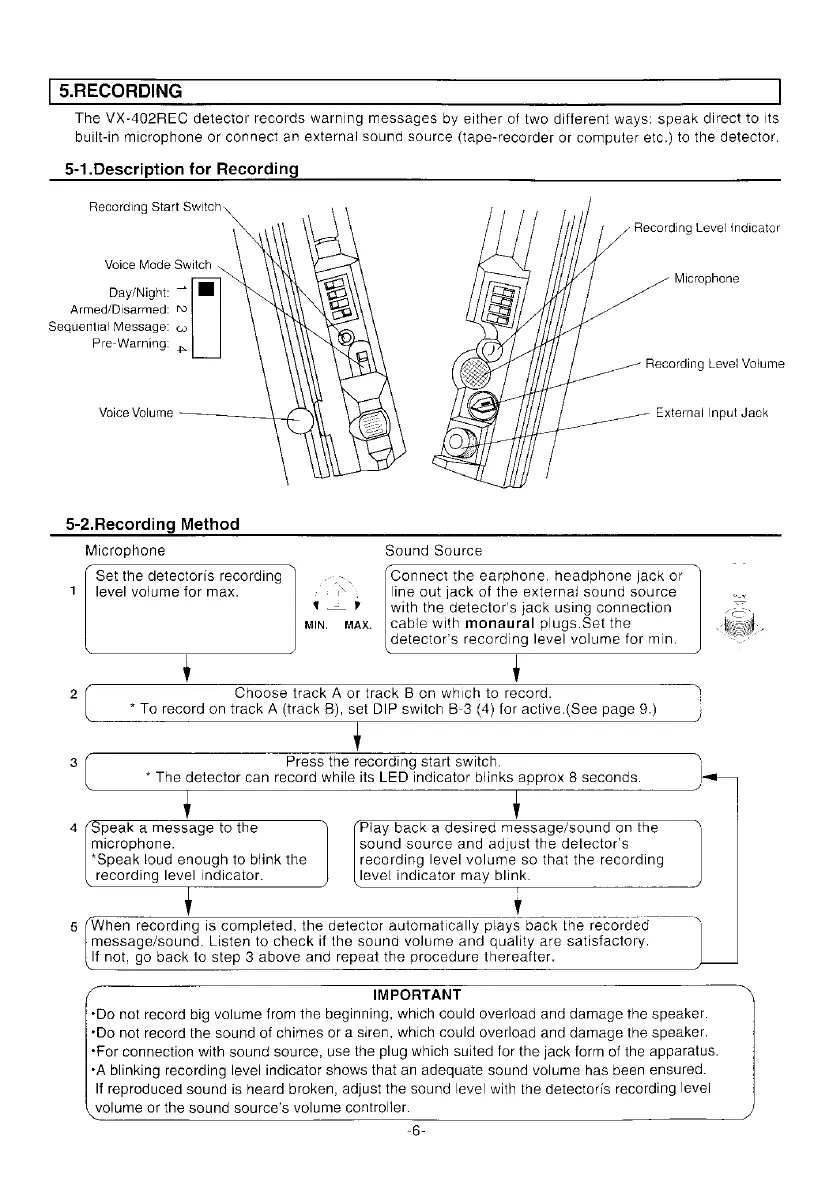
5.RECORDING
The
VX-402REC
detector
records
warning
messages
by
either
of
two
different
ways:
speak
direct
to
its
built-in
microphone
or
connect
an
external
sound
source
(tape-recorder
or
computer
etc.)
to
the
detector.
5-1.Description
for
Recording
Recording
Start
Switch
Recording
Level
indicator
Voice
Mode
Switch
Microphone
Day/Night:
~
Armed/Disarmed:
">
Sequential
Message:
co
Pre-Warning:
Voice
Volume
External
Input
Jack
5-2.Recording
Method
Microphone
Sound
Source
Set
the
detectoris
recording
,
Connect
the
earphone.
headphone
jack
or
1
|
level
volume
for
max.
NS
line
out
jack
of
the
external
sound
source
ty?
with
the
detector's
jack
using
connection
MIN.
MAX,
|
cable
with
monaural
plugs.Set
the
detector’s
recording
level
volume
for
min.
2
Choose
track
A
or
track
B
on
which
to
record.
*
To
record
on
track
A
(track
B),
set
DIP
switch
B-3
(4)
for
active.(See
page
9.)
3
Press
the
recording
start
switch.
\
*
The
detector
can
record
while
its
LED
indicator
blinks
approx
8
seconds.
|
J
4
(Speak
a
message
to
the
Play
back
a
desired
message/sound
on
the
microphone.
sound
source
and
adjust
the
detector's
*Speak
loud
enough
to
blink
the
recording
level
volume
so
that
the
recording
recording
level
indicator.
level
indicator
may
blink.
~
message/sound.
Listen
to
check
if
the
sound
volume
and
quality
are
satisfactory.
5
(When
recording
is
completed,
the
detector
automatically
plays
back
the
recorded
|
If
not,
go
back
to
step
3
above
and
repeat
the
procedure
thereafter.
IMPORTANT
*Do
not
record
big
volume
from
the
beginning,
which
could
overload
and
damage
the
speaker.
‘Do
not
record
the
sound
of
chimes
or
a
siren,
which
could
overload
and
damage
the
speaker.
‘For
connection
with
sound
source,
use
the
plug
which
suited
for
the
jack
form
of
the
apparatus.
*A
blinking
recording
level
indicator
shows
that
an
adequate
sound
volume
has
been
ensured.
If
reproduced
sound
is
heard
broken,
adjust
the
sound
level
with
the
detectoris
recording
level
volume
ar
the
sound
source’s
volume
controller.
~6-

Other manuals for Optex VX-402

Related product manuals