EasyManua.ls Logo

Optex VX-402 - Page 15

Optex VX-402
16 pages
Print Icon
To Next Page IconTo Next Page
To Previous Page IconTo Previous Page
Loading...
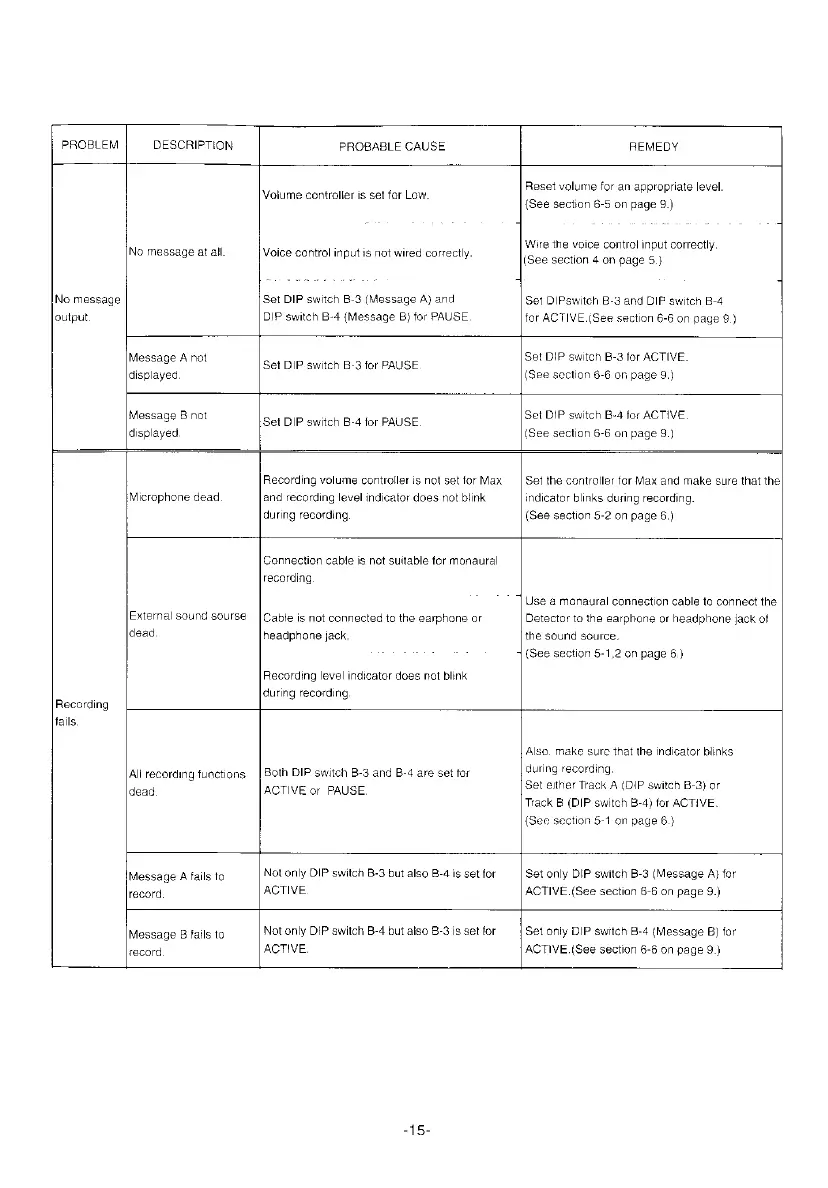
PROBLEM
DESCRIPTION
PROBABLE
CAUSE
REMEDY
No
message
output.
No
message
at
all.
Voiume
controller
is
set
for
Low.
Voice
control
input
is
not
wired
correctly.
Set
DIP
switch
B-3
(Message
A)
and
DIP
switch
B-4
(Message
B)
for
PAUSE
Reset
volume
for
an
appropriate
level.
{See
section
6-5
on
page
9.)
Wire
the
voice
control
input
correctly.
(See
section
4
on
page
5.}
Set
DIPswitch
B-3
and
DIP
switch
B-4
for
ACTIVE.
(See
section
6-6
on
page
9.}
Message
A
not
displayed
Set
DIP
switch
B-3
tor
PAUSE
Set
DIP
switch
B-3
for
ACTIVE.
(See
section
6-6 on
page
9.)
Message
B
not
displayed.
Set
DIP
switch
B-4
for
PAUSE
Set
DIP
switch
B-4
for
ACTIVE
(See
section
6-6
on
page
9.)
Recording
fails
Microphone
dead
Recording
volume
controller
is
not
set
for
Max
and
recording
level
indicator
does
not
blink
during
recording.
Set
the
controller
far
Max
and
make
sure
that
the
indicator
blinks
during
recording.
(See
section
5-2
on
page
6.)
External
sound
sourse
dead
Connection
cabie
is
not
suitable
for
monaural
recording
Cable
is
not
connected
to
the
earphone
or
headphone
jack.
Recording
level
indicator
does
not
blink
during
recording
‘|
Use
a
monaural
connection
cable
to
connect
the
Detector
to
the
earphone
or
headphone
jack
of
the
sound
source.
4
(See
section
5-1,2
on
page
6.)
All
recording
functions
dead
Both
DIP
switch
B-3
and
B-4
are
set
for
ACTIVE
or
PAUSE.
Also.
make
sure
that
the
indicator
blinks
during
recording.
Set
either
Track
A
(DIP
switch
B-3)
or
Track
B
(DIP
switch
B-4)
for
ACTIVE.
(See
saction
5-1
an
page
6.)
Message
A
fails
to
record,
Not
only
DIP
switch
B-3
but
also
B-4
is
set
for
ACTIVE
Set
only
DIP
switch
B-3
(Message
A)
for
ACTIVE.
(See
section
6-6
on
page
9.)
Message
B
fails
to
record
Not
only
DIP
switch
B-4
but
also
B-3
is
set
for
ACTIVE.
Set
only
DIP
switch
B-4
(Message
B)
for
ACTIVE.{See
section
6-6
on
page
9.)
-15-

Other manuals for Optex VX-402

Related product manuals