EasyManua.ls Logo

opti-solar SP5000 Initial-P - Display Setting

Default Icon
33 pages
Print Icon
To Next Page IconTo Next Page
To Previous Page IconTo Previous Page
Loading...
20
Display Setting
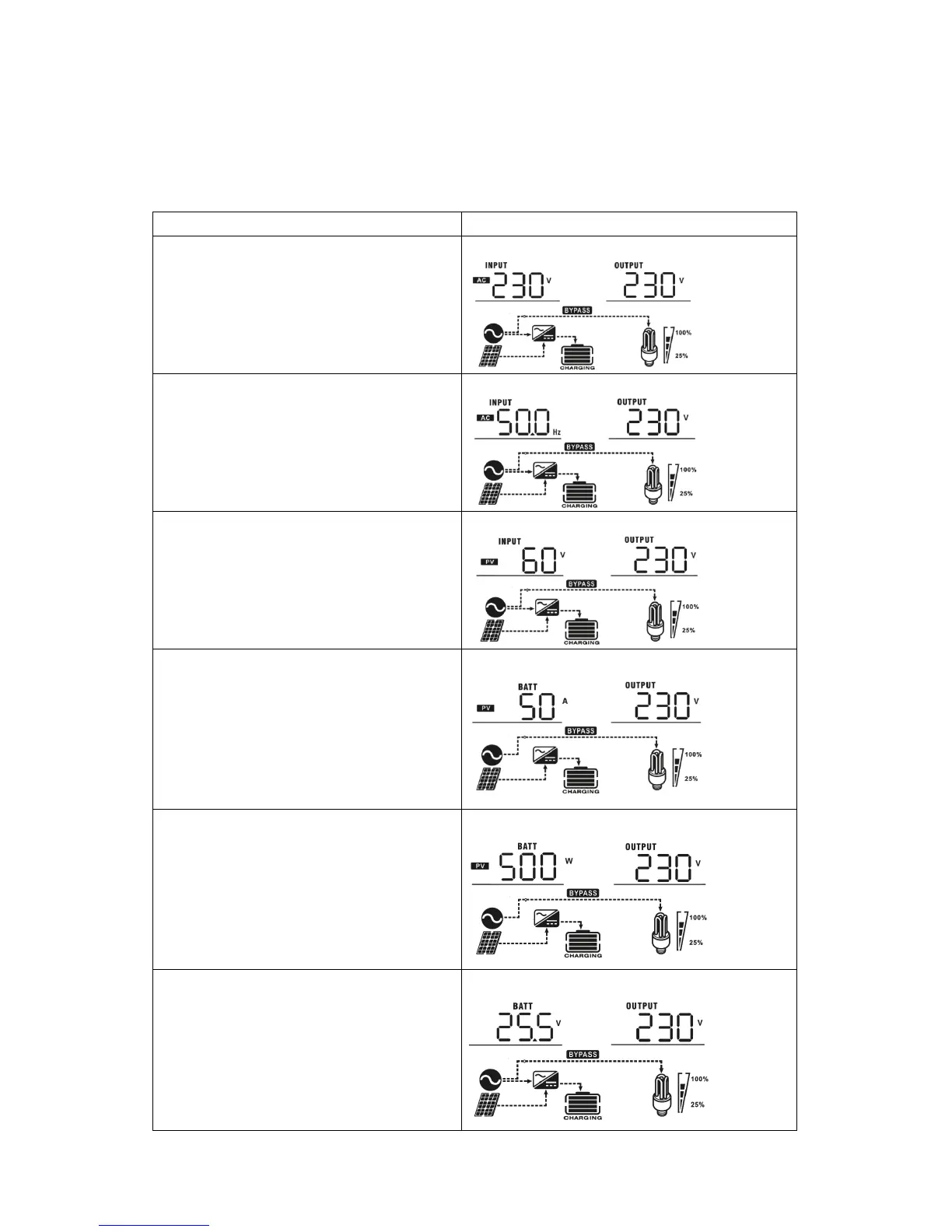
The LCD display information will be switched in turns by pressing UP or DOWN key. The selectable
information is switched as below order: input voltage, input frequency, PV voltage, charging current, charging
power (SP 3000/5000Initial-M), battery voltage, output voltage, output frequency, load percentage, load in
Watt, load in VA, load in Watt, DC discharging current, main CPU Version and second CPU Version.

Selectable information
LCD display
Input voltage/Output voltage
(Default Display Screen)
Input Voltage=230V, output voltage=230V
Input frequency
Input frequency=50Hz
PV voltage
PV voltage=60V
Charging current
Charging current=50A
Charging power (only for MPPT model)
MPPT charging power=500W
Battery voltage and output voltage
Battery voltage=25.5V, output voltage=230V

Related product manuals