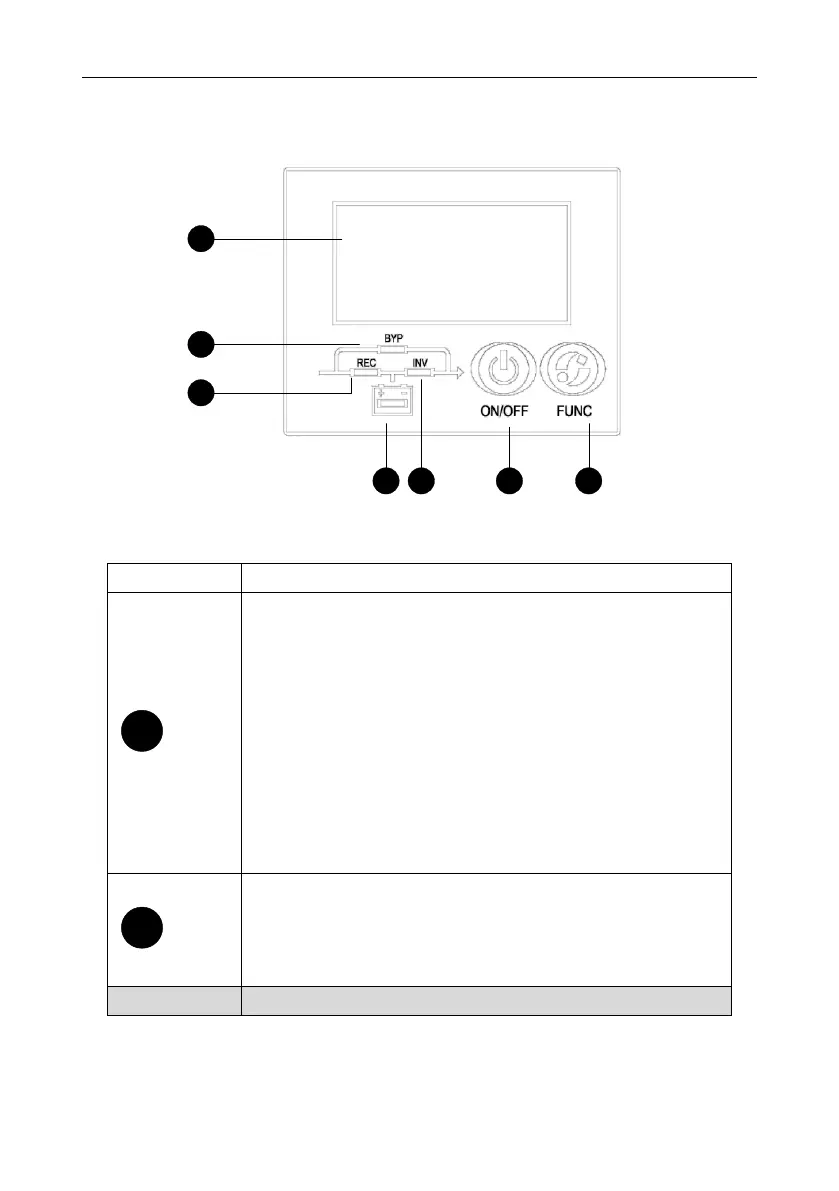
Controls and Indicators
12 DS-I 1-3k UPS User Manual
6. Controls and Indicators
Fig.5 Display Panel
Description of Panel
1.Press ON/OFF to start UPS when utility is normal
NOTE
It only bases on default setting(manual start)
2.Press ON/OFF to start from battery directly when there is no
main input, press again to start UPS upon buzzer alarms
3. Press ON/OFF to shutdown inverter when UPS is in normal
mode.
4.Press ON/OFF to shutdown UPS completely when UPS is in
battery mode
5.Press ON/OFF to ensure the rated parameter setting
1.Press FUNC button to transfer in different menus
2.Press FUNC button for 3 seconds to mute off
3.Press FUNC and ON/OFF together for 2.5 seconds to set rated
parameters when only power supply is on



 To Next Page