APPs
Live Channel
15
This APP provides you live pay channels.
Press "UP" and "DOWN" button to change channel.
Press "OK" button to show the channel list.
Press "UP" and "DOWN" button to select the desired channel.
Press "OK" button to watch the selected channel.
Press "EXIT" button to exit.
Mediaplayer
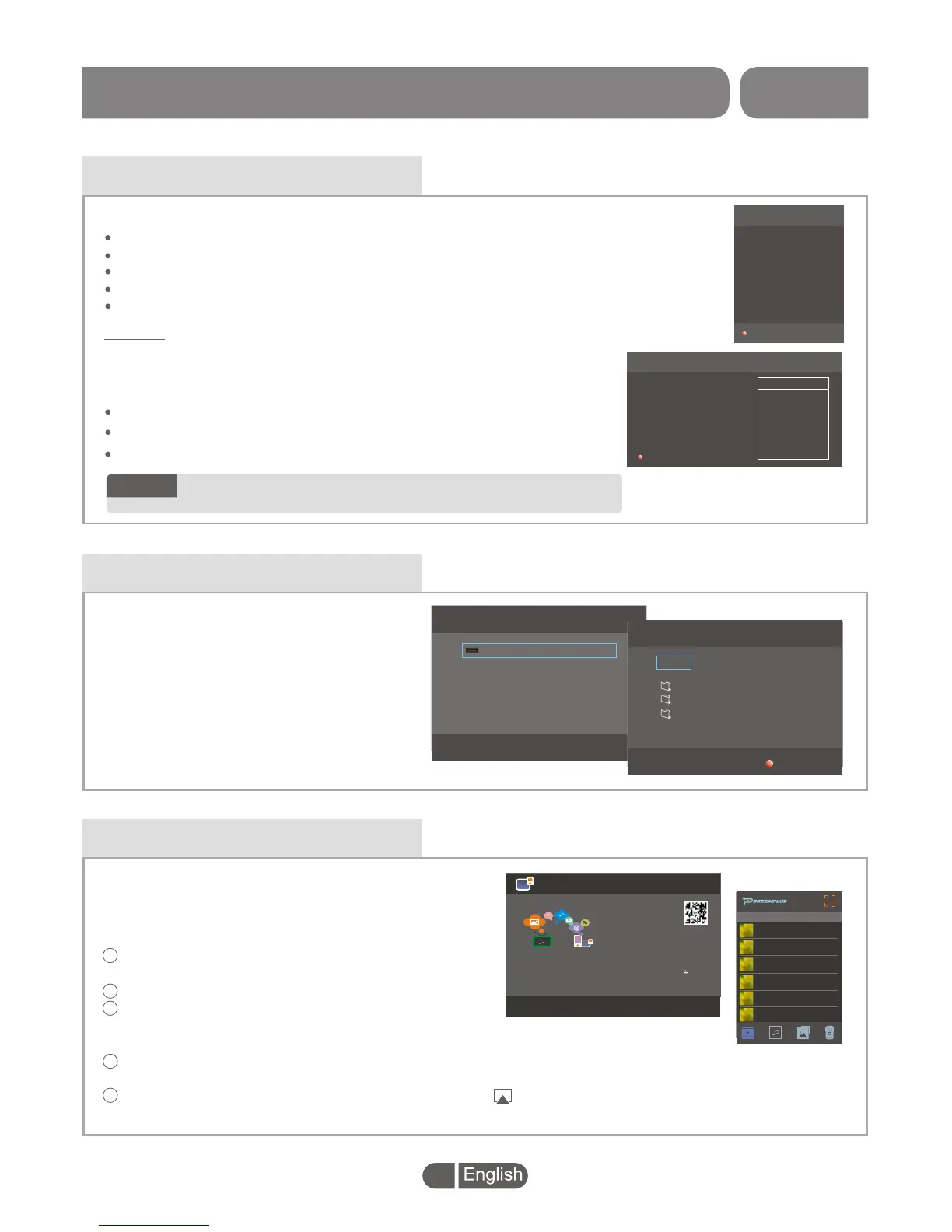
The DLNA allows you to connect your mobile with
the BOX.
After connection, you can transfer your video,
music and photos from your mobile to the BOX.
4
1
2
3
S
external device
elect "Mediaplayer", press "OK" button
to enter the Disk Management menu. It
will search the autom
atically, then you can play and view the
files from the device such as playing
music, video, picture and PVR file etc.
Disk Management
USB DISK 1
Total Size 7.48GB
USB Disk 1
Video Audio Photo Record
music
photo
PVR
Delete
Press "RED" button to delete the
selected file.
DLNA
DLNA
DLNA
Tips:
1. Connect cellphone and STB to same LAN network
(Same SSID for WIFI network)
2. Keep STB box at current menu
3. Open Dreamplus app on the cellphone and choose this STB box
(Name shows on left side)
4. Play Movie/Music/Picture on cellphone, click " " button to
project to the TV Screen
DLNA_01:09
DLAN
DLNA_01:09
XXXXXXXXXXXXX
XXXXXXXXXXXXX
XXXXXXXXXXXXX
XXXXXXXXXXXXX
XXXXXXXXXXXXX
XXXXXXXXXXXXX
5
Connect mobile and set-top BOX to the same
LAN network(Same SSID for WIFI network).
Keep set-top BOX at current menu.
Scan the QR code on the top right of the screen
to enter the download screen to download the
DreamPlus APP.
Open Dreamplus app on the mobile and choose this set-top BOX
(Name shows on the left side of the screen).
Play Movie/Music/Picture on your mobile, click " "button to project to
the TV Screen.
3201 Tf1 HD
3202 Euronews
3203 France24
3204 France2
3205 France3
3206 France4
3207 France5
3208 FranceO
3209 BFM TV
3210 M6 HD
French Live FTA
>>
> >
Setting
USER INFO
MAC: XX:XX:XX:XX:XX:XX
User name: XXX
Package: EUROPE FTA
Price: 79
URL: www.yakkatv.com
Tip:Please register and order package from Yakka TV
website use above URL.
EXIT
1 CDN-FR35
2 CDN-USA216
3 CDN-FR61
4 CDN-FR152
5 CDN-LT153
CDN Selection
You can enter the URL(www.yakkatv.com) by your phone or
computer to register and order package from Yakka TV website
after free trial.
Setting:
In Live channel menu, press "RED" button to enter the Setting menu.
Press "UP" and "DOWN" button to select the CDN.
Press "RED" button to exit.
If you can't view the channel or the channel has any
problems, please contact the Yakka TV customer service.
NOTE:


 To Next Page