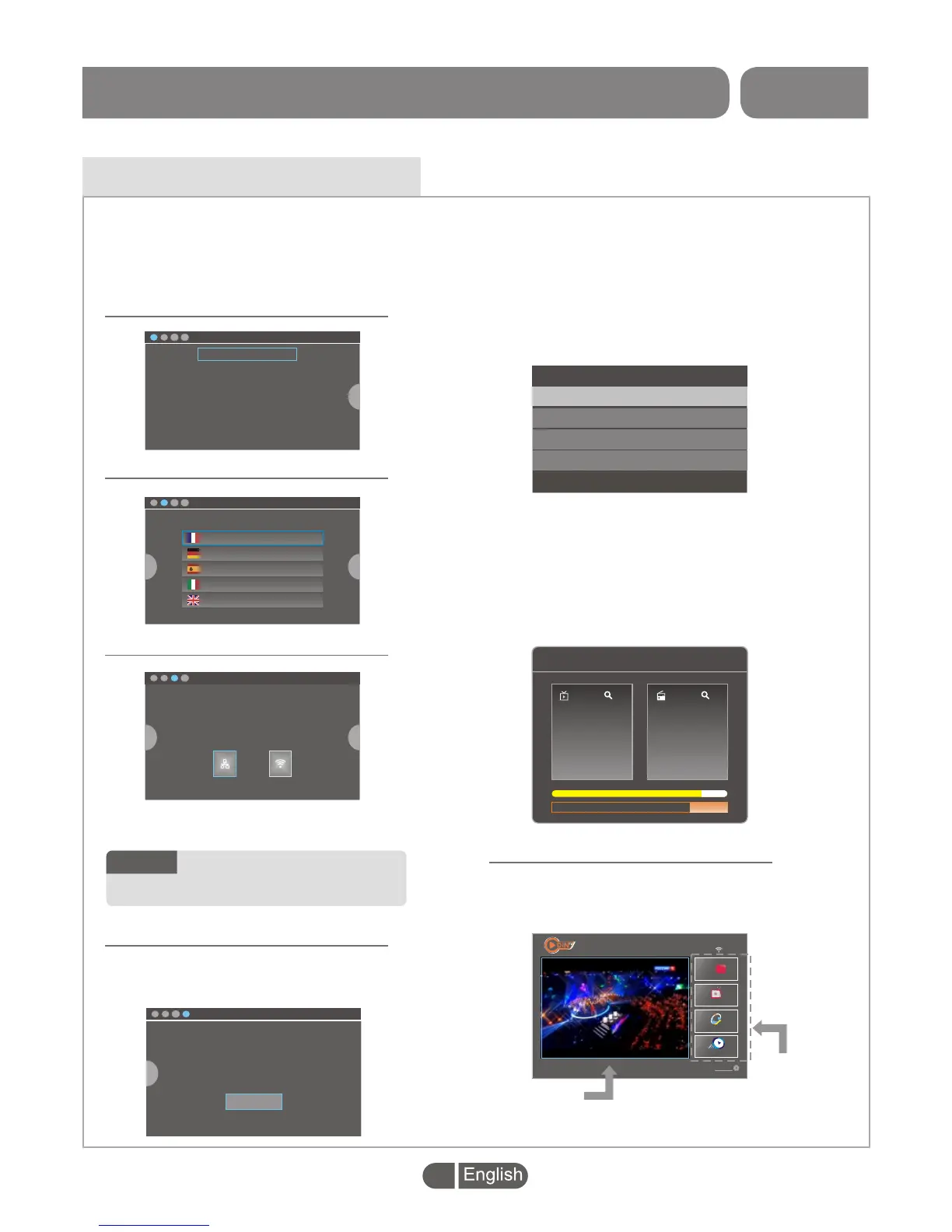
If you use the set-top BOX for the first time, Please take just few steps to finish the common
configurations before you enjoy it.
Press "LEFT" or "RIGHT" button and then press "OK" button to back to the previous page or
enter the next page.
>
English
France
Deutsch
Espanol
Italiano
Nederland
Portugal
Polish
~
Getting Started
>
>
Please select your country.
France
Germany
Spain
Italy
Britain
GMT+1:00
GMT+1:00
GMT+1:00
GMT+1:00
GMT+0:00
>
>
Channel Search
You have not registered DreamPLus.tv. If you can not register
DreamPLus.tv you will not receive updates or custom content. You can
register DreamPLus.tv Settings option from the main menu
Highlight the "Channel Search" and
press "OK" button to enter the Welcome
menu.
OK
Welcome
Region
UK
Language
Video Resolution
Aspect Mode
English
720p@60
Auto
>
>
>
>
>
>
>
>
>
>
Configure your network with one of the following ways:
-cabel(if your device allows it)
-Configure Wi-Fi
Wi-FiEthernet
Channel Search
15
Radio
Radio Mayak
Radio Vesti-FM
Radio Rossii
15
TV
Karusel
NTV
OTR
TV Centre
Fail DVB-T 810167KHz
Highlight "Ethernet" or "WIFI" to set up
wired network or wireless network.
After finish initial settings. A reminder
menu appears.
In the Welcome menu,
Press cursor button to set up the Region,
Language, Video Resolution and Aspect
Mode.
Highlight "OK" and press the "OK"
button to start channel search.
After finished Channel Search, the "HOME
PAGE" will be displayed.
You
Tube
Live Channel
2017-06-23
03:41
TV Store
If you use the set-top BOX for the first time, Please take just few steps to finish the common
configurations before you enjoy it.
Press "LEFT" or "RIGHT" button and then press "OK" button to back to the previous page or
enter the next page.
>
English
France
Deutsch
Espanol
Italiano
Nederland
Portugal
Polish
~
Getting Started
>
>
Please select your country.
France
Germany
Spain
Italy
Britain
GMT+1:00
GMT+1:00
GMT+1:00
GMT+1:00
GMT+0:00
>
>
Channel Search
You have not registered DreamPLus.tv. If you can not register
DreamPLus.tv you will not receive updates or custom content. You can
register DreamPLus.tv Settings option from the main menu
Highlight the "Channel Search" and
press "OK" button to enter the Welcome
menu.
OK
Welcome
Region
UK
Language
Video Resolution
Aspect Mode
English
720p@60
Auto
>
>
>
>
>
>
>
>
>
>
Configure your network with one of the following ways:
-cabel(if your device allows it)
-Configure Wi-Fi
Wi-FiEthernet
Channel Search
15
Radio
Radio Mayak
Radio Vesti-FM
Radio Rossii
15
TV
Karusel
NTV
OTR
TV Centre
Fail DVB-T 810167KHz
Highlight "Ethernet" or "WIFI" to set up
wired network or wireless network.
After finish initial settings. A reminder
menu appears.
In the Welcome menu,
Press cursor button to set up the Region,
Language, Video Resolution and Aspect
Mode.
Highlight "OK" and press the "OK"
button to start channel search.
After finished Channel Search, the "HOME
PAGE" will be displayed.
You
Tube
Live Channel
2017-06-23
03:41
TV Store
Mediaplayer
Setting
>>
GETTING STARTED
4
Set up the Language
Select the Country
Set up the Network
Welcome & Channel Search
HOME PAGE
Use for
Set-top BOX
Use For
Apps
NOTE:
If you do not want to set the
network or you have no
network, please skip this step.


 To Next Page