EasyManua.ls Logo

Optimus STA-795 - Operation; Basic Operation

Optimus STA-795
20 pages
Print Icon
To Next Page IconTo Next Page
To Previous Page IconTo Previous Page
Loading...
OPERATION
BASIC
OPERATION
Warning:
To
prevent
possible
ear
injury
and
hearing
loss,
turn
VOLUME
to
0
before
you
turn
or
receiver
or
change
the
signal
source.
After
you
turn
on
the
receiver
or
change
the
signal
source
just
volume
to
a
comfortable
listening
level.
Follow
these
steps
to
use
the
receiver.
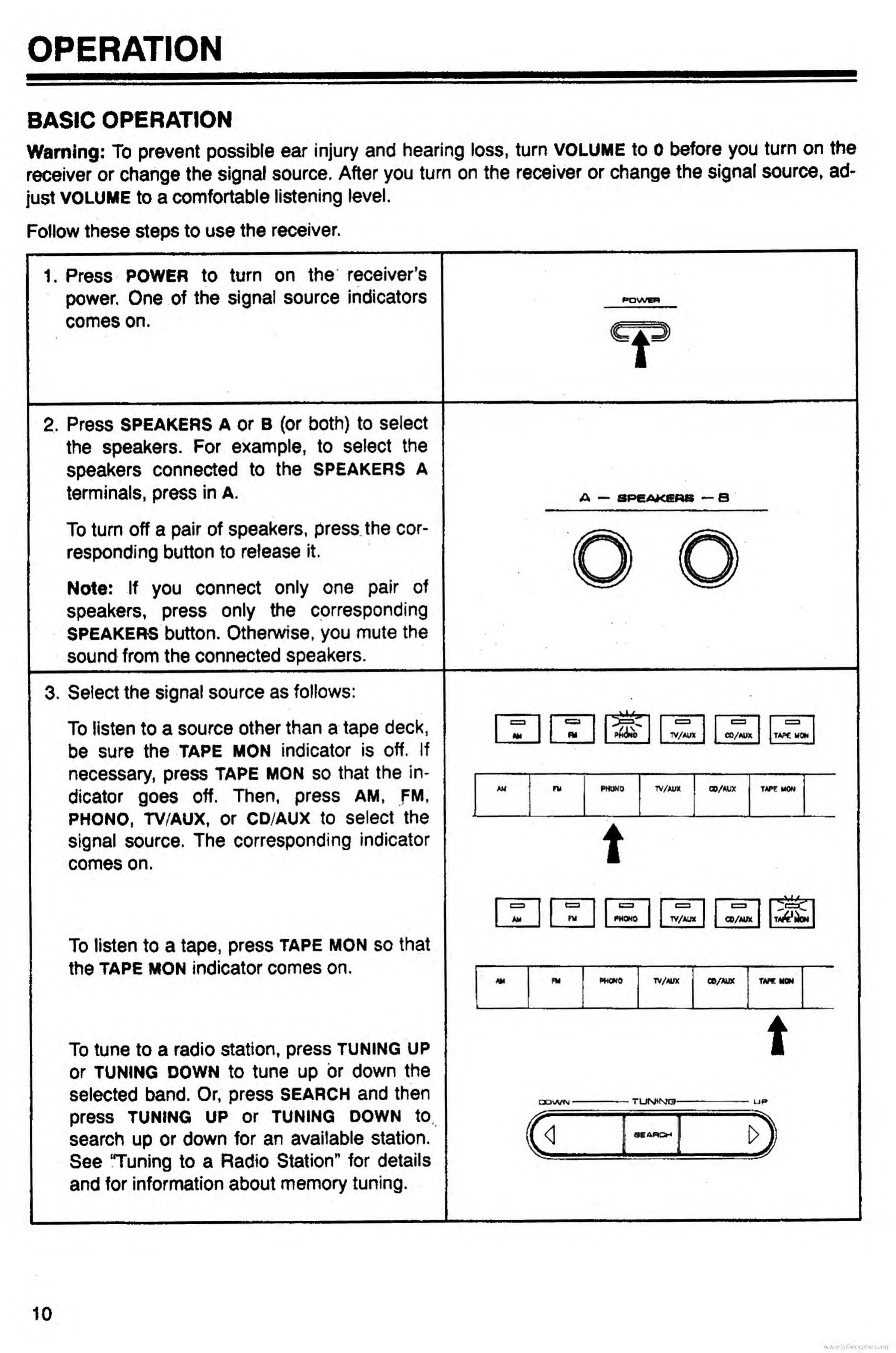
1.
P
ress
POWER
to
turn
on
the
receivers
power.
One
of
the
signal
source
indicators
comes
on.
i
2.
P
ress
speakers
A
or
B
(or
both)
to
select
the
speakers.
For
example,
to
select
the
speakers
connected
to
the
speakers
a
terminals,
press
in
A.
To
turn
off
a
pair
of
speakers,
press
the
cor¬
responding
button
to
release
it.
Note:
If
you
connect
only
one
pair
of
speakers,
press
only
the
corresponding
SPEAKERS
button.
Otherwise,
you
mute
the
sound
from
the
connected
speakers.
3.
S
elect
the
signal
source
as
follows:
To
listen
to
a
source
other
than
a
tape
deck,
be
sure
the
TAPE
MON
indicator
is
off.
If
necessary,
press
TAPE
MON
so
that
the
in¬
dicator
goes
off.
Then,
press
AM,
FM,
phono,
TV/AUX,
or
CD/AUX
to
select
the
signal
source.
The
corresponding
indicator
comes
on.
P&Ub
TV/AUX
CO/AUX
TAPC
MOW
AM
1
ru
PHONO
TV/AUX
CO/AUX
TAPP
MON
t
To
listen
to
a
tape,
press
tape
mon
so
that
the
tape
MON
indicator
comes
on.
Am
phono
TV/AUX
CO/AUX
]
PWCNO
TV/AUX
CO/AUX
1
TAP*
To
tune
to
a
radio
station,
press
TUNING
UP
or
TUNING
down
to
tune
up
or
down
the
selected
band.
Or,
press
SEARCH
and
then
press
TUNING
UP
Or
TUNING
DOWN
to
search
up
or
down
for
an
available
station.
See
“Tuning
to
a
Radio
Station"
for
details
and
for
information
about
memory
tuning.
<1
10
www.hifiengine.com

Related product manuals